Most rule engine vendors assume that if they show a screenshot of their rule editor, visitors will immediately understand its value. In reality, executives and architects are rarely concerned with particular design features of the editor. What they really want to know is:
- Is this just another programming language in disguise?
- Will business users need weeks of training?
- Will we create a governance nightmare?
- Can the editor adapt to our domain?
- Will users be overwhelmed by hundreds of irrelevant fields?
- How do you keep rule authoring simple when decisions become complex?
What Makes the Code Effects Rule Editor Fundamentally Different?
Every business rules engine allows someone to define rules. The real question is: Who can realistically create and maintain them?
For decades, most rule authoring tools have forced organizations into an uncomfortable compromise.
Either: Give business users powerful tools that require learning specialized syntax, scripting languages, or technical concepts.
Or: Restrict rule creation to developers and accept that every policy change becomes a software project.
Code Effects was designed to eliminate that compromise.
We are so confident in the simplicity and effectiveness of the Code Effects Rule Editor that we invite anyone to experience it firsthand. Unlike vendors that rely solely on screenshots, videos, or guided demonstrations, we provide a publicly accessible live demo where you can build rules yourself against a real test source object. We believe the best way to understand the value of our menu-driven approach is not to read about it, but to use it. A few minutes with the editor often demonstrates more clearly than pages of documentation how sophisticated decision logic can be authored without programming knowledge.
Rules Built Through Conversation, Not Programming
Instead of asking users to write expressions, formulas, or scripts, the Code Effects Rule Editor guides them through rule construction one decision at a time. Users select from menus. The editor assembles complete business statements automatically.
A rule might read:
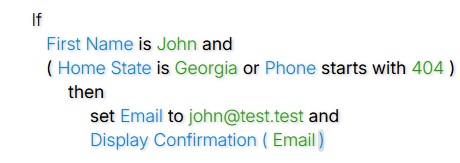
No syntax. No keywords to memorize. No programming knowledge required. Notice how you were able to read this Code Effects rule created using our live demo and immediately understand the business logic it defines without deciphering or translating any cryptic format. Compare that experience with interpreting a typical decision table, where the logic is often hidden behind rows, columns, abbreviations, and conventions that require detailed explanation before they can be understood by non-technical users.
In Code Effects platform, users focus on expressing business intent rather than learning how to communicate with software.
Web-Based by Design
The way people work has changed.
Decision-making no longer happens at a single desk, on a single machine, inside a single office. Teams are distributed across locations, departments, platforms, and devices. Business applications are delivered through browsers, administrative portals, and cloud-based environments.
The Code Effects Rule Editor was designed with this reality in mind.
Because it is a web-based component, the editor can be embedded directly into the applications your users already access every day. There is no separate desktop application to install, distribute, update, or support. Users simply sign in to your application and begin authoring rules through the same interface they already know.
This approach provides several important advantages:
- Zero desktop deployments. New versions of the editor become available immediately through your existing web application deployment process.
- A consistent experience. Every user works with the same version of the editor, eliminating compatibility issues and version mismatches.
- Remote accessibility. Authorized users can create and maintain rules from anywhere they can securely access your application.
- Simplified administration. IT teams manage one application instead of maintaining separate desktop installations across the organization.
- Seamless integration. The editor naturally becomes part of your existing portals, dashboards, and administrative workflows.
- Cross-platform access. Users can work from Windows, macOS, iOS, Android, Linux, and other environments through modern browsers without additional client software.
- Faster adoption. Because the editor appears within familiar business applications, users often perceive it as a natural extension of the systems they already use rather than a new tool they must learn.
For organizations that have experienced the complexity of traditional desktop-based rule authoring environments, the difference is substantial. Rule management becomes another capability of the application itself - not another system to deploy, secure, train, and support.
In practice, this means business users spend less time learning tools and IT teams spend much less time maintaining them.
The result is a simpler path from policy creation to decision automation.
Traditional rule systems often allow users to create invalid expressions and discover mistakes later. Code Effects takes a different approach.
At every step, the editor only presents options that make sense. If a field contains dates, users see date operations. If a field contains numbers, they see numerical comparisons. If a field is of ICollection type, only operations appropriate for collections become available. The editor actively guides users toward valid rules while preventing impossible combinations. Validation happens naturally during authoring rather than after the fact.
Complex Logic Without Complexity
Business decisions are rarely simple. Policies often contain exceptions, alternatives, and nested conditions. The challenge is exposing this complexity without overwhelming users. Code Effects allows authors to create sophisticated rules using familiar constructs such as:
- AND and OR logic,
- grouped conditions,
- nested expressions,
- method calls,
- numeric calculations,
- reusable logic,
- collection operations,
- execution paths with side effects.
Yet each step remains menu-driven. Users work through decisions incrementally instead of confronting an intimidating programming environment.
A User Experience That Feels Familiar
The Rule Editor behaves much like the applications people already use every day. Users point, click, select, and edit. They can:
- use the keyboard or mouse,
- copy and paste rule segments,
- rearrange conditions,
- group related statements,
- edit individual expressions,
- review rules in human-readable form.
Organizations typically introduce the editor as another screen inside an existing administrative portal. For many business users, little formal training is required.
Built for Your Business Language
No two organizations describe their world in exactly the same way. Code Effects allows the Rule Editor to reflect your terminology rather than ours. Field names, method names, labels, descriptions, help messages, and text presented throughout the interface can be customized to match your domain.
Users see concepts they already understand. Not technical abstractions. Not vendor-specific terminology. Your business speaks its own language. The editor simply reflects it.
Traditional rule editors present every available field and method from the beginning. As systems grow, that approach quickly becomes overwhelming.
Adaptive Source changes that experience completely.
Instead of exposing everything at once, the editor can determine what should appear based on the rule being authored at that exact moment. As users build a rule:
- previously selected conditions can influence future menus,
- earlier decisions can narrow available choices,
- irrelevant options can disappear,
- context-specific guidance can emerge.
The result feels less like browsing a data model and more like having a conversation with an expert assistant. The editor continuously adapts to the author's intent.
Context Resetting: The Freedom to Change Direction
One of the challenges of context-aware authoring is knowing what happens when users change their minds. Adaptive Source addresses this through Context Resetting.
If users modify or remove earlier conditions that previously influenced the editor's context, the editor automatically recalculates what should happen next. Menus update accordingly. Dependent choices can be refreshed. Previously hidden paths can reappear. Users remain free to experiment without becoming trapped by earlier decisions.
The authoring experience stays flexible while preserving contextual accuracy.
AI-Friendly by Design
Adaptive Source also enables entirely new authoring experiences. Organizations can use:
- internal recommendation systems,
- external services,
- machine learning models,
- large language models,
- domain-specific knowledge bases,
to determine which options should be presented during rule construction.
For example, an AI service could recommend the most relevant fields based on the rule being authored, restrict choices according to organizational policies, or guide inexperienced users toward preferred decision patterns.
Importantly, the editor itself remains deterministic.
Your organization controls how guidance is generated and how much influence it has.
Governance Without Friction
Ease of use should never come at the expense of control. Because the editor is embedded within your applications, organizations retain complete authority over:
- who can create rules,
- who can modify them,
- who can approve them,
- which source elements are exposed,
- how rules are stored,
- how changes are reviewed and tested.
The editor adapts to your governance model rather than imposing its own.
Why the User Experience Matters
Many organizations evaluating rules technology focus almost exclusively on evaluation performance. But the true cost of decision automation is often determined long before a rule is executed. It is determined by how easily people can express, review, understand, and maintain the policies that govern the business. A rules engine may execute millions of decisions per second. But if the people responsible for those decisions struggle to define them, the technology never delivers its full value.
The Code Effects Rule Editor was designed around a simple principle:
Decision authoring should feel less like programming and more like explaining how the business works. Because the easier it becomes to express decisions, the faster organizations can adapt them.