Business Rule Management: Stand-Alone or Rule Repository
A business rule has a life. Somebody writes it, it is checked, stored and tested, someone approves it, it goes into production, and later someone needs to know why it decided what it did, change it safely, or retire it. Rule management is everything that happens to a rule along that path.
Code Effects always gives you three parts of it: authoring (the Rule Editor), validation (every rule is checked against your data before it becomes Rule XML) and evaluation (the Rule Engine). Everything else can be handled in one of two ways:
- Stand-alone. You place the Rule Editor in your own application, store the Rule XML it produces in your own storage, and evaluate it with the Rule Engine. Storage, versions, testing, approvals, permissions and history are designed and built by your team, to whatever degree your organization needs them.
- With the Rule Repository and Audit. You add the Rule Repository, a complete rule management application that runs inside your web application on a database you own, and optionally Audit, which records every production evaluation. Your team writes the code that connects them to your application; the rule management itself is already built.
Code Effects Basics compares the two ways in one table. This article goes through the life of a rule stage by stage, and says for each stage what Code Effects does, what your team builds in a stand-alone implementation, and what the Rule Repository and Audit do instead. Use it to decide which way fits your project, and, if you choose stand-alone, as a checklist of what to design.
What Is the Same in Both
Neither way changes how rules are written or evaluated. In both:
- Rules are written against the same source objects: your .NET classes, Source XML documents or Adaptive Sources, with the same attributes.
- The Rule Editor is the same editor, with the same menus, operators, data types, reusable rules and inline rules.
- A rule becomes Rule XML only if it is complete and fits its source object, so every stored rule is structurally valid.
- Rules are stored as the same Rule XML and evaluated by the same engine, compiled once and evaluated at the speed of compiled code.
- Everything runs inside your own applications. No component calls a Code Effects service.
The Life of a Rule at a Glance
| Stage |
Stand-alone: your team builds |
With the Rule Repository (and Audit) |
| Making source objects available |
You give the editor a type or Source XML on every page that shows it |
Your code syncs its types once; the repository keeps every version of every source object |
| Writing a rule |
Your pages host the editor and its save, load and delete callbacks |
Built in: rule, version and draft dialogs with the editor inside them |
| Validating |
Your save endpoint checks IsValid before it calls GetRuleXml() |
Built in, on every save |
| Storing |
Your table, your database, your data access code |
A SQL Server or PostgreSQL database whose scripts and data access libraries come with the repository |
| Versions and history |
Your design, if you need them |
Every save is an immutable version; drafts for work in progress; comparisons |
| Testing |
Your test harness, if you need one |
Built in: tests on your real classes, expectations, saved tests, batch runs |
| Approval and publishing |
Your workflow, if you need one |
Built in: approval states, Go Live and Take Offline with typed confirmations, checks before going live |
| Who may do what |
Your endpoints and pages |
40 permissions your application assigns per user on each request |
| Changing a source object safely |
Your process for finding the rules a change breaks |
New source versions only when a stored rule could evaluate differently; every rule keeps the version it was written against |
| Rules that call rules |
Your checks before deleting or changing a called rule |
Checked before saving, going live, taking offline and deleting |
| Loading rules in production |
Your query for the rules your code should run |
Context.GetRules(..) or Audit's GetRules(..): the live versions and every rule they call, as one ruleset |
| Explaining a production decision |
Your logging, if you need it |
With Audit: every evaluation recorded, replayed step by step, analyzed, and turned into a test |
| Activity and notes |
Your audit trail, if you need one |
Every change recorded with who and when; notes on any object |
| AI |
AI prompts inside rules |
Also an AI Assistant, an AI Rule Editor and, with the MCP server, AI agents under the same permissions |
| Effort |
Typically 2 to 4 months for a team of two or three, with storage, versioning and testing |
Typically 3 to 4 days for one developer, plus 1 to 2 days of testing |
The rest of this article goes through these stages for each way.
The Stand-Alone Approach
 Your web application                        Your storage                  Your production code
 Rule Editor  -- save, load, delete -->  your endpoints store Rule XML  -->  Rule Engine evaluates it
In a stand-alone implementation, the Rule Editor is a web component in your pages and the Rule Engine is a library in your production code. Code Effects has no storage, no users and no notion of versions here: every one of those is a decision your team makes. That is the strength of this approach as well as its cost. Nothing is imposed on your design, and nothing is done for you.
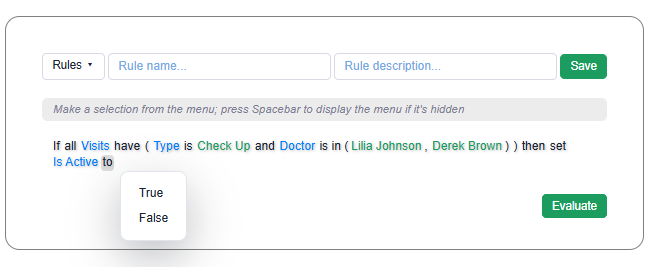
What Code Effects gives you
- The Rule Editor, initialized on the client with
$rule.init(..) and backed on the server by the Control class, which builds the editor's data from your source object and turns what the user wrote into Rule XML. See Rule Editor Client Initialization.
- Validation on your server.
Control.LoadRuleData(..) reads what the editor sent, IsEmpty and IsValid say whether it is a rule, and GetInvalidData() names the elements to mark when it is not. GetRuleXml() produces Rule XML only for a valid rule.
- The Toolbar, which gives rule authors a Rules menu, a name and description field, and Save, Delete and New buttons that call your callbacks. See Toolbar.
- The Rule Engine:
Evaluator<T> and Evaluator compile Rule XML and evaluate your objects against it, with resolvers for reusable rules and a tracer for following an evaluation. See Rule Evaluation.
What your team designs and builds
1. Storage
The editor hands every rule to your save callback; it never stores anything itself. You decide where Rule XML lives: a database table, files, a document store or a service of your own. Storing Rules has a complete save, load and delete example and a one-table design that keeps one row per rule.
One row per rule is enough when saving a rule simply replaces it. Most organizations soon want more: the previous text of a rule, the version that is in production, who changed what. That is where the design work starts.
2. Versions and the version in production
The Rule Editor keeps a rule's ID for the life of the rule, so every save of the same rule arrives with the same ID. To keep versions, insert a new row for each save instead of updating the existing one, and record which version production should run:
CREATE TABLE BusinessRule
(
    RuleId          uniqueidentifier NOT NULL PRIMARY KEY,   -- the editor's rule ID
    Name            nvarchar(50)     NOT NULL,
    IsEvaluation    bit              NOT NULL,
    LiveVersionNo   int              NULL                    -- NULL: nothing in production
);

CREATE TABLE BusinessRuleVersion
(
    RuleId          uniqueidentifier NOT NULL REFERENCES BusinessRule (RuleId),
    VersionNo       int              NOT NULL,
    RuleXml         nvarchar(max)    NOT NULL,               -- stored exactly as GetRuleXml() returned it
    SourceVersion   nvarchar(50)     NOT NULL,               -- the build of your source object it was written for
    CreatedBy       nvarchar(100)    NOT NULL,
    CreatedOn       datetime2(3)     NOT NULL,
    ApprovalState   tinyint          NOT NULL,               -- if you add approvals
    PRIMARY KEY (RuleId, VersionNo)
);
Your team then decides what the user interface shows: a list of versions, a way to open an older one, a way to compare two of them, and a way to make one of them the version in production. None of that is in the editor; you build it around the editor in your own pages.
3. Testing
Before a changed rule reaches production, someone needs to know that it decides what it should. In a stand-alone implementation, a test is your code: create the objects that represent a case, evaluate the rule, and compare the result with what you expect.
using CodeEffects.Rule.Engine;

var rule = new Evaluator<Patient>(RuleStorage.GetRuleXml(ruleId, versionNo));

Assert.True(rule.Evaluate(new Patient { Age = 70 }));
Assert.False(rule.Evaluate(new Patient { Age = 40 }));
That works for developers. For business users to test their own rules, enter values, keep test cases and run them again after every change, your team builds a screen for it. Execution type rules call your methods, so you also decide how a test keeps those calls from sending emails or charging cards.
4. Approval and publishing
If a rule must be reviewed before it goes live, your team designs the workflow: the states a version can be in, who may approve, what happens when a request is declined, and who may make a version live. The editor knows none of this; the states live in your tables and the checks in your endpoints.
5. Who may do what
The editor has no users. Your pages decide who sees it, and your save, load and delete endpoints decide who may do each. For users who may only read, show the rule's text instead of the editor (Control.ToString() after LoadRuleXml(..)), and check the user again on the server, because a client can always call your endpoints directly.
6. Changing a source object
Your source objects change with your application: members are added, renamed and removed. The Rule Editor always loads a rule against the source object it is given now, not the one the rule was written against. A rule that uses a removed member still loads, but IsValid is false and GetInvalidData() names the elements that no longer resolve.
Before you deploy a new build, find the rules it breaks. A loop over your stored rules does it:
using CodeEffects.Rule.Editor;

foreach(var stored in RuleStorage.GetLiveVersions())
{
    var editor = new Control("divEditor")
    {
        SourceType = typeof(Patient),
        RuleResolver = id => RuleStorage.GetLiveRuleXml(id)
    };
    editor.LoadRuleXml(stored.RuleXml);

    if(!editor.IsValid)
        report.Add(stored.Name, editor.GetInvalidData());
}
What happens next is your process: who is told, whether the deployment waits, and how the broken rules are fixed. Remember that a change can also alter how a valid rule evaluates without breaking it, for example a member whose type or range changed; finding those is up to your review.
7. Rules that call other rules
Rules can call reusable rules in their conditions and execute inline rules in their actions. The editor and the engine find a called rule through the resolver you give them, and the engine refuses a cycle. Everything else about the dependencies is yours: before deleting a rule, or changing what it checks, find the rules that call it. A called rule is a <rule> element with an id and no content inside a rule's definition:
using System.Linq;
using System.Xml.Linq;

static string[] CalledRuleIds(string ruleXml)
{
    XDocument doc = XDocument.Parse(ruleXml);
    XNamespace ns = doc.Root.Name.Namespace;

    return doc.Descendants(ns + "definition")
        .Descendants(ns + "rule")
        .Where(r => r.Attribute("operator") == null && !r.HasElements)   // not a collection condition's own rule
        .Select(r => (string)r.Attribute("id"))
        .Distinct()
        .ToArray();
}
8. Loading rules in production
Your production code decides which rules to run and loads their Rule XML from your storage, usually the live version of each, as a ruleset. Creating an evaluator compiles the rules, which is expensive, while evaluating is cheap: compile once, keep the evaluator, and create a new one when a rule changes.
using CodeEffects.Rule.Common.Models;
using CodeEffects.Rule.Engine;

public sealed class PatientRules
{
    private volatile Evaluator<Patient> evaluator;

    public PatientRules() => Reload();

    // Call it when a version goes live: build the new evaluator first, then swap it in
    public void Reload()
    {
        var parameters = new EvaluationParameters { RuleResolver = id => RuleStorage.GetLiveRuleXml(id) };
        evaluator = new Evaluator<Patient>(RuleStorage.GetLiveRulesetXml(), parameters);
    }

    public bool Evaluate(Patient patient, string ruleId) => evaluator.Evaluate(patient, ruleId);
}
How a change reaches running applications is also yours to decide: on a schedule, on a restart, or on a message your publishing step sends.
9. Explaining decisions
When a customer, an auditor or a regulator asks why a decision was made, the answer needs the rule version that ran, the values it read, and the path it took through the conditions. In a stand-alone implementation, recording that is your code: the engine's tracer reports each step of an evaluation, and your team decides what to keep, where, and for how long, and builds the screens to read it.
When to choose it
- You already have a rule management process or system that the rules must fit into.
- Your rules need little beyond authoring and evaluation.
- You want the editor inside screens of your own design, or you let the public build their own rules or data filters.
- Your rules run in a desktop, mobile or embedded product with no web application to host a rule management system.
What it costs: the time to design and build the stages above that your organization needs, typically two to four months for a team of two or three when storage, versioning and testing are included, and their maintenance after that. See Editor Implementation and Engine Implementation.
The Rule Repository and Audit Approach
 Your web application                    Your database                         Your production applications
 Rule Repository  <------------->  source versions, rules, versions,  <----  Context.GetRules(..) or Audit
 (one element of your page,        live versions, tests, activity           load the live versions;
  one endpoint of your server)     evaluation records                 <----  Audit records each evaluation
The Rule Repository is a complete rule management application. It draws itself in one element of a page of your web application, talks to one endpoint of your server, and keeps everything in a SQL Server or PostgreSQL database that you install and own. It contains the same Rule Editor, so rule authors write rules exactly as they would in a stand-alone editor. Audit is a separate library your production applications use to load the live rules and record each evaluation into the same database.
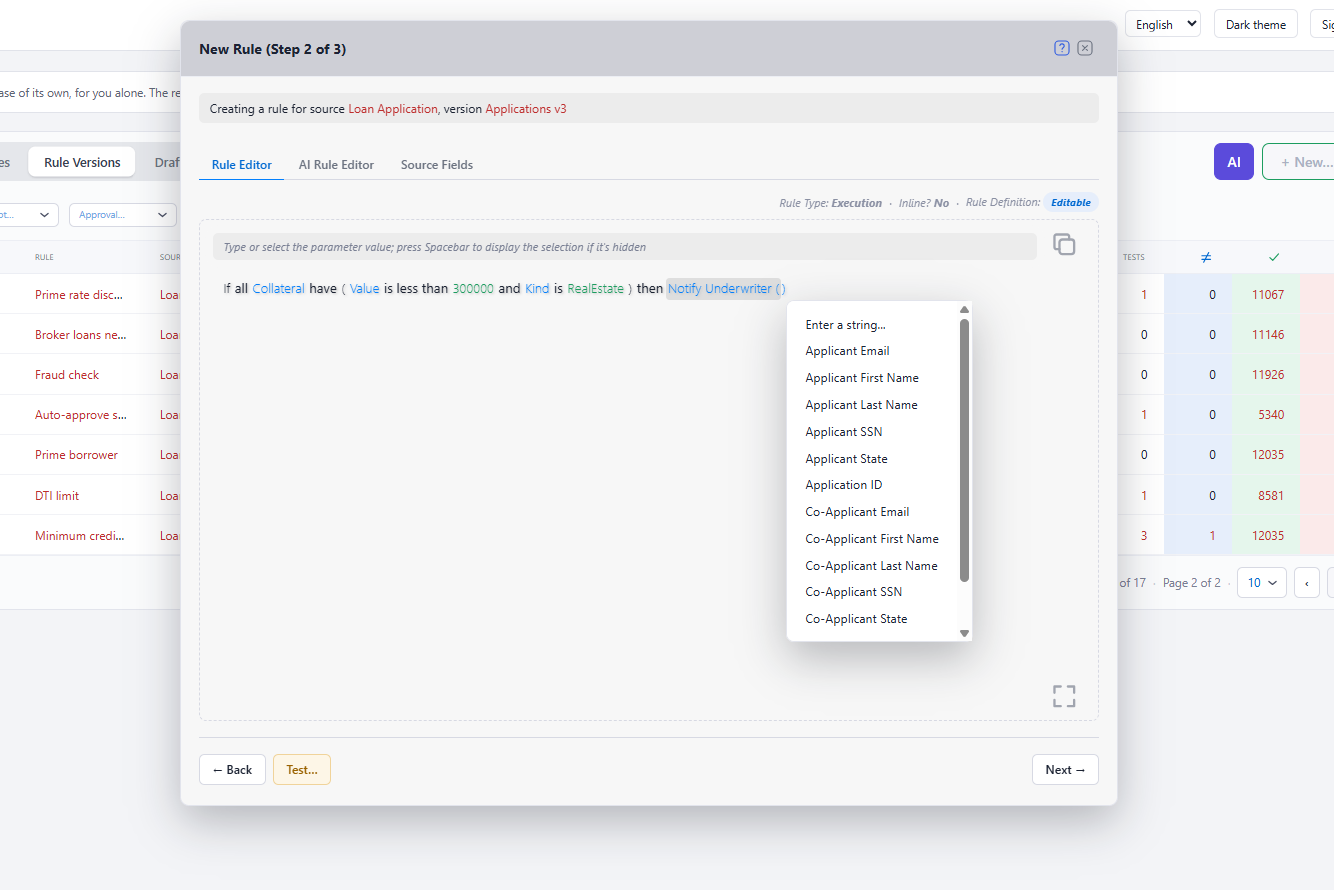
What your team writes
The repository does the rule management; your team connects it to your application. That is a handful of pieces, each documented with complete code:
The database. Run the main script for your database type, then the numbered update scripts as later releases ship them. The repository's libraries never change the schema themselves, and the database runs under your own logins and security policies. See Installing the Database and Database Updates.
The connection. One database provider, shared by everything that uses the repository:
builder.Services.AddSingleton<IDbProvider>(_ =>
    new CodeEffects.Rule.Connection.SqlServer.DbProvider(builder.Configuration.GetConnectionString("Rules")));
One endpoint. A POST endpoint that passes the repository's requests to Context.GetResponse(..), behind your sign-in. See The Server Endpoint.
The configuration of each request. Who the current user is and what that user may do, from your own sign-in and roles. The repository has no users or passwords of its own. See Configuration and Users.
The page. One element and one call, $repo.init(..), in any page of your web application. See The Client.
Syncing your source objects, at startup, from a deployment step or from an administration screen:
var settings = new SourceSettings();
settings.SourceTypes.Add(typeof(Order));
settings.SourceTypes.Add(typeof(Customer));

SyncResult result = Context.SyncSources(dbProvider, settings);
Loading the live rules in production, with or without Audit (below).
Optionally, notifications to your users through your own channels, the user interface in other languages, and an AI model for the AI features.
The Repository Implementation checklist lists every step. A host does not even need an existing application: a new ASP.NET Core project with your sign-in in front of it is enough.
What the repository does for you
Source objects and their versions
Your application syncs its types, Source XML documents or Adaptive Sources; the repository identifies each source object by its alias and keeps every version of it. It creates a new source version only when a stored rule could evaluate differently: a changed type, nullability, range, maximum length, string comparison, data source or member name. A label, description or format change updates the stored definition in place. Every rule version remembers the source version it was written against, so a rule written last year still opens exactly as it was written, and a new build never silently changes what a stored rule means. Users can browse every member of every version and compare two versions side by side. See Source Sync and Versioning.
Rules, versions and drafts
- Every save is a new, immutable version. A version is never edited after it is saved, so what was approved is what runs.
- Drafts hold work in progress, unfinished rules included, saved as often as the author likes and turned into a version when it is ready.
- Clone starts a new version from any earlier one, on the same or another version of the source object. Elements the other source version cannot account for are marked, and the save refuses them until they are fixed.
- Comparisons show two versions of a rule, or two source versions, side by side with every difference highlighted.
Testing
Tests run a rule version on your real classes with values that users enter in a form, with or without expected results. Developers can declare test methods for the methods and actions a rule calls, so a test never sends an email or charges a card; an action without one is recorded instead of run. Users keep values as templates, save tests, and run up to 350 saved tests in one batch after a rule changes. Each rule shows how many of its saved tests have not been run yet.
Approval and publishing
Each rule names its live version, the one production runs. A version's approval is a real step with four states: None, Requested, Approved and Declined. Going live, taking offline, approving and declining each ask for a typed confirmation, so production never changes by a stray click. Before a version goes live, the repository checks every rule it calls and every rule that calls it. Taking a version offline is refused while other live rules depend on it, or done in one step with a replacement. Your application is told about each of these through the Notify event, so it can tell the people who need to know. See Live Versions and Approvals.
Permissions
Your application gives the repository a set of permissions for the current user on every request, from 40 permissions that cover each action on each kind of object, with a dependency map so a permission never works without the ones it needs. The user interface turns off what a user may not do, and the server refuses it anyway. AI agents and services are users too, and their saves always request approval; only a person may make a version live, approve, decline or delete. See Permissions.
Activity, notes and deletion
Every change is an activity entry: who did it, when, and to which source object, rule and version, with the definitions before and after where they apply. Users attach notes to any object. Deleting is for good and checked: a version that has ever been live, and the records it belongs to, cannot be deleted except with its whole source object, so the history behind a past decision stays intact.
Rules that call rules
The repository offers only live, compatible reusable rules in the editor's menus, refuses cycles, and checks calls when a version is saved, goes live, is taken offline and is deleted. A stored rule that still calls a rule that is no longer offered shows the called rule by name and is refused if someone tries to save it again.
Languages, themes and AI
The repository's interface, its rule editors and your source objects' labels can all be translated, and it comes in light and dark themes you can restyle. If your application registers an AI model, users with the permission get an AI Assistant that answers questions about their rules and an AI Rule Editor that writes and changes rules from plain language, always as rules the server has checked. See AI Assistant and AI Rule Editor.
Running the live rules in production
Production applications load the live versions of the rules they need, together with every rule those call, as one ruleset:
using CodeEffects.Rule.Common.Models;
using CodeEffects.Rule.Engine;
using CodeEffects.Rule.Repository;

LoadedRuleset rules = Context.GetRules(dbProvider, RuleQuery.BySource("Acme.Orders.Order"));

var evaluator = new Evaluator<Order>(rules.Xml);   // compile once, keep, reuse
bool approved = evaluator.Evaluate(order, rules.Rule("Approve large orders").Id);
Each loaded rule names the rule version and source version it is, so your application always knows what it runs. When a version goes live, load the rules again; the Notify event says when. See Evaluating Rules from the Repository.
Audit: explaining every decision
With Audit, production loads the rules through one AuditRecorder and attaches it to the engine:
AuditRuleset rules = audit.GetRules(RuleQuery.BySource("Acme.Orders.Order"));

var parameters = new EvaluationParameters();
audit.Attach(parameters);

var evaluator = new Evaluator<Order>(rules.Xml, parameters);

using(audit.Scope(correlationId: order.Number, userId: "order-service"))
{
    bool approved = evaluator.Evaluate(order, rules.Rule("Approve large orders").Id);
}
Each evaluation is then recorded: when it ran and for whom, the rule version and source version, the options, the values the engine read, the branch it took and what it set, and the error if it failed. Recording costs microseconds on the evaluating thread: records go to a local journal and reach the database in the background. In the repository, users find any decision by its correlation ID (your order or claim number), open it, and see it replayed step by step: which condition was true, which was false, and why, including the conditions of every rule it called, as the versions that ran. They follow production volumes in each rule's Live Evaluations chart, analyze decisions by the business values you choose to keep, and turn any recorded evaluation into a saved test. That is decision explainability without any code of yours beyond the lines above. See Recording Evaluations.
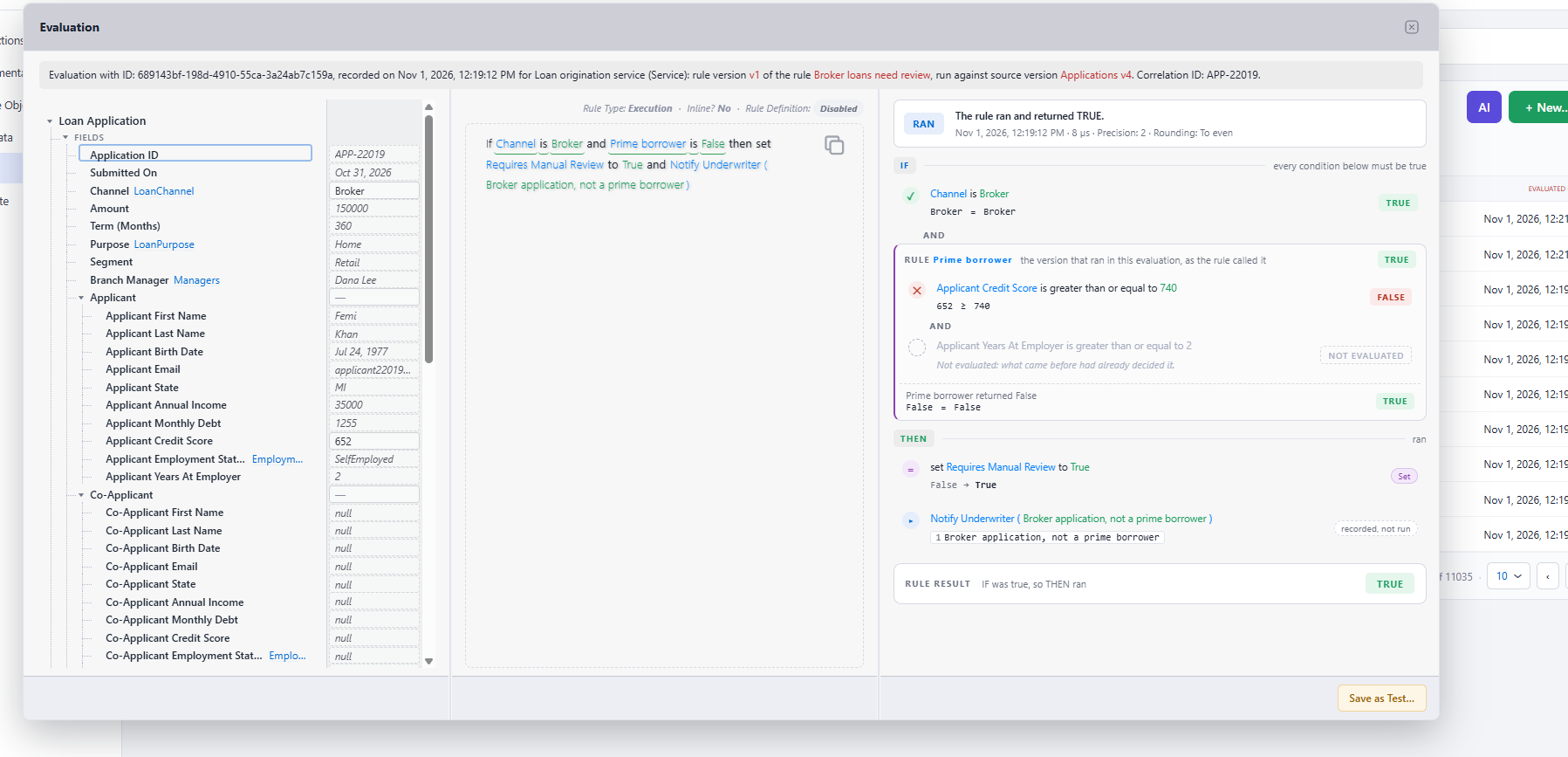
The MCP server
The optional MCP server gives the AI clients your people already use the same rules, under your OAuth sign-in and the same permissions: agents find, explain, write and test rules and investigate recorded decisions, and every rule an agent saves waits for a person's approval.
When to choose it
You want business users to own the life of their rules, with versions, testing, approvals and a dependable history, and you would rather not build and maintain that yourself.
What it costs: a license for the Rule Repository (and for Audit and the MCP server, if you use them), a SQL Server or PostgreSQL database, and an ASP.NET host for the repository's page and endpoint. The implementation typically takes one developer 3 to 4 days, plus 1 to 2 days of testing.
Choosing
Ask how much of the life of a rule your organization needs to manage, and who should manage it:
- If developers manage the rules, or the rules rarely change, or they live inside a product with no web application around them, stand-alone is the lighter choice.
- If business users change rules often, if changes need review before production, or if you must explain past decisions to customers, auditors or regulators, the stages in the middle of the table above are what you need, and the Rule Repository with Audit provides them.
Both ways use the same source objects, the same Rule Editor, the same Rule XML and the same engine, so the skills your team builds carry over from one to the other.