Code Effects vs DecisionRules
Short Answer
Code Effects and DecisionRules can solve the same class of problems - for example, using an LLM to convert unstructured documents into structured data a rules engine can evaluate - but they approach them from opposite architectural starting points.
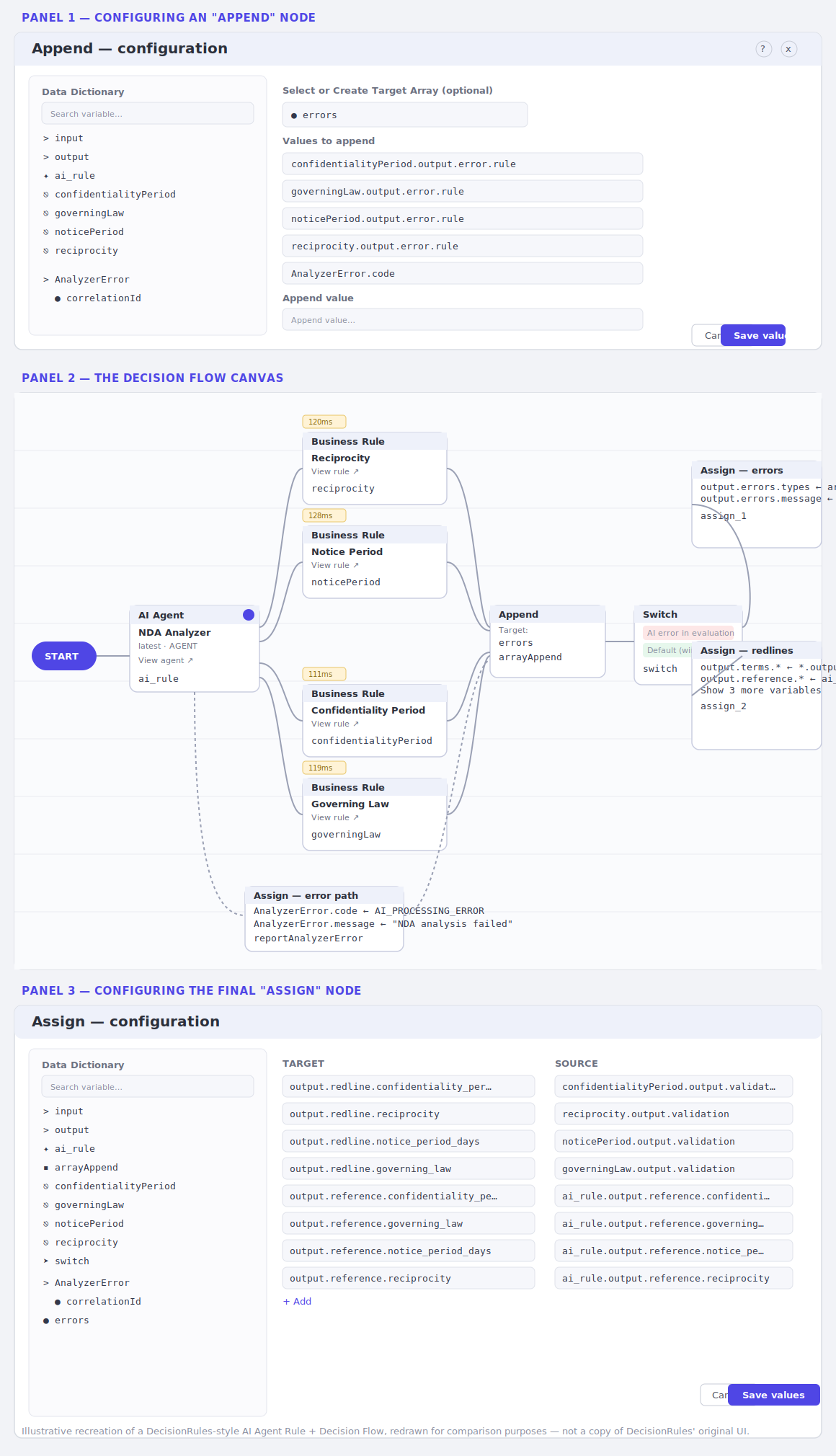
DecisionRules is an external SaaS. It has no access to your codebase, so every piece of the AI pipeline - the input/output JSON schema, the prompt template, the field-by-field extraction instructions, the error-handling paths - has to be collected as data inside its platform and reassembled on every evaluation. That's why building an AI Agent Rule in DecisionRules means designing a JSON schema by hand, writing a structured prompt, annotating every output field with its own "mini-prompt," wiring a multi-node Decision Flow (AI node → parallel Decision Trees → error-handling nodes → Switch → Assign), and maintaining all of it inside their visual editor.
Code Effects is an embedded .NET library. It runs inside your own application and can invoke any public method on your own objects during rule evaluation. That means the LLM call, the document schema, and the extraction logic live where they belong - in your codebase, written once by your developers - while the rule itself only carries the parts that are genuinely business logic: thresholds, allow-lists, and routing decisions.
Choose DecisionRules if you have no in-house development capacity and are willing to have your business team take on real schema-design and prompt-engineering work. DecisionRules markets its AI Agent Rule builder as no-code, but designing a JSON schema by hand, choosing the correct data type per field, and writing field-level annotations precisely enough to drive consistent extraction is programming in every sense except syntax - and unlike a compiler, the platform doesn't catch mistakes here. A wrong type selection or a misaligned annotation doesn't throw an error; it produces a rule that looks complete and fails silently at evaluation time.
Choose Code Effects if you have a development team and want the AI/document-processing complexity encapsulated in code you own, while giving business users a rule-authoring surface where every option they can select is guaranteed to produce a valid, executable rule - no schema typing, no type mismatches, no silent failures.
There's a deeper version of this argument worth stating plainly: neither vendor will ever have a pre-built LLM orchestration for a genuinely specific, long-tail need - extracting particular regulated values from a specific type of German government document required only in certain German industries, for instance. That work gets built by the customer either way. The real question isn't whether the customer builds it - it's whether the result plugs directly into the rules engine, or has to be reshaped first to satisfy a vendor's execution environment. See Long-tail orchestration below for details.
Why the Architectures Diverge
|
DecisionRules |
Code Effects |
| Deployment model |
External SaaS, called over the network |
Embedded library, runs in-process |
| Access to your code |
None - must externalize everything as data |
Full - can invoke any public method at evaluation time |
| Where the JSON schema lives |
Authored inside the DecisionRules UI (Model / JSON editor) |
Anywhere you choose - whether defined in your C# class, passed to the rule evaluation as a field value, or provided as a parameter to a rule action. |
| Where the prompt lives |
Authored inside the DecisionRules UI, with {placeholder} substitution |
Inside your own action method implementation - any LLM, local or hosted, or no LLM at all |
| Field-level extraction guidance |
"Annotations" - per-field description text acting as mini-prompts, authored per rule |
Handled once in code - either with C# attributes or by assigning metadata field properties dynamically; not re-authored in every rule. |
| Error/timeout handling |
Modeled explicitly as flow nodes (Assign, Append, Switch) per rule |
Handled in your action method's own code, written once and reused |
| What the business user actually authors |
The schema, the prompt, the annotations, and the Decision Trees for thresholds |
Only the business parameters - thresholds, allow-lists, booleans, routing - passed as parameters to existing actions |
| Rule composition / reuse |
Achieved via separate Decision Trees wired into a Decision Flow |
Achieved by firing other rules from a custom action method, at the rule author's discretion |
| Re-evaluation on mutated state |
The service re-triggers the flow as document status changes - its only option, since it can't loop internally |
The team decides: loop inside the action method, re-fire the rule, or check status outside the rule entirely |
| LLM choice |
Whatever your DecisionRules connector supports |
Any LLM, including self-hosted/local models - nothing leaves your infrastructure unless your code sends it out |
| Setup surface for one document-review process |
I/O model + prompt + annotations + 4+ Decision Trees + 3–4 flow nodes |
One rule, one action method |
| Guarantee of structural/type validity at authoring time |
None documented - a mistyped JSON attribute name, a wrong data-type choice (Text vs Number vs Boolean), or a misaligned annotation can pass through and fail silently at evaluation, sometimes breaking downstream Decision Flow nodes |
Enforced by the editor itself (Filter, Max/Min, ValueInputType, and other field-level guardrails); invalid elements are blocked before a rule can be saved - every persisted rule is valid by construction |
| Real skill required from "no-code" authors |
Yes - JSON schema design, per-field data-type selection, and multi-node flow wiring, despite no compiled code being written |
No - business users only supply parameter values (thresholds, allow-lists, booleans, routing) into a pre-validated rule structure; no schema or type authoring is exposed to them at all |
Worked Example: NDA Redline Evaluation
Both platforms can implement the same use case described in DecisionRules' online documentation and used in this article as an example of AI-powered document processing: evaluating a new NDA against company standards (confidentiality period, governing law, notice period, reciprocity) and returning the required redlines. The end result is the same; the architecture behind it is not.
In DecisionRules, building this requires: an AI Agent Rule with a hand-built input schema (nda.text, originatingParty, etc.) and output schema (terms, reference objects with ~11 leaf fields each); a Role/Context/Task prompt with variable placeholders; per-field annotations instructing the model to return verbatim source text for each extracted term; four separate Decision Trees (one per standard) wired into a Decision Flow; an Assign node to catch LLM timeouts; an Append node to collect errors into an array; and a Switch node to route between the success and error paths. All of it - including the JSON schema itself - is authored and maintained inside the DecisionRules UI, because the service has no other way to get that information.
In Code Effects, the same process is one rule against a Source object exposing an EvaluateDocument() action:
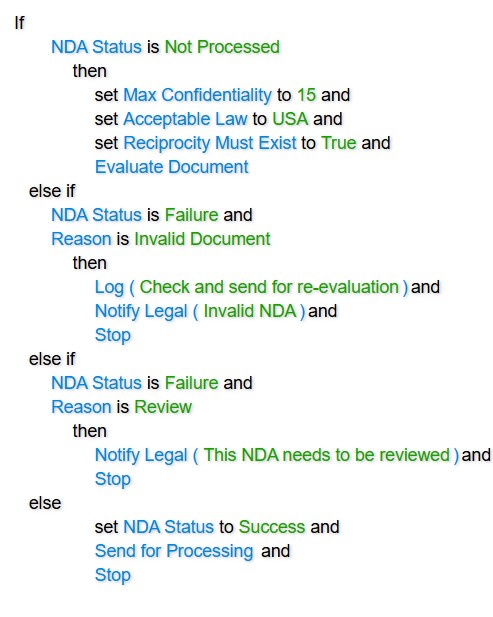
The schema, the prompt, the extraction logic, and the error handling all live inside EvaluateDocument() - written once in C#, by a developer, using any LLM or even custom parsing logic with no LLM at all. The rule itself carries only what a business user should own: the thresholds and the routing decisions after evaluation.
Code Effects also supports Prompted rule elements - string fields, parameters, or return values flagged for AI resolution at evaluation time, with the prompt text captured at authoring time but resolved by developer-written code at runtime. This gives teams a lighter-weight middle option for simpler cases - resolving a single value with AI assistance - without building a full custom action method.
Compare the complexity of DecisionRules - a hand-built JSON schema, per-field annotations, an AI Agent node, four parallel Decision Trees, an Append node, a Switch node, and two Assign nodes each mapping 5–8 target/source pairs by hand - to the entire equivalent logic in Code Effects:
One sentence-structured rule, one action method.
The following source object was used to generate the Code Effects UI shown below. It has been simplified for this article but is based on the metadata described in the DecisionRules documentation for the same use case. In both platforms, this type of source object - or its serialized representation - provides the data that is evaluated against the rule at runtime.
using System;
using CodeEffects.Rule.Common.Attributes;

namespace Test;

public class Nda
{
	[Field(DisplayName = "Max Confidentiality")]
	public int MaxConfidentiality { get; set; } = 0;

	[Field(DisplayName = "Acceptable Law")]
	public Law AcceptableLaw { get; set; } = Law.Undefined;

	public Reason Reason { get; set; } = Reason.Undefined;

	[Field(DisplayName = "Reciprocity Must Exist")]
	public bool ReciprocityMustExist { get; set; } = false;

	[Field(DisplayName = "NDA Status")]
	public NdaStatus Status { get; set; } = NdaStatus.Undefined;

	[Action(DisplayName = "Evaluate Document")]
	public void Evaluate() { /* Evaluation logic goes here */ }

	[Action(DisplayName = "Send for Processing")]
	public void Process(Nda document) { /* Further processing of the document */ }

	public void Log(Nda document, string message) { /* Logging logic goes here */ }

	public void Stop() { /* Process finalization logic goes here */ }

	[Action(DisplayName = "Notify Legal")]
	public void Legal(Nda document, string message) { /* Logging logic goes here */ }
}

public enum NdaStatus
{
	[ExcludeFromEvaluation]
	Undefined,

	[EnumItem("Not Processed")]
	NotProcessed,

	Failure,
	Success
}
public enum Reason
{
	[ExcludeFromEvaluation]
	Undefined,

	[EnumItem("Invalid Document")]
	InvalidDocument,

	Review
}
public enum Law
{
	[ExcludeFromEvaluation]
	Undefined,

	USA,
	Canada
}
There is no decision automation capability offered by DecisionRules that cannot be implemented with Code Effects. The real difference lies in how each platform approaches the problem - and what that means for your architecture, business users, deployment, and long-term maintenance.
AI-Assisted Rule Authoring:
One-Shot Generation vs. Context-Scoped Composition
Separate from the AI Agent Rule feature covered above - which uses AI to extract structured data from a document - DecisionRules also markets an AI Assistant for authoring rules themselves. You describe your logic in plain language (their own example: "If the customer's age is greater than 18 and their credit score is above 700, then approve the loan") and the assistant infers an entire Decision Table in one pass - conditions, columns, and output structure included.
Code Effects takes a structurally different approach: Adaptive Source. It does not generate a finished rule from one prompt. Instead, it supplies the rule editor's field and method menus one step at a time, scoped to the rule's current context - optionally using AI to decide what's relevant next - while the rule author assembles the rule element by element, in something close to a natural-language sentence.
|
DecisionRules AI Assistant |
Code Effects Adaptive Source |
| What the AI does |
Infers an entire Decision Table - conditions, columns, and values - from one natural-language prompt |
Optionally decides which fields/methods to surface next, one step at a time, as the rule author builds the rule |
| What the rule author does |
Reviews and edits the AI's finished table after the fact |
Builds the rule element by element, guided by contextual menus |
| Failure mode when the AI gets it wrong |
Silent - a generated table can look complete while missing an edge case or misreading a condition, with nothing in the pipeline flagging it |
Structurally prevented - the editor blocks invalid or out-of-scope elements before they can be added, regardless of what suggested them |
| What happens when an earlier condition changes |
No documented mechanism for detecting logic invalidated by an earlier edit |
Context Resetters detect changes to a designated condition and automatically remove now-invalid downstream elements, with one-click Undo |
| Resulting rule form |
A structured table/JSON artifact |
A near-natural-language sentence: "If X then Y and Z" |
The practical difference: a DecisionRules AI Assistant table is a finished artifact produced in a single inference pass, which means a human has to review every row to catch anything the model got wrong before trusting it in production. A Code Effects rule, even one shaped with AI-assisted menu narrowing, is validated element-by-element as it's built - so there's no separate "did the AI get this right" review pass, because nothing invalid could have been added to begin with.
Honest caveat: Adaptive Source doesn't turn one free-text sentence into a finished rule either - a developer still has to implement the IMenuProvider first, exactly as DecisionRules needs a team to expose the schema its AI Assistant generates against. And the rule author's experience is genuinely slower step-by-step composition, not an instant finished draft. What Code Effects trades away is the "one sentence, one complete rule" demo moment; what it gains is that the result can't be silently wrong the way a one-shot generated table can. (Full mechanics - Adaptive Source, Context Resetters, and the field-level guardrails behind this guarantee - are documented in Code Effects' comparison of AI-assisted rule editors.)
Long-Tail Orchestration: Where Does Custom AI Work Actually Live?
Both platforms will encounter customer needs neither vendor built for - a document-extraction pipeline for a niche regulated document type, a multi-step validation flow specific to one industry, a normalization step that only makes sense given data the customer already has elsewhere. Once you accept that the vendor is extremely unlikely to ship that exact orchestration, the customer builds it regardless of which platform they chose. The comparison that matters, then, isn't "build vs. don't build" - it's what the customer's already-working pipeline has to go through to be usable inside each platform.
In DecisionRules, custom logic has two routes in, and both add a layer of vendor-shaped adaptation on top of the customer's own work:
- The AI Agent Rule path (covered above) requires the orchestration to be re-expressed as data - a hand-built JSON schema, a prompt template, per-field annotations - authored and versioned inside DecisionRules' UI, sent to their connector-managed LLM call.
- The Scripting Rule path allows custom JavaScript, but it runs inside DecisionRules' own sandboxed execution context:
console.log() is disallowed, and cross-rule calls are routed through their own DR class rather than native code. A team that already has a working extraction pipeline - a Python service, an internal document-processing tool, an existing Bedrock or Azure AI integration - cannot simply call it as-is; it has to be re-implemented, in JavaScript, inside DecisionRules' sandbox, subject to whatever execution limits that environment imposes.
Either route means the customer's orchestration is built at least twice in effect: once to do the actual work correctly, and again reshaped to satisfy the vendor's schema, sandbox, or calling convention.
In Code Effects, EvaluateDocument() - or any custom action method - is ordinary, native C# running in-process. There is no sandbox to adapt to, no JSON contract to satisfy, no platform-specific calling convention. Whatever pipeline the customer already has working - in Python, in an internal service, calling any LLM provider or none at all - plugs in as a method call. Nothing about the platform shapes how that orchestration is written.
|
DecisionRules |
Code Effects |
| Where custom orchestration executes |
Inside DecisionRules' own execution context - the AI Agent Rule's connector-managed call, or the Scripting Rule sandbox |
Inside your own process, as native .NET code, with no platform-imposed sandbox |
| Adaptation required before reuse |
Existing pipelines must be re-expressed as schema/prompt/annotations, or reimplemented in sandboxed JavaScript |
None - an existing method, service call, or library reference is used directly |
| Network/protocol surface to satisfy |
Orchestration must be reachable by, or authored inside, DecisionRules' platform (cloud or self-hosted instance) |
None beyond whatever your own code already calls |
| What changes when the orchestration logic changes |
The platform-side schema, prompt, annotations, or sandboxed script - a second place to update, in addition to any logic that lives outside the platform |
A single code change in your own method, deployed through your own existing pipeline |
| Compliance surface per orchestration change |
Must satisfy both your own requirements and the assumptions built into DecisionRules' schema/sandbox model |
Only your own requirements apply - there is no intermediate platform contract to satisfy |
This is the deeper form of the BYOAI distinction raised elsewhere in this comparison: it was never really about which LLM provider is available. It's about which vendor-owned artifacts - a schema, a sandbox, a connector, a calling convention - the customer's own orchestration has to be reshaped to satisfy before it can run.
DecisionRules requires an answer to that question. Code Effects doesn't, because there's no vendor-owned execution environment standing between the customer's code and the rule.
Honest tradeoffs
DecisionRules' case: if you have no development capacity at all, DecisionRules gives your business team a path to build the entire pipeline without compiling code, and you're not responsible for hosting, uptime, or the AI integration itself. The multi-node Decision Flow does make every step of the process visible in a diagram, which some teams may value for auditability. But "no-code" undersells what's actually required to build it correctly: designing an I/O JSON schema, choosing the right data type per field, and writing per-field annotations precise enough to get consistent extraction is real, unforgiving work - and the platform provides no equivalent to a compiler's error-checking. A wrong type or a misaligned annotation doesn't fail loudly; it produces a rule that looks finished and breaks silently downstream, in exactly the way a subtle programming bug would.
Code Effects' case: the "one simple rule" only stays simple if EvaluateDocument() is well-engineered, and someone with development skills still has to build it, along with exposing the schema through Adaptive Source - Code Effects doesn't eliminate that setup work any more than DecisionRules eliminates the need for a team to expose a source schema its AI Agent Rule builder can generate against. What differs is what happens on the business user's side of that boundary. In Code Effects, the rule editor enforces field-, method-, and parameter-level constraints before a rule can be saved, so every option a business user can select is guaranteed to produce a valid, immediately executable rule - no human validation pass required. In DecisionRules' AI Agent Rule builder, the business user is typing raw JSON attribute names and picking types themselves, with no such safety net. (See Code Effects' comparison of AI-assisted rule editors for the underlying guardrail mechanisms - Filter, Max/Min, ValueInputType, and Context Resetters - that make this guarantee possible.)
FAQ
Is Code Effects a replacement for DecisionRules?
Not directly - they're architecturally different products. DecisionRules is an external SaaS with a visual rule/flow builder; Code Effects is an embedded .NET library that runs inside your own application. Teams choose between them based on whether they have in-house development capacity, not just on rules-engine feature lists.
Why does DecisionRules require building a JSON schema and prompt inside its UI?
Because it's a third-party service with no access to your codebase, DecisionRules has no way to run your own extraction code. Everything the LLM needs - schema, prompt, field-level instructions - has to be defined as data inside its platform and sent along with each evaluation request.
Does Code Effects call an LLM automatically?
No. Code Effects doesn't include built-in LLM/document-processing logic. It invokes whatever public method your rule references - such as a custom EvaluateDocument() action - and your code decides which LLM (hosted or self-hosted) or parsing approach to use, if any.
Can business users still configure AI-assisted rules in Code Effects without a developer?
Business users can supply the values that are genuinely business logic - thresholds, allow-lists, required clauses, routing outcomes - as parameters in the THEN clause of a rule. Defining the underlying schema, prompt, or extraction logic requires a developer to implement or update the action method, similar to how DecisionRules requires someone with prompt-engineering knowledge to build its AI Agent Rule properly, despite being marketed as no-code.
Can a Code Effects rule re-evaluate itself after mutating an object's state?
Yes. A rule can fire repeatedly against the same object as its state changes - for example, after EvaluateDocument() updates a document's status - with the team deciding whether that looping happens inside the action method, through repeated rule evaluation, or via an external status check. DecisionRules' flow re-triggers similarly, but as an external service it has no alternative implementation option.
Does Code Effects support reusing the same validation logic across multiple rules or processes?
Yes, via custom action methods that fire other rules, at the rule author's discretion. DecisionRules achieves similar reuse by wiring separate Decision Trees into a Decision Flow, which is useful when the visual flow itself needs to be shared or audited as a diagram.
Does Code Effects support self-hosted LLMs?
Yes - because the AI call happens inside your own action method, you can point it at any LLM, including local or self-hosted models, without your document data leaving your infrastructure unless your own code sends it externally.
Is DecisionRules' AI Agent Rule builder actually no-code?
Not in the sense the label implies. No one writes compiled code, but building an AI Agent Rule requires designing a JSON input/output schema by hand, choosing the correct data type for every field, and writing field-level annotations precise enough to get consistent extraction from the model. Errors here - a wrong type, a mistyped attribute name, a misaligned annotation - aren't caught by the platform; they produce a rule that appears complete and fails silently at evaluation time. Code Effects' rule editor, by contrast, enforces structural and type validity before a rule can be saved, so nothing a business user configures can silently break downstream.
How does DecisionRules' AI Assistant differ from Code Effects' Adaptive Source?
DecisionRules' AI Assistant infers an entire Decision Table - conditions, columns, and values - from a single natural-language prompt, then leaves the rule author to review it for correctness. Code Effects' Adaptive Source doesn't generate a finished rule from one prompt; it supplies contextually scoped menus one step at a time as the rule author builds the rule, optionally using AI to decide what's relevant next. The rule editor validates each element as it's added, so there's no separate correctness-review pass the way there is with a one-shot-generated table.
If neither vendor has a pre-built orchestration for our specific use case, does that make Code Effects and DecisionRules equally easy to use?
No. Both require the customer to build the orchestration themselves, but what happens next differs. In DecisionRules, that custom logic must be re-expressed as a schema/prompt/annotations for an AI Agent Rule, or reimplemented inside the sandboxed Scripting Rule environment - either way, adapted to fit the platform's execution model. In Code Effects, the same custom logic runs as ordinary native code in your own process, called directly from the rule with no schema, sandbox, or protocol layer to satisfy first.