Source Object
Overview
A source object defines the data surface that Code Effects uses for rule authoring and evaluation. At design time, the Rule Editor reflects the source object to build menus for fields, operators, values, in‑rule methods, and rule action methods. At run time, the Rule Engine evaluates rules against instances of the same source type (or its compatible representations) to produce a boolean result (evaluation type rules) and/or execute actions (execution type rules).
A source object means the same thing in a stand-alone Rule Editor and in the Rule Repository (RR), but the two handle sources differently: how a source reaches the editor, how it is identified, and what happens when it changes. The section Sources in a Stand-Alone Editor and in the Rule Repository below compares them, and every source form described on this page says what is different in RR.
You can provide the source object to the editor in any of the following forms:
- Adaptive Source - the newest and most advanced source option introduced in version 6. It dynamically generates the Rule Editor's menus at runtime based on the current authoring context. Instead of relying on a predefined source model, your application determines which fields, methods, actions, and options are available at each step, enabling context-aware rule authoring and seamless integration with external systems, services, and AI-driven experiences. It is implemented as an
ISourceProvider.
- Reflection / .NET class - the easiest to implement source option. The editor reflects public, value‑typed members as rule fields, in-rule methods, or rule actions. You can customize behavior with Code Effects attributes on the class, its members, parameters, and return values.
- Source XML - a declarative XML representation of a source object that follows the public schema. Useful when the .NET type is unavailable, must be generated dynamically, or must be shaped differently for rule authors - in multilingual projects, for example. It is also the format in which RR stores every source.
- FlexSource - a provider pattern that supplies source metadata dynamically when the underlying type is not declared or not available at design/run time. A stand-alone editor feature: the Rule Repository does not support it.
The same rule can be evaluated against objects of the .NET source type, or (when authored from Source XML / FlexSource) against data projected to the same field/method shape.
Sources in a Stand-Alone Editor and in the Rule Repository
The table compares the two ways to use the same source object.
|
Stand-alone Rule Editor |
Rule Repository |
| How you give it a source |
You set one property of the server-side Control for each editor: SourceType (or SourceTypeName and SourceAssembly), SourceXml or SourceXmlFile, or SourceProvider for an Adaptive Source. |
You never set it on a Control. Your application calls Context.SyncSources with the types, Source XML documents, and Adaptive Source providers in SourceSettings. RR converts each of them to Source XML and stores it. |
| When the source is read |
Whenever the editor is initialized: a type is reflected again and a Source XML document is read again. |
When you run a sync: at startup, from an administration screen, on a schedule, or from a deployment step. RR's editors read the stored Source XML, so a change to your class reaches RR only after the next sync. |
| What identifies it |
Your code decides which source each editor uses. A saved rule names its source in the type attribute of its Rule XML. |
Its alias: the type of the main source with the assembly identity removed, or the name you set in SourceAttribute.TypeOrAliasName. An alias is unique and must not change. A new namespace, class name, or alias is a new source object with no history. |
| What happens when it changes |
Code Effects does not track changes. Your application stores the rules and keeps them in step with the class. |
Every change to the declared shape of the source is a new source version, and a change to labels only updates the stored version in place. Each rule version is written against one source version, and RR can compare versions and show which rules use which members. |
| Adaptive Source |
The editor asks your menuCallback for each menu while the rule is written, and Context Resetters work. |
RR asks the provider once, at sync, for the whole source (ISourceProvider.GetSource()), stores it as Source XML, and runs its editors on the stored document. It does not call the provider's menu methods, so there is no menuCallback and Context Resetters are not available. |
| FlexSource |
Supported. |
Not supported: it cannot be synced, and RR's tests and Audit do not support it. |
| Attributes |
Everything on this page applies. |
Everything on this page applies, plus attributes only RR and its AI agents use: AiAliases, AiDescription, CorrelationField, and TestMethodName / TestMethodType. A stand-alone editor ignores them. |
| Evaluation |
You load the Rule XML and evaluate it against your class. |
The same. RR changes where rules are stored, not how they are evaluated. Context.GetRules returns the live rules for your source. |
A rule is not tied to the way its source was supplied. The Rule XML names members by their declared names, so a rule written against a .NET class in a stand-alone editor can be edited later with Source XML, or the other way around, as long as the member names stay the same.
For the part of RR that shows sources to its users, see Source Objects, Source Versions, and When the Source Object Changes in the Rule Repository guide. The Rule Storage article, Rule Storage in Rule Repository, describes what RR stores.
Reflection and Field Discovery
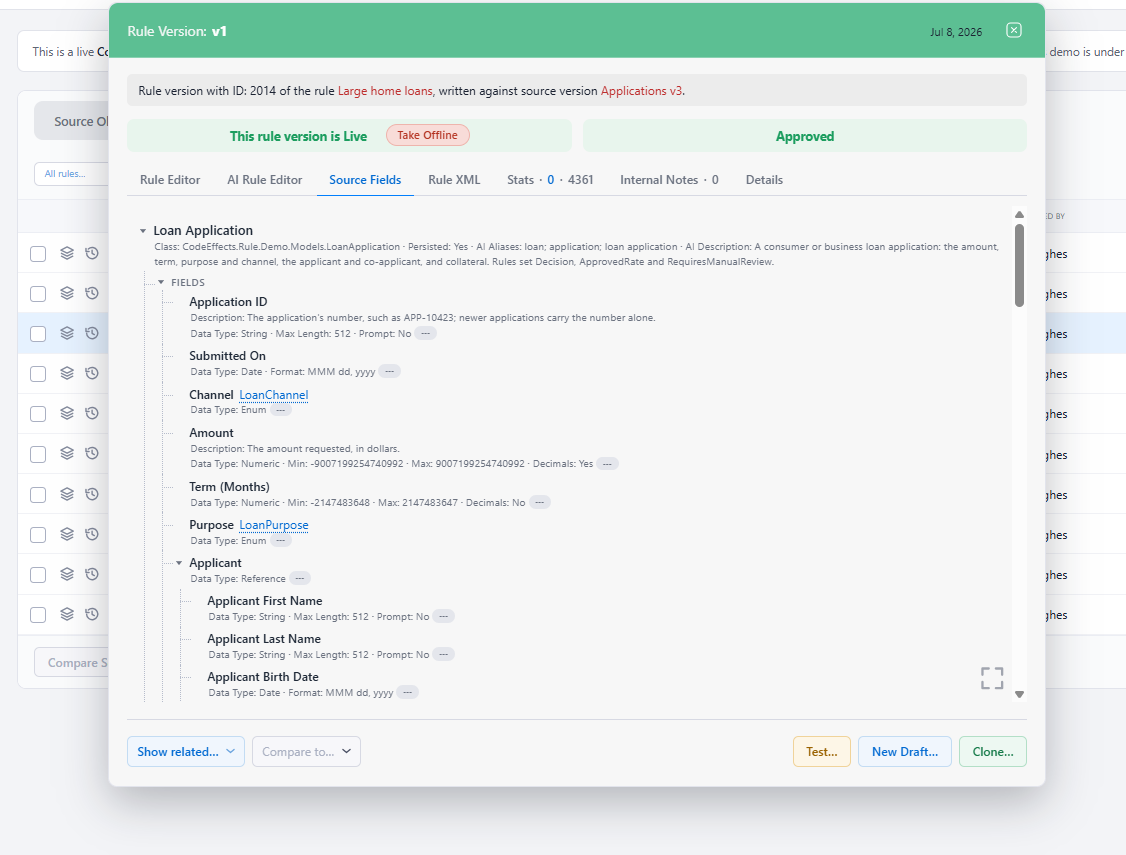
By default, the editor discovers rule fields and methods as follows:
- Uses qualified methods as in-rule methods and actions, and public value‑typed properties and fields of the source type (excluding
System.Guid) as rule fields. Nullable enumerations are supported as fields, parameters, and return values since version 7.
- Traverses reference‑typed members breadth‑first up to
SourceAttribute.MaxTypeNestingLevel (default: 4) to discover additional value‑typed members. Reference types can be customized using the ParentAttribute. The source type is level one, so with the default a field reached through three reference-type properties (Engine.Turbo.Valve.Size) is discovered and one reached through four (Engine.Turbo.Valve.Seat.Width) is not.
- Converts .NET types to editor field types: numeric, string, date, time, boolean, enum, and collections. This simplifies authoring while preserving accurate types during evaluation.
- Adds
isNull / isNotNull operators for nullable members and strings. Labels of the static UI and rule elements such as If, Else if, or Then flow elements, and rule operators can be localized or overridden via Help XML.
- Exposes every qualified public method, with or without
MethodAttribute or ActionAttribute. A qualified method that returns a value appears as an in-rule method, and one that returns void appears as an action. The attributes only name and describe them.
- Ignores any field or method decorated with the
ExcludeFromEvaluationAttribute to prevent its use in rule authoring or evaluation.
Example: Limiting Deep Traversal
using CodeEffects.Rule.Common.Attributes;

[Source(MaxTypeNestingLevel = 3)]
public class Car
{
	// Value-typed members are discovered as fields
	[Field(Max = 17, DisplayName = "VIN number")]
	public string VIN { get; set; }

	[Field(Min = 0, Max = 1000000)]
	public decimal Price { get; set; } = 0;

	public DateTime? Sold { get; set; } // gets isNull/isNotNull

	public Color Color { get; set; } = Color.White; // enum field

	// Reference-typed members may be traversed up to the nesting limit
	public Powertrain Powertrain { get; set; }
}
Increasing MaxTypeNestingLevel may impact initial render time because more members must be reflected and shaped for the UI.
In the Rule Repository, the type is reflected when you sync it, not when an editor opens. RR stores the result, so a different MaxTypeNestingLevel changes the stored source and creates a new source version. See Using an Existing .NET Class as a Source Object.
In‑Rule Methods (Fields Backed by Methods)
An in‑rule method is a qualified public instance or static method that the editor can expose as if it were a field or a value source. To qualify:
- The return type must be a value type or
System.String (except System.Guid and nullable enums).
- Parameters, if any, must be value types,
IEnumerable collections, or System.String; the editor can also pass the source object itself as a special parameter. Methods that accept reference types are ignored.
- Use attributes to control naming and input constraints.
using CodeEffects.Rule.Common.Attributes;

[Method("Had Accidents")]
[return: Return(ValueInputType = ValueInputType.User)]
public bool HadAccidents([Parameter(ValueInputType = ValueInputType.Fields)] string vin)
{
	var events = VehicleService.GetAccidents(vin);
	return events != null && events.Count > 0;
}

// Appears to authors as a field:
// If Had Accidents ( VIN ) is equal to True then Ask For Discount
When a method takes the source object as its only parameter, it appears indistinguishable from a regular field to the author:
using CodeEffects.Rule.Common.Attributes;

[Method("Resale Price")]
public static decimal GetResalePrice(Car car) // car is the source object
{
	decimal? price = VehicleService.GetPriceByVIN(car.VIN);
	return price is null or < 0 ? 0 : price.Value;
}

// Authoring example. The Contact Junkyard is a parameterless action method
// If Resale Price is less than 100 then Contact Junkyard
Actions (Execution Type Rules)
Actions are instance or static public qualified methods that return System.Void. Their parameter type requirements are the same as for the in-rule methods. They can be declared on the source type or on external classes (see below) and are available only to execution type rules - they are ignored by evaluation type rules.
using CodeEffects.Rule.Common.Attributes;

[Action("Change Oil")]
public void ChangeOil(Car car)
{
	var oil = VehicleService.GetOil();
	car.Oil.Replace(oil);
}
External Methods and Actions
You can attach methods from external classes or even separate .NET assemblies to the source via ExternalMethodAttribute and ExternalActionAttribute classes:
using CodeEffects.Rule.Common.Attributes;

[ExternalMethod(typeof(Helper), nameof(Helper.HadAccidents))]
[ExternalAction(typeof(Helper), nameof(Helper.ChangeOil))]
public class Car { /* … */ }
Enumerations and Dynamic Menus
- Enum-typed members become enum fields. To hide specific enum items from authoring, mark them with
ExcludeFromEvaluationAttribute. Use the EnumItemAttribute to customize each individual member of the enumeration.
- For data that should appear like enums but is stored externally, configure Dynamic Menu Data Sources. These present key–value pairs from databases or services as editor menus with the same UX as native enums and support display/value separation, filtering, and localization.
Customization via Attributes (High Level)
Use attributes from CodeEffects.Rule.Common.Attributes namespace to shape the authoring surface:
- Source — scope, traversal depth, and source‑level metadata.
- Field — display name, description, min/max, date/time format and
TimeType, input mode (user vs fields), etc.
- Method, Action, Return, Parameter — naming and input semantics for in‑rule methods, rule actions, and their parameters/return value.
- ExternalMethod, ExternalAction — attach qualified methods from other public classes or libraries.
- Parent - customize reference types reflected and used by the editor.
- ExcludeFromEvaluation — suppress a member, a method, or enum item from authoring/evaluation.
The AiAliases and AiDescription properties of these attributes give AI agents other names for a member and a fuller description than the one people read. The editor ignores them, and RR's AI features use them. Keep in mind that both go to the AI provider you connect to RR.
See the API reference for precise property lists and defaults.
Best Practices
- Design for authors. Shape the source so that field names read naturally. Prefer
DisplayName and Help XML for non‑technical labels and descriptions.
- Control surface area. Keep
MaxTypeNestingLevel reasonable to balance completeness and performance.
- Avoid leaky abstractions. Use in‑rule methods to encapsulate computations and external lookups rather than exposing raw infrastructure types.
- Guard side effects. Only expose actions that are idempotent or operationally safe; use execution rules deliberately.
- Version with intent. When changing the source type, treat it as a contract with rule authors. Provide migration guidance if field or method semantics change. In the Rule Repository, each sync that finds a changed shape stores a new source version for you, but renaming or moving the class creates a new source object, so keep the namespace and class name for the life of the source, or give it a permanent alias with
SourceAttribute.TypeOrAliasName.
Compatibility
Code Effects assemblies target modern .NET platforms (via .NET Standard–based builds). The source‑object concepts above apply uniformly whether rules are authored from a .NET class, Source XML, an Adaptive Source, or (in a stand-alone editor) a FlexSource. Evaluation works against instances compatible with the authored source surface.