Reusable Rules in Code Effects
Code Effects business rules engine comes with a powerful feature that allows you to reuse any evaluation type rule in any other rule as if it were a simple field of the System.Boolean type.
Imagine that your organization uses a simple condition such as Age is greater than or equal to 21 in hundreds of its business rules. Obviously, if the value 21 changes tomorrow, your organization would need to edit, test, and redeploy all those rules with the new value. Having that condition as a reusable rule allows for much greater flexibility because any change to that rule is instantly adopted by all other rules that use it.
For example, consider the following source object:
using System;
using CodeEffects.Rule.Common.Attributes;

namespace TestProject
{
    public class Patient
    {
        public string Name { get; set; }
        public Gender Gender { get; set; } = Gender.Unknown;

        [Field(DisplayName = "Date of Birth", DateTimeFormat = "MMMM dd, yyyy")]
        public DateTime? DOB { get; set; }

        [Method("Age", "Returns age of the patient")]
        public int GetAge()
        {
            if(this.DOB == default) throw new Exception("DOB is not set");
            else return DateTime.Now.Year - this.DOB.Value.Year;
        }
    }

    public enum Gender
    {
        Male,
        Female,

        [ExcludeFromEvaluation]
        Unknown
    }
}
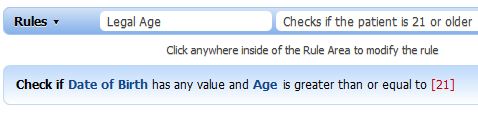
If we were to register Rule Editor on a web page with this Patient class as a source object, we could create an evaluation type rule that checks whether the patient is 21 or older, name that rule Legal Age, and save it:
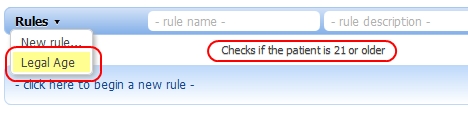
Later, we could reuse that rule in other rules as if it were a Boolean field called Legal Age by adding it to the collection of items in the Rules menu and the fields context menu the next time we load the page (more about adding items to the Rules menu can be found in the Toolbar topic). So, the selection of this rule from the Rules menu for editing would look like this:
It would also appear as an ordinary Boolean field in the context menu when you create other rules:
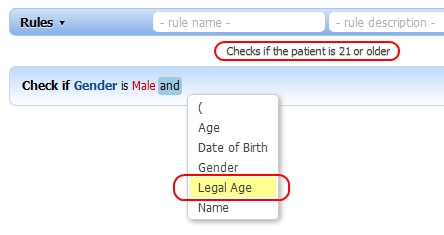
Notice that the Help String displays the description of our rule every time the mouse hovers over its name in either menu.
Now we can reuse our Legal Age rule in any other rule that uses the same source object:
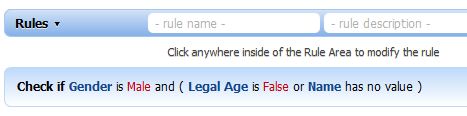
This powerful feature allows you to easily encapsulate common logic into separate rules and reuse them across your entire organization.
IMPORTANT! If used carelessly, reusable rules can lead to a nasty issue called circular references. Imagine the following three business rules:
Rule # 1
Check if Name is John and Rule # 3 is False
Rule # 2
Check if Email ends with .com and Rule # 1 is True
Rule # 3
Check if Zip code is 12345 or Rule # 2 is True
It's easy to see the circular references in these rules. What makes it worse is the fact that a rule author cannot see that by using Rule # 1 in Rule # 2, he's actually creating recursion.
Code Effects business rules editor does not allow rule authors to reuse a rule inside itself while that rule is being edited — it simply won't display the rule's name in the context menu even if the developer adds it to the menu's item collection. Rule Editor can also check for circular references during rule validation, but it does this only if it's able to retrieve the Rule XML of the referenced rule and examine it for inner references. You can force Rule Editor to perform such a check by supplying it with the GetRuleDelegate - a method that receives a rule ID and returns that rule's XML.
var editor = new CodeEffects.Rule.Editor.Control("divRuleEditor")
{
    SourceType = typeof(Patient),
    GetRuleDelegate = YourRuleStorageService.LoadRuleXml
};
If the GetRuleDelegate is set, Rule Editor performs a recursion check during rule validation because it knows how to retrieve a referenced reusable rule if it finds one in the current rule. Rule Editor checks not only the initial rule but all referenced rules, the rules referenced by those rules, and so on. Do not supply the delegate if you are absolutely sure that the current rule does not reference any other rules.
If recursion is detected, the entire initial rule is marked invalid and returned to the client.