Inline Rules in Code Effects
An inline rule is an execution type rule that another execution type rule runs from its THEN or ELSE section, as if the executed rule's statements were written there. Where a reusable rule packages a condition that other rules can check, an inline rule packages a group of actions, with the condition that guards them, that other rules can perform.
Imagine that hundreds of your order processing rules end with the same step: if the order total is 10000 or more, set the status to Review and the priority to High. If that step changes tomorrow, your organization would need to edit, test, and redeploy all those rules. Having the step as an inline rule means that any change to it is adopted by every rule that executes it.
Inline rules and reusable rules are different kinds of rules, and a rule cannot be both:
- A reusable rule is an evaluation type rule. A rule uses it in a condition, as a
Boolean value, and its result matters.
- An inline rule is an execution type rule. A rule executes it after
then or else, with the Execute... item of the actions menu, and its result is discarded. Only the sets and actions it performs matter.
Code Effects supports inline rules in two very different ways, depending on where your rules live.
With the Rule Repository, the Repository does the work. When the owner of an execution type rule creates it, the owner answers the question Can Other Rules Execute It?. For an evaluation type rule the answer is always No. Once a rule that allows it has a live version, the Repository offers it under Execute... in the editor of every execution type rule that is written for the same source object. It never offers the rule being edited, and it offers only the rules of that source object, never the rules written for the items of a collection, because an executed rule runs against the same object as the rule that executes it. You do not build the menu and you do not write the code that finds the executed rules, because the Repository is the one that stores them. It also refuses what the editor alone would not: an executed rule that is not available, a cycle, and a change that would stop the rules that execute a rule from working. It checks these when a version is saved, when a version is made live, when a rule is taken offline, and when it is deleted. An executed rule runs in its live version at the moment your application creates its Evaluator, which is why an Evaluator that your application caches keeps the executed rules as they were.
With the stand-alone Rule Editor, your application does the work. The editor is a web component, and the rules live in whatever storage you built for them, so only your application knows which rules exist. It must give the editor the list of rules to offer, and it must give both the editor and the Evaluator a method that retrieves a rule by its ID. The rest of this article describes how.
NOTE: The code samples and the pictures of the Rule Editor below are for the stand-alone editor. The Rule Repository handles inline rules in its own way, as described above, and needs none of this code.
Inline Rules in the Stand-Alone Editor
For example, consider the following source object:
namespace TestProject
{
    public class Order
    {
        public decimal Total { get; set; }
        public string Status { get; set; } = "New";
        public string Priority { get; set; } = "Normal";
        public string Region { get; set; }
    }
}
If we were to register Rule Editor on a web page with this Order class as a source object and set its mode to execution, we could create a rule that flags big orders, name that rule Flag for Review, and save it:

Adding an Inline Rule to the Editor
The Rule Editor does not look for saved rules by itself. Your application gives it the list of rules that it can offer under Execute..., as MenuItem objects with the ID of a rule and its name, in the InlineRules property of the editor. The editor also needs the RuleResolver that retrieves a rule by its ID, so it can show the name of an executed rule when it loads a rule that uses one:
using CodeEffects.Rule.Common.Models;
using CodeEffects.Rule.Editor;
using CodeEffects.Rule.Editor.Models;

var editor = new Control
{
    ID = "divEditor",
    SourceType = typeof(Order),
    EvaluationMode = EvaluationMode.Execution,
    RuleResolver = YourRuleStorageService.LoadRuleXml,
    InlineRules = new List<MenuItem>
    {
        new MenuItem("33333333-0000-0000-0000-000000000001", "Flag for Review"),
        new MenuItem("33333333-0000-0000-0000-000000000002", "Reset Status")
    }
};
The InlineRules collection should hold only execution type rules. The editor does not check that for you. The editor ignores the collection in the Evaluation and Filter modes, because those rules do not execute anything. With an Adaptive Source, it ignores the collection in every mode. The source provider supplies the rules instead, with its GetInlineRules() method, and the editor skips any item that has no ID.
Now the Execute... item appears beside Set... and the rule actions every time the editor offers a statement for the THEN or ELSE section, or after and:
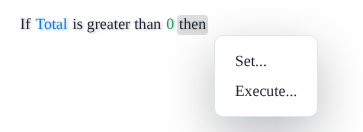
The Execute... item opens the list of the rules that you gave to the editor, by their names:
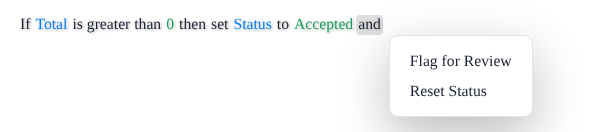
Now we can execute our Flag for Review rule in any other execution type rule that uses the same source object:

The executed rule is shown in italics. Click it, or the word execute before it, to pick another rule. The Rule XML of the rule does not hold the statements of Flag for Review. It holds a rule element with only the ID of the rule, among the other statements of the then section:
<if>
  <clause>
    <condition type="greater">
      <property name="Total" />
      <value type="System.Decimal">0</value>
    </condition>
  </clause>
  <then>
    <set>
      <property name="Status" />
      <value>Accepted</value>
    </set>
    <rule id="33333333-0000-0000-0000-000000000001" />
  </then>
</if>
Evaluating Rules That Execute Rules
The Evaluator writes every rule that the main rule executes into it when it compiles the rule, so it needs the Rule XML of those rules. It looks for an executed rule by its ID, first among the rules of the same Rule XML document, and then it asks the resolver that you set in the RuleResolver property of EvaluationParameters. The resolver is a GetRuleDelegate, a method that receives a rule ID and returns the Rule XML of that rule, either as a whole document or as a single rule element:
using CodeEffects.Rule.Common.Models;
using CodeEffects.Rule.Engine;

var options = new EvaluationParameters { RuleResolver = YourRuleStorageService.LoadRuleXml };
var evaluator = new Evaluator<Order>(mainRuleXml, options);

var big = new Order { Total = 20000 };
bool success = evaluator.Evaluate(big);   // True: Status is Review, Priority is High

var small = new Order { Total = 500 };
success = evaluator.Evaluate(small);      // True: Status is Accepted, Priority is Normal

var empty = new Order { Total = 0 };
success = evaluator.Evaluate(empty);      // False: nothing was set
This is how the engine runs an executed rule:
- In place, in order. The statements of the executed rule run against the same object, at the point where the rule is executed, together with the statements around it. The executed rule sees the values that the rules set before it. In the example above, the main rule sets
Status to Accepted, and then Flag for Review changes it to Review for a big order. Had the main rule executed Flag for Review first, Accepted would have been the final status.
- With its own condition. The
THEN section of the executed rule runs when its condition is met, and its ELSE section, if it has one, runs when it is not. That is why the small order above kept the status that the main rule gave it.
- Its result is discarded. The result of the main rule is its own, whether the executed rule's condition was met or not.
- A ruleset runs whole. If the executed rule holds several
IF statements, all of them run, under the Scope and the ShortCircuit that you set in the EvaluationParameters for the main rule. See Business Rule Evaluation.
- Rules can execute rules. An executed rule can execute other rules.
Keep these in mind:
- The Evaluator asks once. It calls the resolver once for each executed rule while it is being created, and it keeps the rules as they were at that moment. If you change Flag for Review tomorrow, an
Evaluator that you created today still runs the old version. Create a new Evaluator when a rule that it executes has changed, or let your cache of evaluators expire.
- A missing rule is an error. If there is no resolver, or it has no rule with the requested ID and returns
null, the constructor of the Evaluator throws an EvaluationException with the control number GH7349.
- A rule cannot execute itself, directly or through other rules. The constructor of the
Evaluator throws an EvaluationException with the control number GH7427.
Validation in the Editor
If the editor has a RuleResolver, it checks the rules that a rule executes during validation, as it does for reusable rules. A rule is invalid when it executes itself, directly or through other rules, or when it executes a rule that the resolver cannot find. It is also invalid when execute has no rule after it. If the rule is invalid, IsValid is false, the elements that cause the problem are marked in the editor, and GetRuleXml() refuses to return the rule. See Circular References in the Reusable Rules article for more about the check.
The plain text that Control.ToString() returns for a rule names the executed rules: If Total is greater than 0 then set Status to Accepted and execute Flag for Review.