AI Prompts in Code Effects
Version 6 introduces AI Prompts as part of the new BYOAI (Bring Your Own AI) architecture in Code Effects decision platform.
The feature allows organizations to integrate AI inference directly into deterministic business rules using any AI model, provider, or infrastructure of their choice.
AI Prompts are implemented through the new Prompt property available on string-based rule elements. When enabled, the editor automatically displays a dedicated Prompt dialog for long-form structured input during rule authoring. The resulting prompt value can then be passed directly into in-rule methods or rule actions that communicate with external AI systems.
Overview
The AI Prompts feature was designed around several core principles:
- complete AI provider independence
- deterministic rule execution
- infrastructure ownership
- embeddable enterprise architecture
- runtime flexibility
- security isolation
Code Effects itself does not implement or require any specific AI model, SDK, cloud provider, or inference platform. Instead, the platform provides the infrastructure necessary to integrate AI evaluation into business rules using your own implementation. This allows organizations to use:
- OpenAI
- Anthropic
- Gemini
- Azure AI
- local LLMs
- private inference clusters
- internal AI systems
- future AI platforms
without coupling the rules engine to any vendor-specific AI architecture.
The Prompt Property
The AI Prompts feature is enabled through the Prompt property available on string-based fields, method parameters, and method return values. It works with all supported source types, including Reflection, SourceXML, and Adaptive Source. Examples:
using CodeEffects.Rule.Common.Attributes;
using CodeEffects.Rule.Editor.Client;

// .NET Reflection source type
[Field(DisplayName = "First Name", Prompt = true)]
public string FirstName { get; set; }

// SourceXML source type
<string
	propertyName="FirstName"
	class="System.String"
	prompt="true"
	nullable="false"
	valueInputType="all"
	displayName="First Name"
	maxLength="256" />

// Field in Adaptive Source
var field = new Field();
field.Value = "User.FirstName";
field.DisplayName = "First Name";
field.Prompt = true;
field.Settings.Max = 256;

// In-rule method in Adaptive Source
var method = new Function();
method.Value = "User.GetScore";
method.DisplayName = "Get AI Score";

method.Return.DataType =
	Common.Models.DataType.Numeric;

var parameter = new Parameter();
parameter.DataType = DataType.String;
parameter.Prompt = true;

method.Parameters.Add(parameter);
When this flag is enabled, the editor automatically replaces the standard inline string input with a dedicated Prompt dialog designed for long-form structured text every time user selects the prompted field or parameter from a menu:
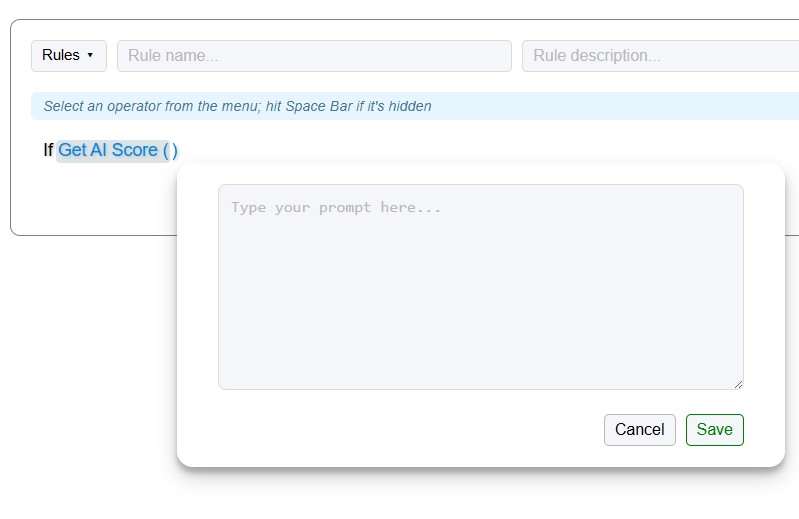
This dialog supports:
- multiline input
- structured prompts
- detailed instructions
- semantic descriptions
- AI evaluation context
- operational notes
The Prompt feature is not limited to AI-related scenarios. It can be used with any long-form user input associated with string-typed fields, method parameters, or method return values.
Prompted values are stored in Rule XML as standard string values with no special serialization requirements. While Code Effects does not explicitly enforce limits on prompt length, organizations and rule authors are encouraged to use reasonable judgment regarding the size and complexity of prompted input values.
Basic AI Prompt Example
The most common implementation pattern is using Prompt-enabled parameters inside in-rule methods. Example:
using CodeEffects.Rule.Common.Attributes;

[Method(DisplayName = "Ask AI")]
public bool AskAI([Parameter(Prompt = true)] string prompt)
{
    return _aiService.GetResult(prompt);
}
When the rule author selects the Ask AI method from context menu, the editor automatically displays the Prompt dialog for entering the AI prompt. The resulting rule may look like this:
If Ask AI("Determine whether this transaction appears fraudulent") is True
then Escalate Transaction
At evaluation time, the prompt string is passed directly into your own AI integration logic.
How the Evaluation Flow Works
The AI Prompts feature does not alter the deterministic nature of the Code Effects engine itself. The rule evaluation flow remains the same:
- Rule evaluation begins
- The engine reaches a Prompt-enabled method or action
- Your implementation receives the prompt value
- Your code communicates with your AI system
- The AI result is returned to the rule
- Rule execution continues normally
Code Effects remains completely agnostic regarding:
- how prompts are constructed
- where inference occurs
- which model is used
- how results are validated
- how AI requests are secured
This architecture allows organizations to fully control their AI strategy independently of the rules engine.
Example Using OpenAI
A simplified example:
using CodeEffects.Rule.Common.Attributes;

[Method(DisplayName = "Ask AI")]
public bool AskAI([Parameter(Prompt = true)] string prompt)
{
    var result = _openAiService.Evaluate(prompt);

    return result.IsTrue;
}
The implementation itself can contain:
- OpenAI SDK calls
- HTTP APIs
- Azure AI integrations
- local inference execution
- semantic validation
- result normalization
- confidence scoring
- custom retry logic
The rules engine simply consumes the returned result.
Returning More Than Boolean Values
Prompt-enabled methods are not limited to boolean evaluation. Organizations can also return:
- numeric scores
- percentages
- classifications
- risk levels
- categories
- semantic ratings
- confidence values
- structured operational data
Example:
using CodeEffects.Rule.Common.Attributes;

[Method(DisplayName = "AI Risk Score")]
public decimal GetRiskScore([Parameter(Prompt = true)] string prompt)
{
    return _aiService.GetRiskScore(prompt);
}
The returned value can then participate in normal deterministic rule logic:
If AI Risk Score("Analyze this insurance claim") is greater than 75
then Require Manual Review
This allows organizations to combine probabilistic AI inference with deterministic operational policies.
AI Prompts in Rule Action Methods
The Prompt feature can also be used inside rule actions.
Example:
using CodeEffects.Rule.Common.Attributes;

[Action(DisplayName = "Generate Summary")]
public void GenerateSummary([Parameter(Prompt = true)] string prompt)
{
    _aiService.GenerateSummary(prompt);
}
This enables AI-driven operational workflows such as:
- document summarization
- classification
- semantic tagging
- customer communication generation
- workflow enrichment
- compliance explanation generation
directly inside executable business rules.
Security and Infrastructure Ownership
The AI Prompts feature follows the same infrastructure ownership principles as the rest of the Code Effects platform. Organizations retain full control over:
- prompts
- AI providers
- model hosting
- inference infrastructure
- security policies
- request routing
- compliance boundaries
- operational logging
- evaluation tracing
No prompts or AI requests are routed through Code Effects infrastructure. The platform does not impose:
- vendor-managed AI gateways
- hosted prompt processing
- centralized orchestration layers
- external runtime dependencies
This architecture is particularly important for:
- regulated industries
- internal enterprise AI systems
- private model deployments
- sensitive operational workflows
- sovereign cloud environments
- air-gapped infrastructures
Combining AI Prompts with Adaptive Source
AI Prompts become especially powerful when combined with Adaptive Source that allows the editor to dynamically generate rule surfaces contextually during rule authoring. Together, these features enable:
- context-aware AI workflows
- intelligent rule authoring
- dynamic semantic guidance
- adaptive decision pipelines
- tenant-specific AI behavior
- operationally-aware prompt generation
while preserving deterministic execution control.
This creates a hybrid decision automation architecture where:
- deterministic rules provide operational governance
- AI provides probabilistic inference
- organizations retain full infrastructure ownership
inside a single executable platform.
AI Infrastructure Without Vendor Lock-In
The AI Prompts feature in Code Effects 6 was designed to provide organizations with a long-term AI integration architecture rather than a fixed AI platform dependency. The platform enables:
- AI-assisted decision automation
- provider-independent inference
- deterministic execution governance
- enterprise infrastructure ownership
- embeddable operational control
- flexible deployment models
while preserving the performance, security, and operational predictability of the core rules engine.