DataSourceItem Class
Assembly: CodeEffects.Rule.Editor.dll
Namespace: CodeEffects.Rule.Editor.Client
Summary
Represents a menu item used by the Dynamic Menu Data Sources feature.
Syntax
public class DataSourceItem : IFilterable
Constructors
DataSourceItem()
Creates an empty item with ID set to 0.
DataSourceItem(int id, string name)
Creates an item with the specified numeric ID and display name.
Parameters
id (System.Int32): the ID of the item.name (System.String): the display name of the item.
DataSourceItem(string key, string name)
Creates an item with the specified string key and display name.
Parameters
key (System.String): the key of the item.name (System.String): the display name of the item.
DataSourceItem(int id, string name, string filter)
Creates an item with the specified numeric ID, display name, and filter value.
Parameters
id (System.Int32): the ID of the item.name (System.String): the display name of the item.filter (System.String): the filter value of the item.
DataSourceItem(string key, string name, string filter)
Creates an item with the specified string key, display name, and filter value.
Parameters
key (System.String): the key of the item.name (System.String): the display name of the item.filter (System.String): the filter value of the item.
Properties
ID
Type: System.Int32
Gets or sets the numeric ID of the menu item used by the Dynamic Menu Data Sources. See Remarks for details on the use of this property. The default value is 0.
Key
Type: System.String
Gets or sets the string ID (key) of the menu item used by the Dynamic Menu Data Sources. See Remarks for details on the use of this property.
Name
Type: System.String
Gets or sets the display name of the item. The name appears in menus and, once the user selects the item, as the value in the rule. Rule evaluation does not rely on it.
Filter
Type: System.String
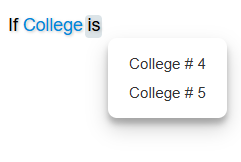
Gets or sets the string value used by the Dynamic Menu Data Sources feature to display only the items whose Filter matches the Filter value of the field, parameter, or return that uses the data source. This property implements IFilterable and works together with the Filter values of the FieldAttribute, ParameterAttribute, and MethodAttribute classes.
  using CodeEffects.Rule.Common.Attributes;
  using CodeEffects.Rule.Common.Models;

  namespace Test
  {
  	[Data("Education", typeof(Util), "Schools")]
  	public class Patient
  	{
  		[Field(DisplayName = "High School", DataSourceName = "Education", Filter = "school")]
  		public string SchoolID { get; set; }

  		[Field(DisplayName = "College", DataSourceName = "Education", Filter = "college")]
  		public string CollegeID { get; set; }

  		[Field(DisplayName = "University", DataSourceName = "Education", Filter = "university")]
  		public string UniversityID { get; set; }
  	}

  	public class Util
  	{
  		public static List<DataSourceItem> Schools()
  		{
  			var schools = new List<DataSourceItem>();

  			schools.Add(new DataSourceItem("One", "School # 1", "school"));
  			schools.Add(new DataSourceItem("Two", "University # 2", "university"));
  			schools.Add(new DataSourceItem("Three", "Third School", "school"));
  			schools.Add(new DataSourceItem("Four", "College # 4", "college"));
  			schools.Add(new DataSourceItem("Five", "College # 5", "college"));
  			schools.Add(new DataSourceItem("Six", "University # 6", "university"));

  			return schools;
  		}
  	}
  }
The ID and Key properties both represent the identifier of each DataSourceItem in your dynamic menus. The only difference between them is their type: ID is of type System.Int32, while Key is of type System.String. Both properties are used in the same way. The first version of Code Effects included only the numeric ID property, but many customers requested support for a string identifier as well. As a result, the Key property was added while keeping ID for backward compatibility. If both properties are set, the value of Key takes precedence.