AiAliases
Type: System.String[]
Gets or sets other names an AI agent may know this field by: industry terms, abbreviations, or the names other systems use (for example, "DTI" or "debt-to-income ratio"). Agents working with the Code Effects Rule Repository find the field by these as well as by its display name, and still call it by its display name. The aliases are never shown in the Rule Editor. They are stored with the source and sent to the AI provider the host uses, so they must hold nothing confidential. Changing them is a label change, not a new source version. This property is optional.
  [Field(DisplayName = "Debt To Income", AiAliases = new[] { "DTI", "debt-to-income ratio" })]
  public decimal DebtToIncome { get; set; }
AiDescription
Type: System.String
Gets or sets what an AI agent should know about this field when it needs more than the Description that people read: what the field means, its units, how it is used. When this property is not set, agents read the Description. It is never shown in the Rule Editor. It is stored with the source and sent to the AI provider the host uses, so it must hold nothing confidential. Changing it is a label change, not a new source version. This property is optional.
  [Field(Description = "Debt to income", AiDescription = "Monthly debt payments divided by gross monthly income, as a percentage (0 to 100).")]
  public decimal DebtToIncome { get; set; }
AllowCalculations
Type: System.Boolean
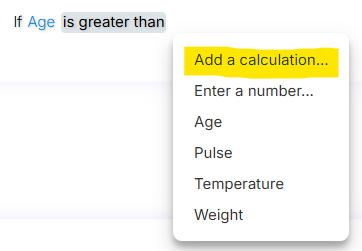
Used only for rule fields of numeric type. Ignored for fields of other types. Gets or sets a value that indicates whether the value element of this field can be expressed as a calculation. When creating a rule condition with a numeric field or in-rule method, rule authors must choose between selecting another numeric field, entering a number directly (Enter a number...), or adding a calculation (Add a calculation...) before assigning the field’s value. If this property is set to false, the Add a calculation... option is removed from rule menus for numeric fields. This property is optional. The default value is true.
AllowConcatenations
Type: System.Boolean
Used only for rule fields of string type and ignored for fields of other types. Gets or sets a value that indicates whether the value element of this field can be expressed as a concatenation of strings, such as { Last Name + ", " + First Name }. If this property is set to false, rule authors cannot add a concatenation as the value of this field. This property is optional. The default value is true.
CollectionItemName
Type: System.String
Deprecated. This property will be removed in one of the future versions. Use CollectionSingleItemDisplayName instead. Getting or setting it gets or sets CollectionSingleItemDisplayName.
Used only for rule fields of collection type and ignored for fields of other types. Gets or sets the display name of the single type in collection when it's displayed in the Rule Area. This property is optional. The default value is the declared name of the property.
CollectionItemType
Type: System.Type
Deprecated. This property will be removed in one of the future versions. Use NonGenericCollectionUnderlyingType instead. Getting or setting it gets or sets NonGenericCollectionUnderlyingType.
Used only for rule fields of non-generic collection types whose underlying type cannot be determined at run time (qualified collections). Ignored for fields of other types and for generic collections. Gets or sets the underlying type of a qualified collection. Examples of qualified collections include System.Collections.Specialized.StringCollection and System.Collections.ArrayList. This property is optional. A qualified collection is ignored if this property is not set.
CollectionSingleItemDisplayName
Type: System.String
Used only for rule fields of generic collection type, IEnumerable<T>, and ignored for fields of non-generic collections and other types. Gets or sets the singular label of the collection's item type, used to display the collection in a human-like language in certain menus and other elements of the Rule Area. For example, for the List<Order> property named Orders, set this value to Order. This property is optional. The default value is the value of the DisplayName property.
  [Field(CollectionSingleItemDisplayName = "Visit")]
  public ICollection<Visit> Visits { get; set; } = new List<Visit>();

DataSourceName
Type: System.String
Used only for rule fields of the integer types (byte, sbyte, short, ushort, int, uint, long, ulong, and their nullable forms) and of System.String, and ignored for fields of other types. Gets or sets the unique name of the dynamic menu data source declared by the DataAttribute on the source object. Items of integer fields are identified by their ID, and items of string fields by their Key.
-
Type: System.String
Used only for rule fields of date and time types (including System.TimeSpan, where the format names the units of a duration; see TimeType) and ignored for fields of other types. Gets or sets the date or time format of the field’s value as displayed in the Rule Editor. Standard .NET date and time format strings are supported. This property is not used during rule evaluation. This property is optional. The default value for date fields is MMM dd, yyyy, and for time fields is hh:mm tt.
Remarks
The Rule Editor uses a built-in date picker for fields of the DateTime type. If the DateTimeFormat value includes the time fraction, the date picker includes time selection controls and an OK button, which closes the picker and sets the selected value in the Rule Area. If the format omits the time fraction, the picker includes no time controls. It closes automatically and sets the value when the user clicks the desired date in the calendar.
If the time fraction is omitted, the Evaluator adds a zero time component to the date and uses the resulting value yyyy-MM-ddT00:00:00.0000 during rule evaluation.
  [Field(
  	Description = "Date of Birth of the Patient",
  	DisplayName = "Date of Birth",
  	DateTimeFormat = "yyyy.MM.dd")]
  public DateTime DOB { get; set; } = DateTime.MinValue;


  [Field(
  	Description = "Date of Birth of the Patient",
  	DisplayName = "Date of Birth",
  	DateTimeFormat = "MMM dd, yyyy hh:mm:ss tt")]
  public DateTime DOB { get; set; } = DateTime.MinValue;


Description
Type: System.String
Gets or sets the description of the rule field. Rule authors can view this description by hovering the mouse pointer over the field element in the Rule Area or in the field menu. The value of this property is ignored if Control.ShowDescriptionsOnMouseHover is set to false. It is not recommended to use this property in multilingual applications; instead, use culture-specific custom Source XML documents. This property is optional.
  [Field(Description = "Date of Birth of the Patient")]
  public DateTime DOB { get; set; } = DateTime.MinValue;


DisplayName
Type: System.String
Gets or sets the display name of the rule field in the Rule Editor. Use this property to represent rule fields in the Rule Area when the property name is not descriptive enough for non-technical rule authors. It is not recommended to use this property in multilingual applications; instead, use culture-specific custom Source XML documents. This property is optional. The default value is the declared name of the property.
Filter
Type: System.String
Gets or sets the name of the menu filter. This property is optional.
Remarks
Use this property to instruct the Rule Editor to allow value comparisons in rule conditions based on the filter value. For example, consider a source object that declares four properties of the System.String type:
  using CodeEffects.Rule.Common.Attributes;

  namespace TestLibrary
  {
  	public class Thing
  	{
  		[Field(DisplayName = "Work Email", Max = 200)]
  		public string WorkEmail { get; set; }

  		[Field(DisplayName = "Home Email", Max = 200)]
  		public string HomeEmail { get; set; }

  		[Field(DisplayName = "Work Phone", Max = 10)]
  		public string WorkPhone { get; set; }

  		[Field(DisplayName = "Home Phone", Max = 10)]
  		public string HomePhone { get; set; }
  	}
  }
With this source object, a user could create a condition in which the phone value is compared to the email value. Although both fields are of the System.String type, they clearly represent unrelated data:

Let’s separate these fields into two filters: email and phone:
  using CodeEffects.Rule.Common.Attributes;

  namespace TestLibrary
  {
  	public class Thing
  	{
  		[Field(DisplayName = "Work Email", Max = 200, Filter = "email")]
  		public string WorkEmail { get; set; }

  		[Field(DisplayName = "Home Email", Max = 200, Filter = "email")]
  		public string HomeEmail { get; set; }

  		[Field(DisplayName = "Work Phone", Max = 10, Filter = "phone")]
  		public string WorkPhone { get; set; }

  		[Field(DisplayName = "Home Phone", Max = 10, Filter = "phone")]
  		public string HomePhone { get; set; }
  	}
  }
Now, users can compare email addresses only to other email addresses, and phone numbers only to other phone numbers:

Gettable
Type: System.Boolean
Gets or sets a value that indicates whether this field appears in the Rule Editor’s context menus that list available rule fields and in-rule methods for rule conditions. The default value is true.
Group
Type: System.String
Gets or sets the name of the menu group. This property is optional.
Remarks
Your source object may declare dozens or even hundreds of rule fields and in-rule methods. In such cases, the field menus in the Rule Area could contain an overwhelming number of items and become difficult to use. Grouping allows you to organize fields into groups, which the Rule Editor uses to present them in two levels of menus: first, it displays a list of all available groups, and then, when the user selects a group, it shows a new menu containing only the items from that group.
This feature is automatically enabled if at least one rule field or in-rule method in the source object has a group name set. The group name can be any string value. When grouping is enabled, all rule fields that do not have a group assigned are placed in a default group called OTHER, which is displayed at the bottom of the menu. You can rename the default group using the Help XML feature.
IncludeInCalculations
Type: System.Boolean
Used only for rule fields of numeric type and ignored for fields of other types. Gets or sets a value that indicates whether the rule field can be included in value calculations of other fields and in-rule methods. For example, it may be confusing for rule authors when a non-financial numeric field, such as an ID, appears in a calculation menu alongside financial fields like Income or Debt. In such cases, set IncludeInCalculations to false. This property is optional. The default value is true.
IncludeInConcatenations
Type: System.Boolean
Used only for rule fields of string type and ignored for fields of other types. Gets or sets a value that indicates whether this field can be included in the string concatenations of other fields and in-rule methods. This property is optional. The default value is true.
Max
Type: System.Int64
Used only with numeric and string value elements and ignored for other types. For numeric elements, gets or sets the maximum value that rule authors can enter manually. For string elements, gets or sets the maximum length of the string that rule authors can enter as the value. This property is used only by the Rule Editor and is not used during rule evaluation. This property is optional.
Max value for numeric types allowed by the editor: 2147483647
Max length for string types allowed by the editor: 256
Min
Type: System.Int64
Used only for rule fields of numeric type and ignored for fields of other types. Gets or sets the minimum value that rule authors can enter manually. This property is used only by the Rule Editor and is not used during rule evaluation. This property is optional. The minimum value allowed by the editor is -2147483648.
NonGenericCollectionUnderlyingType
Type: System.Type
Used only for rule fields of non-generic collection types whose underlying type cannot be determined at run time (qualified collections). Ignored for fields of other types and for generic collections. Gets or sets the underlying type of a qualified collection. Examples of qualified collections include System.Collections.Specialized.StringCollection and System.Collections.ArrayList. This property is optional. A qualified collection is ignored if this property is not set.
  [Field(NonGenericCollectionUnderlyingType = typeof(int))]
  public ArrayList Scores { get; set; } = new ArrayList();
Prompt
Type: System.Boolean
Used only for rule fields of string type and ignored for fields of other types. Gets or sets a value that indicates whether the Rule Editor displays a dedicated Prompt dialog for long-form input of the value of this field. The value can then be passed to in-rule methods or rule actions that communicate with AI systems. See AI Prompts for details. This property is optional. The default value is false.
  [Field(DisplayName = "Notes", Prompt = true)]
  public string Notes { get; set; }
ResetsContext
Type: System.Boolean
Gets or sets a value that indicates whether this field is a context resetter. When a rule author changes the field, its operator or its value in a condition, the Rule Editor removes all rule elements that follow that condition and displays the Undo icon at the end of the rule. This property is optional. The default value is false. See Context Resetters for details.
Settable
Type: System.Boolean
Gets or sets a value that indicates whether the value of the rule field can be assigned in execution-type rules. In general, the Rule Editor recognizes read-only fields and properties with private setters and does not allow rule authors to assign values to them. Setting this property to false prevents rule authors from assigning a value to the field or property, regardless of the .NET setter declared for that property. The default value is false for const and readonly fields and for properties with a private setter, and true for all other fields and properties.
StringComparison
Type: System.StringComparison
Used only for rule fields of string type and ignored for other types. Gets or sets the string comparison option that determines how string values are compared in rule conditions during evaluation. This property can be used to specify culture-specific comparison options, including case sensitivity. The default value is System.StringComparison.OrdinalIgnoreCase.
TimeType
Type: CodeEffects.Rule.Common.Models.TimeType
Used only for rule fields of the System.TimeSpan type and ignored for fields of all other types. Gets or sets whether the value of the field is a time of day, TimeType.TimeOfDay, or a duration, TimeType.Duration. This property is optional. The default value is TimeType.TimeOfDay.
The units of a duration are the ones named by its DateTimeFormat: d (days), h (hours), m (minutes) and s (seconds). The largest unit that the format names is unbounded; the smaller ones wrap (minutes and seconds at 59, hours at 23 when the format names days). When DateTimeFormat is not set, the format of a duration is d.hh:mm. Setting TimeType.Duration on a System.TimeOnly field is not allowed because TimeOnly is always a time of day.
  [Field(DisplayName = "Transit Time", TimeType = TimeType.Duration, DateTimeFormat = "d.hh:mm")]
  public TimeSpan TransitTime { get; set; }
TypeOrAliasName
Type: System.String
Gets or sets the assembly-qualified name or alias name of the type this field is based on, for the applications whose Rule Editor and Rule Engine do not share the same .NET types. For fields of an enumeration type, it names the enumeration. For fields of a non-generic collection type, it names the type of the collection's items. Ignored for fields of other types. When this property is not set, the name is taken from the type itself. This property is optional.
  [Field(TypeOrAliasName = "Status")]
  public Status Status { get; set; }
-
Type: CodeEffects.Rule.Common.Models.ValueInputType
Gets or sets a value that specifies whether the field’s value can be entered manually, selected from other fields, or both. For example, consider the rule condition FirstName = John. In this case, the value John is a string typed by the rule author — a user-entered value of type ValueInputType.User. The same condition can also be expressed as FirstName = MiddleName. Since MiddleName is a field, this value is selected by the rule author as a field item from the menu — a value of type ValueInputType.Fields. This property is optional. The default value is ValueInputType.All, which allows both User and Fields input types.