ReturnAttribute Class
Assembly: CodeEffects.Rule.Common.dll
Namespace: CodeEffects.Rule.Common.Attributes
Summary
If applied to the return type of a qualified in-rule method, marks it as a value element of a rule condition. The method must return a value type supported by Code Effects.
Syntax
[AttributeUsage(AttributeTargets.ReturnValue, AllowMultiple = false, Inherited = false)]
public class ReturnAttribute : System.Attribute
Constructors
Properties
AllowCalculations
Type: System.Boolean
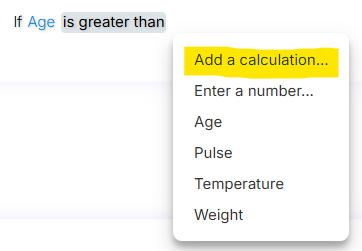
Used only for return values of numeric type and ignored for values of other types. Gets or sets a value indicating whether the return value of the in-rule method can be expressed as a calculation. This property is optional. The default value is true.
AllowConcatenations
Type: System.Boolean
Used only for return values of string type and ignored for values of other types. Gets or sets a value indicating whether the value element of the in-rule method can be expressed as a concatenation of strings. This property is optional. The default value is true.
DataSourceName
Type: System.String
Used only in return values of the integer types (byte, sbyte, short, ushort, int, uint, long, ulong, and their nullable forms) and of System.String, and is ignored in return values of other types. Gets or sets the unique name of the Dynamic Menu Data Source declared by the DataAttribute on the source object.
-
Type: System.String
Used only for return values of date and time types (including System.TimeSpan, where the format names the units of a duration; see TimeType) and ignored for values of other types. Gets or sets the date or time format of the return value displayed in the Rule Editor. You can use standard .NET date and time formatting. This property is not used during rule evaluation. This property is optional. The default date format is MMM dd, yyyy, and the default time format is hh:mm tt. The use of this property is identical to the use of FieldAttribute.DateTimeFormat.
Max
Type: System.Int64
Used only for return values of numeric and string types and ignored for values of other types. For numeric values, gets or sets the maximum numeric value that rule authors can enter manually. For string values, gets or sets the maximum length of the string that rule authors can type as the value. This value is not used during rule evaluation. This property is optional.
- Max value for numeric types allowed by the editor:
2147483647
- Max length for string types allowed by the editor:
256
Min
Type: System.Int64
Used only for return values of numeric type and ignored for values of other types. Gets or sets the minimum numeric value that rule authors can enter manually. This value is not used during rule evaluation. This property is optional. The minimum value allowed by the editor is -2147483648.
Prompt
Type: System.Boolean
Used only with return values of string type and ignored for those of other types. Gets or sets a value that indicates whether the Rule Editor displays a dedicated Prompt dialog for long-form input of the value. The value can then be passed to in-rule methods or rule actions that communicate with AI systems. See AI Prompts for details. This property is optional. The default value is false.
StringComparison
Type: System.StringComparison
Used only in return values of string type and ignored for values of other types. Gets or sets the string comparison option that determines how string values are compared in rule conditions during evaluation. Can be used to specify culture-specific comparison behavior, including case sensitivity. The default value is System.StringComparison.OrdinalIgnoreCase.
TimeType
Type: CodeEffects.Rule.Common.Models.TimeType
Used only with return values of the System.TimeSpan type and ignored for all other types. Gets or sets whether the value is a time of day, TimeType.TimeOfDay, or a duration, TimeType.Duration. This property is optional. The default value is TimeType.TimeOfDay.
The units of a duration are the ones named by its DateTimeFormat: d (days), h (hours), m (minutes) and s (seconds). The largest unit that the format names is unbounded; the smaller ones wrap. When DateTimeFormat is not set, the format of a duration is d.hh:mm. Setting TimeType.Duration on a System.TimeOnly value is not allowed because TimeOnly is always a time of day.
  [return: Return(TimeType = TimeType.Duration, DateTimeFormat = "d.hh:mm")]
  public TimeSpan GetTransitTime() { return TimeSpan.FromHours(36); }
TypeOrAliasName
Type: System.String
Gets or sets the assembly-qualified name or alias name of the type of the return value, for the applications whose Rule Editor and Rule Engine do not share the same .NET types. Used for enumeration types, where it names the enumeration; ignored for other types. When this property is not set, the name is taken from the type itself. This property is optional.
-
Type: CodeEffects.Rule.Common.Models.ValueInputType
Gets or sets a value that indicates whether the return value can only be entered manually, can only accept other fields as its value, or can accept both. For example, consider the rule condition Get ID(LastName) = 123. The return value of the in-rule method Get ID is 123, which is a number manually entered by the rule author. This is a user-entered value and is of type ValueInputType.User. The same condition can also be expressed as Get ID(FirstName) = Admin ID. Since Admin ID is a field, this value was selected by the rule author from the menu of available fields, and is therefore of type ValueInputType.Fields. This property is optional. The default value is ValueInputType.All, which allows both input types.
In the rule condition...
... Get Age( Birthday ) is equal to 18 ...
... Get Age is an in-rule method, Birthday is its parameter, and 18 is a value element that can be customized with the ReturnAttribute (that is, the return value of the in-rule method). See the source object topic for details on in-rule methods and actions.
Example
using System;
using CodeEffects.Rule.Common.Attributes;

namespace TestLibrary
{
	public class Person
	{
		[Field(DateTimeFormat = "yyyy-MM-dd", DisplayName = "Birthday")]
		public DateTime DOB { get; set; } = DateTime.MinValue;

		[Method("Get Age")]
		[return: Return(Min = 0, Max = 150)]
		public int GetAge()
		{
			return DateTime.Today.Year - this.DOB.Year;
		}
	}
}