AiDescription
Type: System.String
Gets or sets what an AI agent should know about this parameter when it needs more than the Description that people read: what it means, its units, how it is used. When this property is not set, agents read the Description. It is never shown in the Rule Editor. It is stored with the source and sent to the AI provider the host uses, so it must hold nothing confidential. Changing it is a label change, not a new source version. This property is optional.
CollectionItemType
Type: System.Type
Deprecated. This property will be removed in one of the future versions. Use NonGenericCollectionUnderlyingType instead. Getting or setting it gets or sets NonGenericCollectionUnderlyingType.
Used only with qualified parameters of non-generic collection types whose underlying element type cannot be determined at run time (qualified collections). This property is ignored for parameters of all other types and for generic collections. Gets or sets the underlying element type of the qualified collection. Examples of qualified collections include System.Collections.Specialized.StringCollection and System.Collections.ArrayList. This property is optional. The entire method is ignored if the value of this property is not set for any qualified parameter of a qualified collection type.
ConstantValue
Type: System.String
Deprecated. This property is deprecated and will be removed in future versions.
Gets or sets a constant value for this parameter. If this value is set, the parameter is hidden from rule authors and the constant value is used during rule evaluation.
DataSourceName
Type: System.String
Used only with rule action or in-rule method parameters of the integer types (byte, sbyte, short, ushort, int, uint, long, ulong, and their nullable forms) and of System.String, and ignored for parameters of other types. Gets or sets the unique name of the dynamic menu data source declared by the DataAttribute on the source object. When set, the rule author can select a value only from the list of items provided by the specified data source method.
-
Type: System.String
Used only with qualified parameters of date and time types (including System.TimeSpan, where the format names the units of a duration; see TimeType) and ignored for parameters of other types. Gets or sets the display format of the qualified parameter. Supports standard .NET date and time format strings. This property is optional and not used during rule evaluation. The default date format is MMM dd, yyyy, and the default time format is hh:mm tt.
Remarks
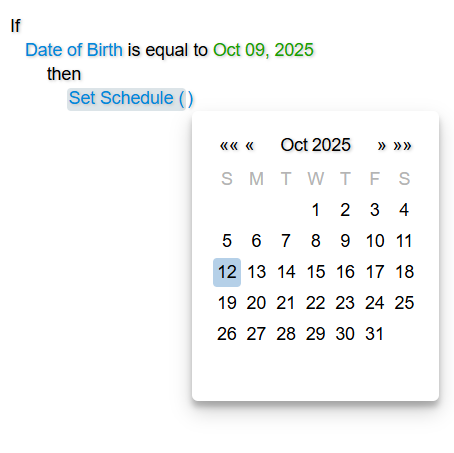
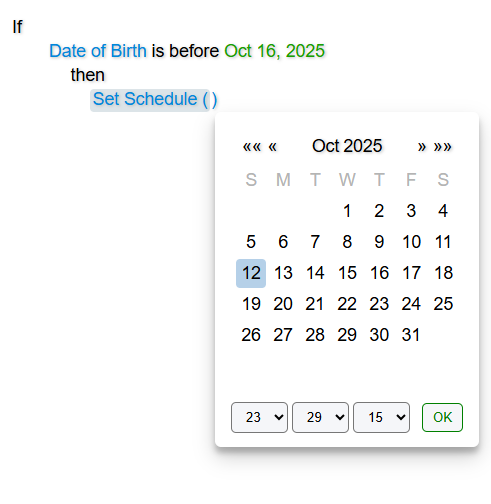
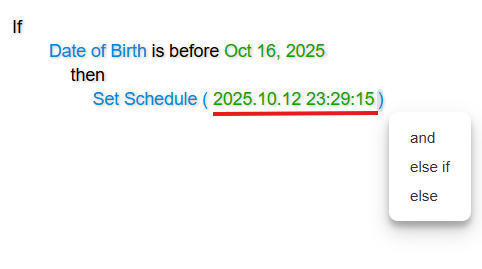
The Rule Editor uses a built-in date picker for parameters of the DateTime type. If the DateTimeFormat value includes the time fraction, the date picker includes time selection controls and an OK button, which closes the picker and sets the selected value in the Rule Area. If the format omits the time fraction, the picker includes no time controls. It closes automatically and sets the value when the user clicks the desired date in the calendar.
If the date value omits the time fraction, the Evaluator adds a zero time component to the date value and uses the resulting value yyyy-MM-ddT00:00:00.0000 during rule evaluation.
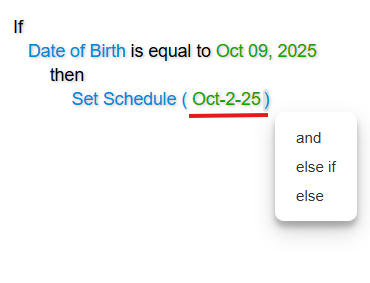
  [Action(DisplayName = "Set Schedule")]
  public void SetSchedule([Parameter(DateTimeFormat = "MMM-d-yy")] DateTime dateTime)
  {
  	// Method implementation
  }
  [Action(DisplayName = "Set Schedule")]
  public void SetSchedule([Parameter(DateTimeFormat = "yyyy.MM.dd HH:mm:ss")] DateTime dateTime)
  {
  	// Method implementation
  }
Description
Type: System.String
Gets or sets the description of the parameter. Rule authors can view this description by hovering the mouse pointer over the parameter element in the Rule Editor. The value of this property is ignored if Control.ShowDescriptionsOnMouseHover is set to false. It is not recommended to use this property in multilingual applications; instead, use culture-specific custom Source XML documents. This property is optional.
Filter
Type: System.String
Gets or sets the name of the menu filter. This property is optional.
Remarks
Use this property to instruct the Rule Editor to allow value comparisons in in-rule method and rule action parameters based on the filter value. For example, consider a source object that declares four properties of the System.String type, and a rule action method that accepts a parameter of the System.String type:
  [Field(DisplayName = "Work Email", Max = 200)]
  public string WorkEmail { get; set; }

  [Field(DisplayName = "Home Email", Max = 200)]
  public string HomeEmail { get; set; }

  [Field(DisplayName = "Work Phone", Max = 10)]
  public string WorkPhone { get; set; }

  [Field(DisplayName = "Home Phone", Max = 10)]
  public string HomePhone { get; set; }

  [Action(DisplayName = "Save Phone")]
  public void SavePhone([Parameter(Description = "Phone number", Max = 10)] string phone)
  {
  	// Method implementation
  }
With this source object, a user could pass both email and phone number values as the SavePhone parameter. Although all those fields are of the System.String type, they clearly represent unrelated data:
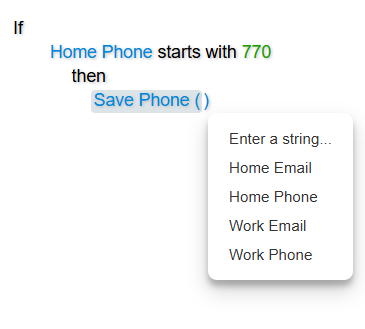
Let’s separate these fields and the SavePhone parameter into two filters: email and phone:
  using CodeEffects.Rule.Common.Attributes;

  namespace TestLibrary
  {
  	public class Thing
  	{
  		[Field(DisplayName = "Work Email", Max = 200, Filter = "email")]
  		public string WorkEmail { get; set; }

  		[Field(DisplayName = "Home Email", Max = 200, Filter = "email")]
  		public string HomeEmail { get; set; }

  		[Field(DisplayName = "Work Phone", Max = 10, Filter = "phone")]
  		public string WorkPhone { get; set; }

  		[Field(DisplayName = "Home Phone", Max = 10, Filter = "phone")]
  		public string HomePhone { get; set; }

  		[Action(DisplayName = "Save Phone")]
  		public void SavePhone([Parameter(Description = "Phone number", Max = 10, Filter = "phone")] string phone)
  		{
  			// Method implementation
  		}
  	}
  }
Now, users can pass only phone numbers as the parameter to the rule action that expects phone numbers:
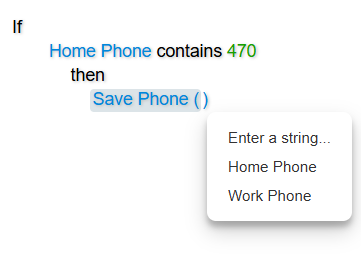
Max
Type: System.Int64
Used only with qualified parameters of numeric and string types, and ignored by parameters of other types. For numeric parameters, gets or sets the maximum value that rule authors can enter manually. For string parameters, gets or sets the maximum length of the string that rule authors can type as the value. Setting this property has no effect on rule evaluation. This property is optional.
- Max value for numeric types allowed by the editor:
2147483647
- Max length for string types allowed by the editor:
256
Min
Type: System.Int64
Used only with qualified parameters of numeric type, and ignored by parameters of other types. Gets or sets the minimum value that rule authors can enter manually for the qualified parameter. Setting this property has no effect on rule evaluation. This property is optional. The minimum value allowed by the editor is -2147483648.
NonGenericCollectionUnderlyingType
Type: System.Type
Used only with qualified parameters of non-generic collection types whose underlying element type cannot be determined at run time (qualified collections). This property is ignored for parameters of all other types and for generic collections. Gets or sets the underlying element type of the qualified collection. Examples of qualified collections include System.Collections.Specialized.StringCollection and System.Collections.ArrayList. This property is optional. The entire method is ignored if the value of this property is not set for any qualified parameter of a qualified collection type.
Prompt
Type: System.Boolean
Used only with parameters of string type and ignored for those of other types. Gets or sets a value that indicates whether the Rule Editor displays a dedicated Prompt dialog for long-form input of the value. The value can then be passed to in-rule methods or rule actions that communicate with AI systems. See AI Prompts for details. This property is optional. The default value is false.
TimeType
Type: CodeEffects.Rule.Common.Models.TimeType
Used only with parameters of the System.TimeSpan type and ignored for all other types. Gets or sets whether the value is a time of day, TimeType.TimeOfDay, or a duration, TimeType.Duration. This property is optional. The default value is TimeType.TimeOfDay.
The units of a duration are the ones named by its DateTimeFormat: d (days), h (hours), m (minutes) and s (seconds). The largest unit that the format names is unbounded; the smaller ones wrap. When DateTimeFormat is not set, the format of a duration is d.hh:mm. Setting TimeType.Duration on a System.TimeOnly value is not allowed because TimeOnly is always a time of day.
public void SetDuration([Parameter(TimeType = TimeType.Duration, DateTimeFormat = "hh:mm")] TimeSpan duration) { }
TypeOrAliasName
Type: System.String
Gets or sets the assembly-qualified name or alias name of the type of this parameter, for the applications whose Rule Editor and Rule Engine do not share the same .NET types. Used for enumeration types, where it names the enumeration; ignored for other types. When this property is not set, the name is taken from the type itself. This property is optional.
-
Type: CodeEffects.Rule.Common.Models.ValueInputType
Gets or sets a value indicating whether the qualified parameter can only be entered manually, can only accept fields of a certain type, or both. For example, consider the in-rule method DoSomething(John). The parameter John is a string that the rule author typed in. This is a value entered by the user, i.e., it is of type ValueInputType.User. The same in-rule method can be expressed as DoSomething(MiddleName). In this case, the parameter MiddleName is a field, so it was selected by the rule author as a field item from the menu, i.e., it is of type ValueInputType.Fields. This property is optional. The default value is ValueInputType.All, which allows both input types.