AiAliases
Type: System.String[]
Gets or sets other names an AI agent may know this source object by: industry terms, abbreviations, or the names other systems use (for example, "DTI" or "debt-to-income ratio"). Agents working with the Code Effects Rule Repository find the source object by these as well as by its display name, and still call it by its display name. The aliases are never shown in the Rule Editor. They are stored with the source and sent to the AI provider the host uses, so they must hold nothing confidential. Changing them is a label change, not a new source version. This property is optional.
  [Source(AiAliases = new[] { "loan application" })]
  public class Loan { }
AiDescription
Type: System.String
Gets or sets what an AI agent should know about this source object when it needs more than the description that people read: what it means, its units, how it is used. When this property is not set, agents read the Description. It is never shown in the Rule Editor. It is stored with the source and sent to the AI provider the host uses, so it must hold nothing confidential. Changing it is a label change, not a new source version. This property is optional.
CorrelationField
Type: System.String
Gets or sets the name of the field of this source object whose value the application passes as the correlation ID of each evaluation it records, such as nameof(LoanNumber). AI agents working with the Code Effects Rule Repository then know that a question about loan number 123 is about the evaluations recorded with the correlation ID "123". The name must be that of a string or numeric field that the source object declares itself, not a member of a reference property, a collection or a method. It is never shown in the Rule Editor. Changing it is a label change, not a new source version. This property is optional.
  [Source(CorrelationField = nameof(LoanNumber))]
  public class Loan
  {
  	public string LoanNumber { get; set; }
  }
DeclaredMembersOnly
Type: System.Boolean
Gets or sets a value indicating whether the Rule Editor should use only the public members declared by the source object itself, ignoring any members inherited from its base class(es). The default value is false. Note that members of the System.Object class are ignored by Code Effects regardless of the value of this property. This property plays an important role in preserving attributes in auto-generated classes.
DisplayName
Type: System.String
Gets or sets the label of the source object, as it is written to the displayName attribute of the source in Source XML. This property is optional. The default value is the full name of the class, including its namespace.
MaxTypeNestingLevel
Type: System.Int32
Rule Editor performs a recursive search of all reference-type members of the source object and includes their public value-type members that are not decorated with the ExcludeFromEvaluation attribute as rule fields. The recursion depth for public value-type members is determined by this optional property. The default value is 4. Setting this value to a high number may reduce the performance of the Rule Editor while it renders on a page.
PersistTypeNameInRuleXml
Type: System.Boolean
Gets or sets a value indicating whether the Rule Editor should store the name of the source object’s type in the Rule XML. The default value is true. Set this property to false if source objects are generated dynamically and their types are not known at design time.
TypeOrAliasName
Type: System.String
Gets or sets the alias name that identifies the source object type in the Rule Editor and in rules, in place of its assembly-qualified name, for the applications whose Rule Editor and Rule Engine do not share the same .NET types. Only the attribute on the class itself is used, never one declared on an interface that the class implements. This property is optional.
  [Source(TypeOrAliasName = "Loan")]
  public class Loan { }
UseParentFullNamePaths
Type: System.Boolean
Gets or sets a value indicating whether the Rule Editor should use dot notation instead of the declared names of reference types when assigning DisplayName values to rule fields, in-rule methods, and rule actions during the recursive search for value-type properties and qualified methods. The default value is false.
Consider a plain Parent class with no Code Effects attributes applied:
  namespace HelloWorld
  {
  	public class Parent
  	{
  		public Child Test { get; set; }
  	}

  	public class Child
  	{
  		public Address Home { get; set; }
  		public Address Work { get; set; }
  	}

  	public class Address
  	{
  		public string Street { get; set; }
  		public string Zip { get; set; }
  	}
  }
If we run an imaginary web app with the Rule Editor and the Parent class as its source object, we would see the following fields menu:
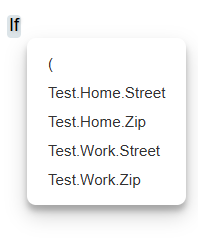
This menu works as expected. However, you would likely want to display more readable names for your fields, even if they are buried deep within your source object. If we decorate this class with the SourceAttribute, set the value of its UseParentFullNamePaths property to true, decorate the members of the Address class with the ParentAttribute, and use dot notation to define the exact path of each reference type down to its value types ...
  using CodeEffects.Rule,Common.Attributes;

  namespace HelloWorld
  {
  	[Source(UseParentFullNamePaths = true)]
  	public class Patient
  	{
  		public Middle Test { get; set; }
  	}

  	public class Middle
  	{
  		public Address Home { get; set; }
  		public Address Work { get; set; }
  	}

  	public class Address
  	{
  		[Parent("Test.Home", "Home Street")]
  		[Parent("Test.Work", "Work Street")]
  		public string Street { get; set; }

  		[Parent("Test.Home", "Home Zip")]
  		[Parent("Test.Work", "Work Zip")]
  		public string Zip { get; set; }
  	}
  }
... and then run the project again, we get the result we were looking for:
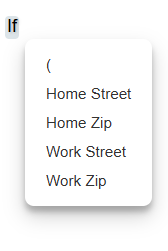
As you can see, this property works well in combination with ParentAttribute.ParentName when the structure of the source object is more complex than a single level of reference-type properties, or when the exact structure of the source is not known at design time. If the value of this property is set to true, you can use paths with any number of levels as the value of ParentAttribute.ParentName, such as Test.One.Two.Three.Home.