MethodAttribute Class
Assembly: CodeEffects.Rule.Common.dll
Namespace: CodeEffects.Rule.Common.Attributes
Summary
IMPORTANT Generic methods with generic params cannot be used in Source XML as in-rule methods or rule actions. Use plain .Net class(es) if your source object declares generic methods.
If applied to a qualified public method of the source object, this attribute marks that method as an in-rule method. To qualify, the method must return a value type and either be parameterless or declare only parameters of the source object type or any value type supported by Code Effects. This attribute can also be applied to a qualified method of any other public class to make it available as an in-rule method. In that case, the source object must be decorated with the ExternalMethodAttribute, which references the external method by name and class type.
Syntax
[AttributeUsage(AttributeTargets.Method, AllowMultiple = false, Inherited = true)]
public class MethodAttribute : System.Attribute
Constructors
MethodAttribute()
Initializes a new instance of the MethodAttribute class. Gettable, IncludeInCalculations and IncludeInConcatenations are true.
MethodAttribute(string displayName)
Initializes a new instance of the MethodAttribute class and sets the DisplayName property.
Parameters
- displayName (
System.String) - The label that represents the in-rule method in the Rule Editor.
MethodAttribute(string displayName, string description)
Initializes a new instance of the MethodAttribute class and sets the DisplayName and Description properties.
Parameters
- displayName (
System.String) - The label that represents the in-rule method in the Rule Editor.
- description (
System.String) - The description of the in-rule method.
MethodAttribute(bool includeInCalculations)
Initializes a new instance of the MethodAttribute class and sets the IncludeInCalculations property.
Parameters
- includeInCalculations (
System.Boolean) - Indicates whether the in-rule method can be included in numeric value calculations.
MethodAttribute(string displayName, bool includeInCalculations)
Initializes a new instance of the MethodAttribute class and sets the DisplayName and IncludeInCalculations properties.
Parameters
- displayName (
System.String) - The label that represents the in-rule method in the Rule Editor.
- includeInCalculations (
System.Boolean) - Indicates whether the in-rule method can be included in numeric value calculations.
MethodAttribute(string displayName, string description, bool includeInCalculations)
Initializes a new instance of the MethodAttribute class and sets the DisplayName, Description and IncludeInCalculations properties.
Parameters
- displayName (
System.String) - The label that represents the in-rule method in the Rule Editor.
- description (
System.String) - The description of the in-rule method.
- includeInCalculations (
System.Boolean) - Indicates whether the in-rule method can be included in numeric value calculations.
Properties
AiAliases
Type: System.String[]
Gets or sets other names an AI agent may know this in-rule method by: industry terms, abbreviations, or the names other systems use (for example, "DTI" or "debt-to-income ratio"). Agents working with the Code Effects Rule Repository find the in-rule method by these as well as by its display name, and still call it by its display name. The aliases are never shown in the Rule Editor. They are stored with the source and sent to the AI provider the host uses, so they must hold nothing confidential. Changing them is a label change, not a new source version. This property is optional.
  [Method("Debt To Income", AiAliases = new[] { "DTI" })]
  public decimal GetDti() { return 0; }
AiDescription
Type: System.String
Gets or sets what an AI agent should know about this in-rule method when it needs more than the Description that people read: what it means, its units, how it is used. When this property is not set, agents read the Description. It is never shown in the Rule Editor. It is stored with the source and sent to the AI provider the host uses, so it must hold nothing confidential. Changing it is a label change, not a new source version. This property is optional.
Description
Type: System.String
Gets or sets the description of the in-rule method. Rule authors can view this description by hovering the mouse pointer over the in-rule method element in the Rule Editor. The value of this property is ignored if Control.ShowDescriptionsOnMouseHover is set to false. It is not recommended to use this property in multilingual applications; instead, use culture-specific custom Source XML documents. This property is optional.
DisplayName
Type: System.String
Gets or sets the display name of the in-rule method in the Rule Editor. Use this property to represent in-rule methods when the method name is not descriptive enough for non-technical rule authors or when several overloads of the same method need to appear as different in-rule methods. It is not recommended to use this property in multilingual applications; instead, use culture-specific custom Source XML documents. This property is optional. The default value is the declared name of the qualified method.
Filter
Type: System.String
Gets or sets the name of the menu filter. This property is optional.
Remarks
Use this property to instruct the Rule Editor to allow value comparisons in rule conditions based on the filter value. For example, consider a source object that declares two in-rule methods returning the System.String type and two fields of the System.String type:
  [Method(DisplayName = "Home Phone")]
  [return:Return(Max = 10)]
  public string GetHomePhone()
  {
  	return MyCRM.GetPhoneNumber(PhoneTypeEnum.Home);
  }

  [Field(DisplayName = "Work Phone", Max = 10)]
  public string WorkPhone { get; set; }

  [Method(DisplayName = "Home Email")]
  [return: Return(Max = 200)]
  public string GetHomeEmail()
  {
  	return MyCRM.GetEmail(EmailTypeEnum.Home);
  }

  [Field(DisplayName = "Work Email", Max = 200)]
  public string WorkEmail { get; set; }
With this source object, a user could create a condition in which the phone value is compared to the email value. Although all fields and in-rule methods are of the System.String type, they clearly represent unrelated data:
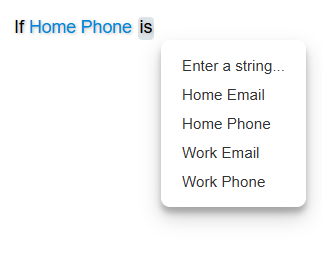
Let’s separate these properties and in-rule methods into two filters: email and phone:
  [Method(DisplayName = "Home Phone", Filter = "phone")]
  [return:Return(Max = 10)]
  public string GetHomePhone()
  {
  	return MyCRM.GetPhoneNumber(PhoneTypeEnum.Home);
  }

  [Field(DisplayName = "Work Phone", Max = 10, Filter = "phone")]
  public string WorkPhone { get; set; }

  [Method(DisplayName = "Home Email", Filter = "email")]
  [return: Return(Max = 200)]
  public string GetHomeEmail()
  {
  	return MyCRM.GetEmail(EmailTypeEnum.Home);
  }

  [Field(DisplayName = "Work Email", Max = 200, Filter = "email")]
  public string WorkEmail { get; set; }
Now, users can compare email addresses only to other email addresses, and phone numbers only to other phone numbers:
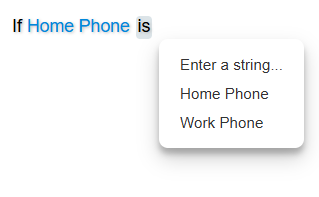
Gettable
Type: System.Boolean
Gets or sets a value that indicates whether the in-rule method appears in the Rule Editor's context menus that list available rule fields and in-rule methods for rule conditions. The default value is true.
Group
Type: System.String
Gets or sets the name of the menu group. This property is optional.
Remarks
Your source object may declare dozens or even hundreds of rule fields and in-rule methods. In such cases, the field menus in the Rule Area could contain an overwhelming number of items and become difficult to use. Grouping allows you to organize fields and in-rule methods into groups, which the Rule Editor uses to present them in two levels of menus: first, it displays a list of all available groups, and then, when the user selects a group, it shows a new menu containing only the items from that group.
This feature is automatically enabled if at least one rule field or in-rule method in the source object has a group name set. The group name can be any string value. When grouping is enabled, all rule fields and in-rule methods that do not have a group assigned are placed in a default group called OTHER, which is displayed at the bottom of the menu. You can rename the default group using the Help XML feature.
IncludeInCalculations
Type: System.Boolean
Used only for in-rule methods that return numeric types and ignored for in-rule methods of other return types. Gets or sets a value that indicates whether the in-rule method can be included in value calculations of other fields and in-rule methods. For example, it may be confusing for rule authors when an in-rule method that returns a non-financial value appears in a calculation menu alongside financial fields like Income or Debt. In such cases, set IncludeInCalculations to false. This property is optional. The default value is true.
IncludeInConcatenations
Type: System.Boolean
Used only for in-rule methods that return string type and ignored for in-rule methods of other return types. Gets or sets a value that indicates whether the in-rule method can be included in the string concatenations of other fields and in-rule methods. This property is optional. The default value is true.
ResetsContext
Type: System.Boolean
Gets or sets a value that indicates whether this in-rule method is a context resetter. When a rule author changes the method, its operator or its value in a condition, the Rule Editor removes all rule elements that follow that condition and displays the Undo icon at the end of the rule. This property is optional. The default value is false. See Context Resetters for details.
TestMethodName
Type: System.String
Gets or sets the name of the method that the Code Effects Rule Repository calls instead of this one when a rule is tested. An instance test method declared in the class of the object the rule is evaluated against (the collection item's class for a member of a collection's item type) is called on that very object and takes only the parameters this method takes from the rule. Any other test method takes that object first, then those parameters; a parameter of the source object type of this method is not repeated. Ignored outside a Rule Repository test. This property is optional.
  [Method("Credit Score", TestMethodName = nameof(GetTestCreditScore))]
  public int GetCreditScore(string ssn) { return CreditBureau.Lookup(ssn); }

  public int GetTestCreditScore(string ssn) { return 700; }
TestMethodType
Type: System.Type
Gets or sets the class that declares the test method named by TestMethodName. When this property is not set, the class that declares this method is used. A static test method is called on the class; an instance one is called on the evaluated object when this is the object's class, otherwise on a new instance, which requires a public parameterless constructor. Ignored outside a Rule Repository test. This property is optional.
Rule Editor uses any qualified method of the source object as an in-rule method unless it is decorated with the ExcludeFromEvaluationAttribute. If this attribute is applied to a non-qualified method, an exception is thrown. All non-qualified methods that are not decorated with the MethodAttribute are ignored.
Remember that static or instance in-rule methods can accept your source object as a parameter. When a rule author uses such a method in a rule, parameters of the source object type are not displayed — Rule Editor passes them automatically. In the Rule XML, the parameter of the source object type is represented as this.
Example
using CodeEffects.Rule.Common.Attributes;

namespace TestLibrary
{
	public class Person
	{
		[Field(DisplayName = "First name", Max = 30)]
		public string FirstName { get; set; }

		[Field(DisplayName = "Last name", Max = 30)]
		public string LastName { get; set; }

		[Method("Full name", Description = "Concatenates the first and last names into a single string.")]
		public string GetFullName()
		{
			return $"{LastName}, {FirstName}";
		}
	}
}