ParentAttribute Class
Assembly: CodeEffects.Rule.Common.dll
Namespace: CodeEffects.Rule.Common.Attributes
Summary
Defines the display name and the description of a public non-static property of a value type or of a field of a reference type declared in the source object.
Syntax
[AttributeUsage(AttributeTargets.Property | AttributeTargets.Field, AllowMultiple = true, Inherited = false)]
public class ParentAttribute : System.Attribute
Constructors
Properties
AiAliases
Type: System.String[]
Gets or sets other names an AI agent may know this member by when it is reached through this parent: industry terms, abbreviations, or the names other systems use. When this property is not set, the FieldAttribute.AiAliases of the member are used. The aliases are never shown in the Rule Editor. They are stored with the source and sent to the AI provider the host uses, so they must hold nothing confidential. Changing them is a label change, not a new source version. This property is optional.
AiDescription
Type: System.String
Gets or sets what an AI agent should know about this member when it is reached through this parent. When this property is not set, the FieldAttribute.AiDescription of the member is used. It is never shown in the Rule Editor. It is stored with the source and sent to the AI provider the host uses, so it must hold nothing confidential. Changing it is a label change, not a new source version. This property is optional.
Description
Type: System.String
Gets the description of the rule field. Rule authors can see this description when they hover the mouse pointer over the field element in the Rule Editor. The value of this property is ignored if Control.ShowDescriptionsOnMouseHover is set to false. It is not advisable to use this property in multilingual applications; instead, use culture-specific custom Source XML documents. This property is optional.
DisplayName
Type: System.String
Gets the display name of the rule field in the Rule Editor. Use this property to represent rule fields in the Rule Area when the property name is not sufficiently descriptive for non-technical rule authors. It is not recommended to use this property in multilingual applications; instead, use culture-specific custom Source XML documents. This property is optional. The default value is the declared name of the property.
ParentName
Type: System.String
Gets the name of the parent property declared in the source object. See the remarks below for details on this feature.
If a source object contains two or more reference-type properties, those properties can be of the same type. For example, consider a Company class that declares two properties of type Address: ShippingAddress and BillingAddress:
namespace TestLibrary
{
	public class Company
	{
		public Address ShippingAddress { get; set; }
		public Address BillingAddress { get; set; }
	}

	public class Address
	{
		public string Street { get; set; }
		public string City { get; set; }
		public string PostalCode { get; set; }
	}
}
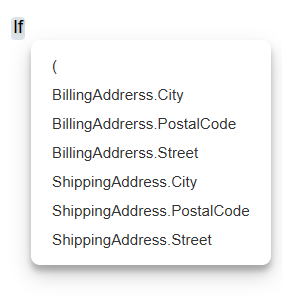
Code Effects Rule Editor uses dot notation to display the default field names of reference types in the Rule Area. If the Company class is used as the source object, the fields menu will appear as follows:
While this may be acceptable for internal solutions, you will likely want to assign meaningful display names to the rule fields to make the experience easier for business users. However, simply setting the DisplayName parameter of the FieldAttribute on each Address field...
[Field(DisplayName = "Street Address")]
public string Street { get; set; }
…won’t work because Rule Editor cannot determine which property should be labeled Street Address when it scans the source object while preparing the Rule Area — ShippingAddress.Street or BillingAddress.Street. If the Street property is modified as shown in the example above, Rule Editor will simply use the first property of the Company class that contains the field Street (the ShippingAddress property in this case) and ignore all other occurrences. This is the default behavior.
Use the ParentAttribute to resolve this issue. Its behavior is easy to understand from the code sample below:
using CodeEffects.Rule.Common.Attributes;

namespace TestLibrary
{
	public class Company
	{
		public Address ShippingAddress { get; set; }
		public Address BillingAddress { get; set; }
	}

	public class Address
	{
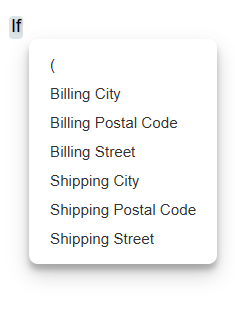
		[Parent("ShippingAddress", "Shipping Street")]
		[Parent("BillingAddress", "Billing Street")]
		public string Street { get; set; }

		[Parent("ShippingAddress", "Shipping City")]
		[Parent("BillingAddress", "Billing City")]
		public string City { get; set; }

		[Parent("ShippingAddress", "Shipping Postal Code")]
		[Parent("BillingAddress", "Billing Postal Code")]
		public string PostalCode { get; set; }
	}
}
Run the editor with this version of the Company class as the source object to see the difference: