Data Types in Code Effects
Rule authors work with the members of your source object: its fields, in-rule methods, and actions. Every value in a rule has a data type, and the data type decides how the Rule Editor lets the author enter the value, which operators it offers, and how the engine compares the value during evaluation. This article describes every data type that Code Effects v7 supports, the types it does not, and what to do about those.
Collections have their own article, Collection Data Types. Two more articles describe rules that apply to several types at once: Nullable Value Support and Automatic Numeric Type Conversion.
Supported Types
Everything in the following list can be a field, a property, the return value of an in-rule method, or a parameter of an in-rule method or an action. Each type can also be used as a nullable (int?, DateTime?, and so on).
- Boolean:
bool.
- Numeric:
byte, sbyte, short, ushort, int, uint, long, ulong, float, double, and decimal.
- String:
string.
- Date and time:
DateTime, DateOnly, and DateTimeOffset are dates. TimeOnly is a time of day. TimeSpan is a time of day, or a duration if you say so. See Dates and Times.
- Enumerations: any
enum, and its nullable.
- Collections: arrays and the types that implement
IEnumerable, except dictionaries. See Collection Data Types.
Properties of reference types that are not collections, such as an Address property of a Patient class, are not data types of their own. The editor flattens them: their members appear in the fields menu as Address.City, Address.State, and so on, and each member is a field of one of the types above.
Types That Are Not Supported
The following types are not supported. A member of one of these types is left out of the source silently, as if it did not exist: the editor does not list it, and there is no error to catch.
System.GuidcharIntPtr and UIntPtrHalf, Int128, and UInt128- Tuples (
ValueTuple and Tuple) and KeyValuePair<TKey, TValue>
- Every other struct that is not in the lists above
- Dictionaries (any type that implements
IDictionary)
object, open generic types, and abstract classes that are not collections
Working Around Unsupported Types
The common way around every one of them is to expose a member of a supported type that stands for the unsupported one. The unsupported member stays in the class for your own code; the editor never sees it.
Guid. A rule author cannot type a GUID into a value element in any useful way, and a field list is no place to pick one from. Expose it as a string and compare strings:
public Guid CustomerId { get; set; }                // ignored by the editor

[Field(DisplayName = "Customer ID", Max = 36)]
public string CustomerIdText
{
    get => CustomerId.ToString();
    set => CustomerId = Guid.Parse(value);          // only if execution rules assign it
}
char. Use a string of one character:
[Field(DisplayName = "Middle Initial", Max = 1)]
public string MiddleInitial => MiddleInitialChar.ToString();
Numeric types the editor does not know. Expose decimal or double for Half, and decimal for Int128, UInt128, or a value of a wrapper type:
[Field(DisplayName = "Dose")]
public decimal DoseValue => (decimal)Dose;          // Dose is a Half
Structs and tuples. Expose the members the rules need as fields of their own, or put the logic in an in-rule method that takes and returns supported types:
[Field(DisplayName = "Latitude")]
public double Latitude => Location.Latitude;        // Location is a struct

[Method(DisplayName = "Distance to Clinic (km)")]
public double DistanceToClinic() => Location.DistanceTo(Clinic);
Dictionaries and lists of key-value pairs. If a rule needs to look something up by key, write an in-rule method that does the lookup and returns a supported type. If it needs a list of pairs, declare a small class with a key and a value property and expose a list of that class. See Collection Data Types. To let rule authors pick from a fixed list of key-value pairs while they write a rule, use Dynamic Menu Data Sources.
A rule author can give a value in three ways: by typing it, by selecting another field, or by either. The ValueInputType property of the FieldAttribute class sets the way for a field, and works for every data type. Its members are ValueInputType.All (the default), ValueInputType.User, and ValueInputType.Fields. In-rule methods and actions control the input of their parameters with the ParameterAttribute class, and their return values with the ReturnAttribute class.
Consider the following source object:
using CodeEffects.Rule.Common.Attributes;
using CodeEffects.Rule.Common.Models;

public class Patient
{
    // The value can only be selected from other numeric fields
    [Field(DisplayName = "Copay", ValueInputType = ValueInputType.Fields, AllowCalculations = false)]
    public decimal Copay { get; set; }

    // The value can be typed, selected, or calculated (the defaults)
    [Field(DisplayName = "Balance")]
    public decimal Balance { get; set; }

    // The value can only be typed
    [Field(DisplayName = "Room Number", ValueInputType = ValueInputType.User, AllowCalculations = false)]
    public int Room { get; set; }

    // Never offered in calculations: an ID has nothing in common with a price
    [Field(DisplayName = "Chart ID", IncludeInCalculations = false)]
    public long ChartId { get; set; }

    // ...
}
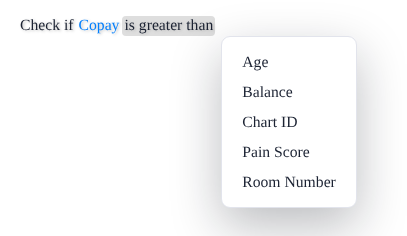
The value of Copay can only be another numeric field, so the editor offers no way to type it:
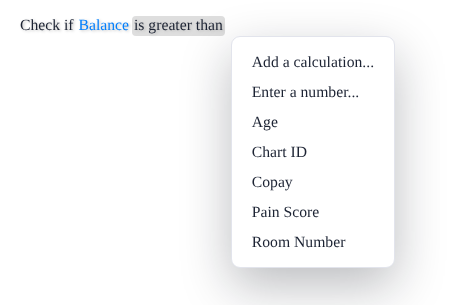
The value of Balance can be typed, calculated, or selected from the fields:
The value of Room Number can only be typed, so the editor does not offer a menu at all. It goes straight to the input:

Fields are offered as values only when their data types are compatible with the field in the condition, so a string field never appears in a menu of numbers. A string field that has no other string field to choose from is entered by typing for the same reason.
Strings
A string value is a text box. The author clicks the value element, types the text, and clicks away or presses Enter to finish. The following properties of FieldAttribute, ParameterAttribute, and ReturnAttribute shape the input:
Max is the maximum length of the text a rule author can enter. The editor allows up to 256 characters.StringComparison sets how the engine compares the string during evaluation. The default is StringComparison.OrdinalIgnoreCase, so John and JOHN are equal.Prompt adds a Prompt dialog for long-form input.AllowConcatenations and IncludeInConcatenations control concatenations (see below).
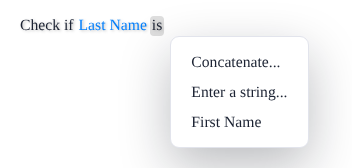
When the source object has more than one string, a rule author can also build the value as a concatenation: a few strings and typed text joined together, such as { Last Name + ", " + First Name }. The Concatenate... item of the value menu starts one:
Set AllowConcatenations = false on a field to take Concatenate... away from its value menu, and IncludeInConcatenations = false to keep a field out of everybody else's concatenations. Both are true by default.
Strings have the operators is, is not, contains, does not contain, starts with, does not start with, ends with, does not end with, has no value, has any value, is in, and is not in.
Numbers
All eleven numeric types are supported: byte, sbyte, short, ushort, int, uint, long, ulong, float, double, and decimal. A numeric value is a text box that stops accepting characters that do not fit the field. The Help String shows a message that says why.
The editor reads the type of the member and sets three things for you:
- Whether the value may have decimals. The editor allows a decimal point only for
float, double, and decimal.
- The smallest and the largest value a rule author can type. The defaults are the limits of the type for
byte, sbyte, short, ushort, int, and uint. For long, ulong, float, double, and decimal they are plus and minus 9007199254740992 (2^53), because that is the largest whole number a browser can calculate with exactly. A lower bound for an unsigned type is 0.
- Which fields and values are compatible with each other. See Automatic Numeric Type Conversion.
Use the Min and Max properties to narrow the range, for example to the plausible values of an age:
[Field(DisplayName = "Age", Min = 0, Max = 130)]
public int Age { get; set; }
Min and Max are used by the editor only. The engine does not check them during evaluation, so a value outside the range of the target type still throws an OverflowException there.
Conditions compare numbers of different types: Age of type int can be compared with Balance of type decimal. The engine converts both operands to the wider of the two types before it applies the operator. See Automatic Numeric Type Conversion.
Calculations
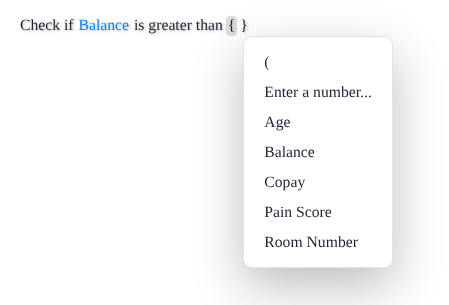
A numeric value can also be a calculation: numbers and numeric fields joined with +, -, ×, ÷, and parentheses. The Add a calculation... item in the value menu starts one, and the editor wraps the calculation in curly brackets, which the author never types:

After a number or a field, the menu offers the four operators:
Control calculations with the following properties:
AllowCalculations turns the Add a calculation... item on or off for a field's value. The default is true.IncludeInCalculations decides whether a field can appear in the calculations of other fields. Set it to false for IDs, codes, and anything else that has no business being added to a price. The default is true.
Boolean Values
A bool value is a menu of two items. Their labels, True and False, come from the Help XML and can be changed or translated:
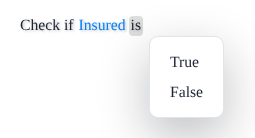
A Boolean has the operators is and is not, and, if it is nullable, has no value and has any value.
Enumerations
An enum value is a menu of the enumeration's members. The menu shows the member name unless you give it a display name with the EnumItem attribute. Hide a member from the editor, and from every rule, with ExcludeFromEvaluation:
using CodeEffects.Rule.Common.Attributes;

public enum PatientState
{
    Arizona,
    California,
    [EnumItem("North Carolina")]
    NorthCarolina,
    [EnumItem("South Carolina")]
    SouthCarolina,
    Florida,
    [ExcludeFromEvaluation]
    Unknown
}
The value menu of a field of this type offers Select a value..., which opens the list of members. The list does not show Unknown:
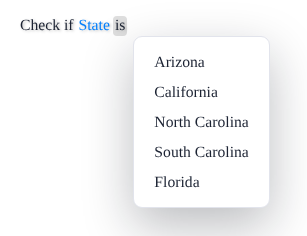
An enumeration has the operators is, is not, is in, and is not in. A nullable enumeration, PatientState?, is supported in v7 and adds has no value and has any value:
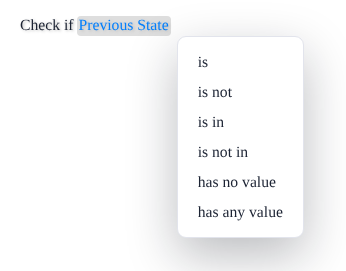
Code Effects 6 and earlier ignored nullable enumerations. If your older source objects hide them behind a non-nullable property, you can drop the workaround.
If you need a menu of values that you cannot express as an enumeration, such as rows from a database, use Dynamic Menu Data Sources, which turns key-value pairs into a menu.
Dates and Times
Date and time types are text boxes that open a picker. Rule authors never have to type a date by hand, and they cannot enter one the format does not allow. Code Effects supports five types:
| Type |
What it is |
Default format |
Since |
DateTime |
A date, or a date and time |
MMM dd, yyyy |
|
DateOnly |
A date with no time |
MMM dd, yyyy |
v7 |
DateTimeOffset |
A date and time with a UTC offset |
MMM dd, yyyy hh:mm tt zzz |
v7 |
TimeOnly |
A time of day |
hh:mm tt |
v7 |
TimeSpan |
A time of day, or a duration |
hh:mm tt; d.hh:mm as a duration |
durations since v7 |
Each of them can also be nullable (DateTime?, DateOnly?, and so on), and can be a field, a property, the return value of an in-rule method, or a parameter of an in-rule method or an action.
All of them share the DateTimeFormat property of FieldAttribute, ParameterAttribute, and ReturnAttribute, which takes a .NET date and time format string. The format is used by the editor only: it decides how the value is displayed and which parts the picker asks for. It never changes how a value is stored or evaluated.
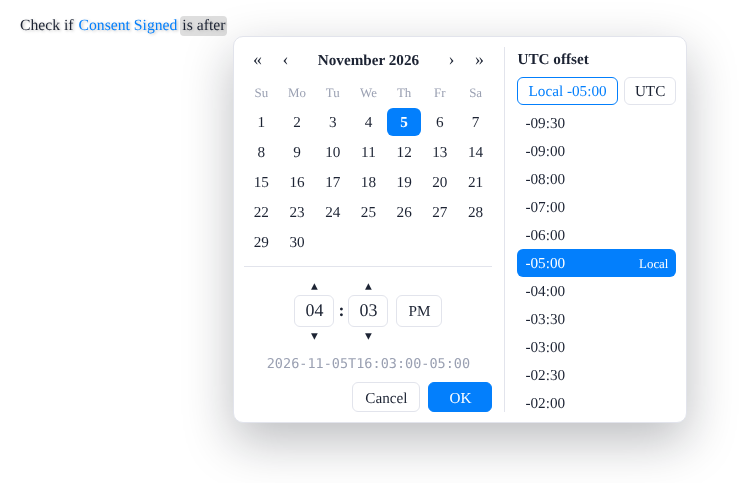
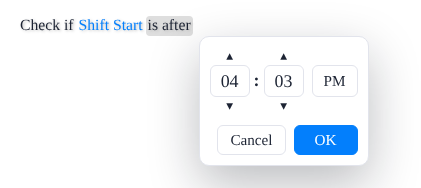
DateTime. If the format contains no time, the picker closes as soon as the author clicks a day, and the value has the time 12:00:00.000 AM. If it does, the picker adds boxes for the time and an OK button.DateOnly. It behaves like a DateTime whose format has no time. The engine converts it to a DateTime internally and back.DateTimeOffset. The picker adds a list of offsets and Local and UTC buttons. It starts with the offset of the rule author's browser, and the line under the time shows exactly what is stored.TimeOnly. A time of day, which behaves like a TimeSpan time of day. The engine converts it to a TimeSpan internally and back.TimeSpan. A time of day by default, from 00:00 to 23:59. Set TimeType = TimeType.Duration and it becomes a duration; see Durations.
In an Adaptive Source, set the format with the Format property of a field's Settings. For a collection of dates or times, the field's Settings are its items' settings, so Format is the items' format. Source.GetFields(..) fills it from the DateTimeFormat of your attributes.
public class Patient
{
    [Field(DisplayName = "Date of Birth")]                       // MMM dd, yyyy
    public DateTime Born { get; set; }

    // The format of most of the world, with the time
    [Field(DisplayName = "Discharged", DateTimeFormat = "dd.MM.yyyy HH:mm")]
    public DateTime? Discharged { get; set; }

    [Field(DisplayName = "Admitted", DateTimeFormat = "MM/dd/yy h:mm:ss tt")]
    public DateTime Admitted { get; set; }

    [Field(DisplayName = "Next Checkup")]
    public DateOnly NextCheckup { get; set; }

    [Field(DisplayName = "Consent Signed")]
    public DateTimeOffset ConsentSigned { get; set; }

    [Field(DisplayName = "Visiting Hours Start")]
    public TimeOnly VisitingStart { get; set; }

    [Field(DisplayName = "Shift Start")]
    public TimeSpan ShiftStart { get; set; }
}
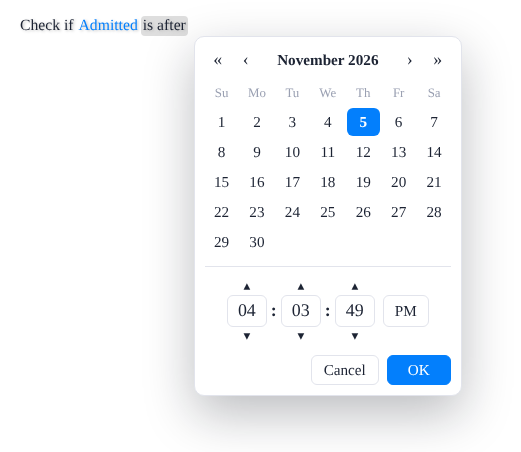
A picker without a time portion is a calendar:
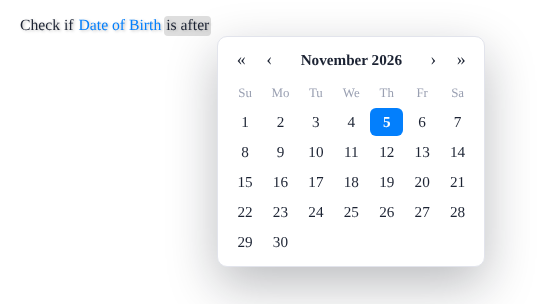
With a time in the format, the picker also asks for the time:
A DateTimeOffset also asks for the UTC offset:
A time of day has a picker of its own:
Operators
Dates have the operators is equal to, is not equal to, is before, is before or equal to, is after, is after or equal to, is between, is not between, is in, and is not in, plus has no value and has any value for nullables. A time of day has the same operators, worded for times.
is between includes both bounds. Admitted is between Jan 1, 2026 and Jan 31, 2026 holds for both January 1 and January 31. The first bound must come before the second: equal bounds and reversed bounds are invalid, and the editor says so.is not between is its exact opposite. It is true whenever is between is false, so a member or a bound with no value is not between. It is a separate operator with a flag of its own, ExcludedOperator.NotBetween: if you hide is between with ExcludedOperators, hide is not between too.is in and is not in take a list of dates or times, such as Next Checkup is in (Mar 1, 2026, Jun 1, 2026). A value listed twice is refused.
Dates Compared as Dates
When a DateTime field is shown as a date only, because its format has no time, every date operator compares only the dates. Admitted is equal to Oct 22, 2026 is true for an admission at 2:30 PM on October 22, and Admitted is before Oct 22, 2026 is false for it. If the other operand is shown with its time, such as a field, an in-rule method, or a date shift whose format includes the time, the operator compares the full values instead.
The editor writes this into the rule when the author saves it. A rule saved by an earlier version keeps comparing full values until it is saved again.
The same applies to a collection of DateTime items shown as dates only: its contains, does not contain, starts with, and ends with compare the items' dates, so Visit Dates contains Oct 22, 2026 holds for an item of October 22 at 2:30 PM. See Collection Data Types.
Offsets
A DateTimeOffset is compared by the instant it stands for: Consent Signed is equal to a value with another offset is true when both name the same moment. Rule XML stores the value in ISO 8601 with its offset, such as 2026-10-22T14:30:00-04:00, and a stored value with no offset is read as UTC. Collections of DateTimeOffset are not supported yet.
Date Shifts
A date value can be shifted: Add days..., Remove days..., and the same for months and years, move a date field or a date-returning in-rule method by a whole number of units, as in Next Checkup is before Admitted + 30 days. Shifts work with DateTime, DateOnly, and DateTimeOffset, nullable or not.
How Values Are Stored
Rule XML stores dates and times in invariant forms that depend neither on the display format nor on the rule author's culture: a DateTimeOffset as ISO 8601 with its offset, a time of day as HH:mm:ss, and a duration in the constant format of TimeSpan (1.12:30:00 for one day, twelve hours, and thirty minutes). The display format can change at any time without touching stored rules.
Durations
A TimeSpan field is a time of day by default. Set TimeType = TimeType.Duration on its FieldAttribute, or on the ParameterAttribute or ReturnAttribute of an in-rule method or action, and it is a length of time instead. In an Adaptive Source, set the TimeType of the member's Settings.
// Days, hours, and minutes by default
[Field(DisplayName = "Stay", TimeType = TimeType.Duration)]
public TimeSpan Stay { get; set; }

// Hours and minutes: the hours are not limited to 23
[Field(DisplayName = "Wait", TimeType = TimeType.Duration, DateTimeFormat = "hh:mm")]
public TimeSpan Wait { get; set; }
Only TimeSpan can be a duration. A TimeOnly always holds a time of day, so TimeType.Duration on a TimeOnly member is refused when the source object loads, with the error QR8349.
The format decides the units. A duration's DateTimeFormat uses the tokens of TimeSpan: d for days, h or hh for hours, m or mm for minutes, and s or ss for seconds. A unit the format lacks is not used at all, the largest unit has no upper limit, and the smaller ones wrap as usual. With hh:mm, 900 hours reads 900h 0m; with the default d.hh:mm, it reads 37d 12h 0m. The editor shows a duration with the letter of each unit, such as 1d 12h 30m, and the letters come from the Help XML, so they can be translated.
A duration has its own picker, with a box for each unit. A negative duration is refused.
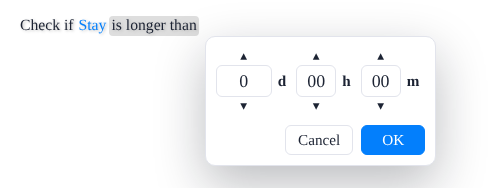
Its own operators. A duration has is equal to, is not equal to, is shorter than, is shorter than or equal to, is longer than, is longer than or equal to, is between, is not between, is in, and is not in, plus has no value and has any value for nullables.
Durations stay with durations. A duration can only be compared with, set from, returned into, or passed as a duration, and a time of day only with a time of day. The editor offers only the fields of the same time type in its menus, and the server refuses a rule that mixes them (validation message v164), whether a person, a script, or an AI agent wrote it. A time of day of one day or more is refused as well (v118).
Source XML. A duration is written as timeType="duration" on its time element, and on the value options of a parameter, a return, or a collection item. The attribute is written only for durations, so older Source XML documents are unchanged.
Help XML. A custom Help XML document can translate the duration's operators (its <duration> section), its input, its unit letters, and the help hints i142 to i145. An older custom Help XML document without them still works: the operators and letters fall back to English, and the hints to the ones for times.
In the Rule Repository, a member's TimeType is part of its source version, so switching it creates a new source version. Changing only a duration's format is a label change, written in place.
Nullable Types
Every supported type has a nullable form, and so does an enumeration. A nullable field has two more operators, has no value and has any value:
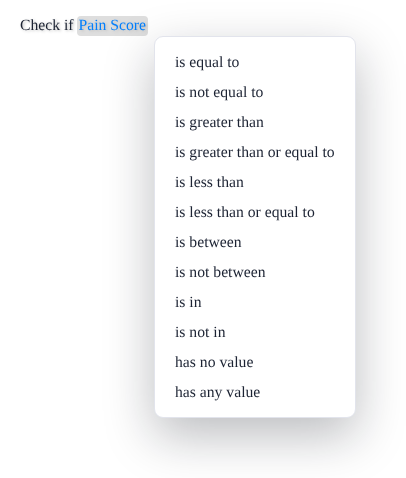
Nullable and non-nullable values can be compared in conditions without restrictions, and the rules for parameters and setters are stricter. See Nullable Value Support.
Collections
Arrays and the types that implement IEnumerable are collections, with rules and operators of their own. See Collection Data Types.