A method that is a Dynamic Menu Data Source named by a Data attribute must be parameterless, but the items it returns often depend on something you know only at run time, such as the current user, the tenant, or the type of network. This article shows how to make the items depend on such a value.
The editor does not allow parameters because it is the one that calls the method, when it builds the page, and it has nothing to pass. What you can do is give the editor a delegate to an object you created yourself, an object that already holds the value. The method of that object is still parameterless, and the object's state decides what it returns.
The Data Source Class
Consider a class whose method returns different items depending on a value it was created with:
using System.Collections.Generic;
using CodeEffects.Rule.Editor.Client;

public class TestUtility
{
    // The value that customizes the items
    private int test;

    public TestUtility(int testValue)
    {
        this.test = testValue;
    }

    // A parameterless method that can be a data source
    public List<DataSourceItem> GetTestNumbers()
    {
        var list = new List<DataSourceItem>();

        if(this.test > 4)
        {
            list.Add(new DataSourceItem(5, "Five"));
            list.Add(new DataSourceItem(6, "Six"));
        }
        else
        {
            list.Add(new DataSourceItem(1, "One"));
            list.Add(new DataSourceItem(2, "Two"));
        }

        return list;
    }
}
The class has a constructor with a parameter, so a Data attribute cannot name its method: the editor would have no way to create an instance. The delegate makes up for it.
The Source Object
The source object does not carry a Data attribute. Its field only names the data source that it wants:
using CodeEffects.Rule.Common.Attributes;

public class TestSource
{
    [Field(DisplayName = "Test Number", DataSourceName = "Numbers")]
    public int TestNumber { get; set; }

    // The rest of the class goes here...
}
Giving the Delegate to the Editor
The DataSources property of the Control class takes a collection of DataSourceHolder objects. Each holder has a name, the one that the field's DataSourceName uses, and a GetDataSourceDelegate that points to the method. Create the control in the code that returns the editor's settings to the page, the same place where you set its source object:
using System.Collections.Generic;
using CodeEffects.Rule.Editor;
using CodeEffects.Rule.Editor.Models;

app.MapGet("/api/settings", () =>
{
    // The value your data source depends on: the current user's tenant, a setting, and so on
    var utility = new TestUtility(2);

    var editor = new Control("divEditor")
    {
        SourceType = typeof(TestSource),
        DataSources = new List<DataSourceHolder>
        {
            new DataSourceHolder
            {
                // The name that DataSourceName uses
                Name = "Numbers",
                Delegate = new GetDataSourceDelegate(utility.GetTestNumbers)
            }
        }
    };

    return Results.Json(new { g = editor.GetGlobalData(), e = editor.GetEditorData() });
});
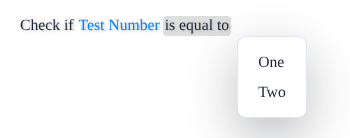
With the value 2, the menu of the field has two items:
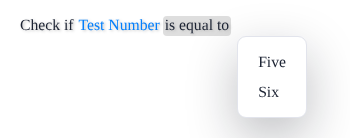
Create the utility with 6, and the same field offers different items:
What to Know
- The delegate is called every time the editor's data is built, so the items are current whenever the page is loaded. The editor never calls it from the browser.
- The names must match. The
Name of the holder is the DataSourceName of the field, the return value, or the parameter. Fields, return values, and parameters of integer and string types can use it, as with any other data source.
- A
Data attribute wins. If the source object also declares a data source with the same name through a Data attribute, the editor uses the attribute and ignores the holder.
- Reflection sources only. A
DataSources collection works with a source object that is a class. An Adaptive Source describes its data sources with DataSource objects, as the main article shows.
- A failing delegate stops the editor. If the delegate throws, the editor throws a
SourceException with the control number WS9483 and the message of the original exception.
- The ID must keep its meaning. A rule stores the ID of the item, not its name. If different users see different items, make sure the same ID never means two things, or a rule that one user wrote reads differently for another.
Reading a Rule as Text
The plain text of a rule that Control.ToString() returns shows the ID that a data source value holds: Check if Test Number is equal to 1. To get the names, pass a dictionary of the same delegates, by the same names, to the overload that takes one:
var delegates = new Dictionary<string, GetDataSourceDelegate>
{
    ["Numbers"] = new GetDataSourceDelegate(utility.GetTestNumbers)
};

// Check if Test Number is equal to One
string text = editor.ToString(delegates);
A value that the delegate no longer returns is shown as its ID.