Working with Dynamic Menu Data Sources
Dynamic Menu Data Sources are useful when you have a dynamic list of key/value pairs, and would like to use those values in Rule Editor as if they were members of a plain .NET enumerator. You can define one or many menu sources, and use them as field values, in-rule method return values, and even as parameter(s) of in-rule methods and rule actions.
A single menu source can be declared by any .NET class (including the source object) as a parameterless static or public instance method that returns a collection of instances of the DataSourceItem class. It can also be declared as a client parameterless function that returns an array of { ID: value, Name: value } anonymous objects. Having a client function as the menu source is generally more advisable because any change to the underlying data will be available to the rule authors the moment they pull up the related menu. With server-side menu sources, the rule author needs to reload the entire page to get the latest changes, which is a non-issue if the data doesn't change very often.
Note that even though the method must be parameterless, there is a way to customize the returned collection of the dynamic source by using external values. Read more about it in this topic.
Imagine that your organization has a database lookup table (or SQL view) called Role which contains (or returns) IDs and names of user roles that you'd like to use in your business rules. Records in that table (or view) may change periodically. To use those records in Code Effects, you could go the server-side route and declare a .NET class Helper with a static parameterless method of GetRoles():
using System.Collections.Generic;
using CodeEffects.Rule.Common.Models;

public class Helper
{
	// Declaring it as a static method but it can be an instance method as well
	// as long as it's parameterless, returns a list of DataSourceItem and
	// its declaring type has an empty constructor
	public static List<DataSourceItem> GetRoles()
	{
		var list = new List<DataSourceItem>();

		// Hard-coding a list of items that otherwise would come from the Role table
		list.Add(new DataSourceItem { ID = 1, DisplayName = "Management" });
		list.Add(new DataSourceItem { ID = 2, DisplayName = "Network Admins" });
		list.Add(new DataSourceItem { ID = 3, DisplayName = "Developers" });
		list.Add(new DataSourceItem { ID = 4, DisplayName = "Designers" });

		return list;
	}
}
Now we need a source object that uses the Roles menu source:
using CodeEffects.Rule.Common.Models;

[Data("Roles", typeof(Helper), "GetRoles")]
public class User
{
	public enum Status
	{
		Warning, Success, Error
	}

	public User() { }

	[Field(DisplayName = "Full Name", Max = 20)]
	public string FullName { get; set; }

	[Field(DisplayName = "Role", DataSourceName = "Roles", AllowCalculations = false, IncludeInCalculations = false)]
	public int RoleID { get; set; }

	public void Authorize(Status status)
	{
		// some authorization logic goes here
	}
}
This simple source object declares properties FullName and RoleID. It also declares a single rule action method called Authorize that takes Status enum as its single param. This source is also decorated with the CodeEffects.Rule.Common.Attributes.Data attribute. It declares our menu source.
There are several things in this source object to notice:
- The
Data attribute is declared on the class level which allows us to name each menu source globally, only once, and reuse it for any field, method, or parameter of that source object.
- Note the use of the
DataSourceName property of the CodeEffects.Rule.Attributes.Field attribute for the RoleID property. It tells Code Effects which menu source should be used for this property. The Parameter and Return attributes also declare the DataSourceName property, so you can use menu sources as parameters and return values of in-rule methods as well.
- Dynamic Menu Data Sources work only with fields, properties, return values, and parameters of System.
Int32 and System.String types. Rule Editor ignores the value of DataSourceName for other types.
Let's see all of this in action. Assuming that we've already declared Rule Editor on a web page, and set our User class as its source object, we can load the page and see the data from the GetRoles() methods appear as the RoleID menu:
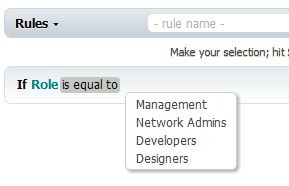
The rule displays names returned by the method...
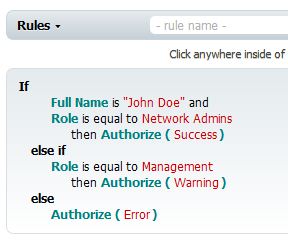
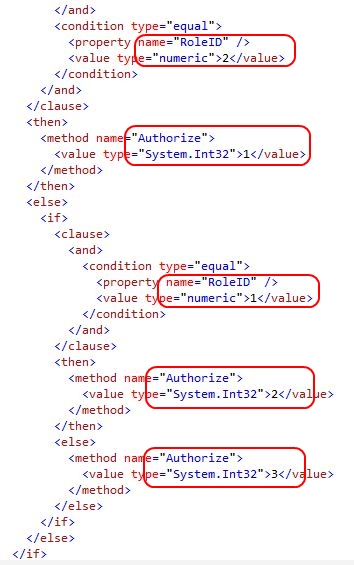
... but the resulting Rule XML contains ID of the selected role instead of display name. This value will be used by the Evaluator during rule evaluation:
IMPORTANT If a rule condition uses any values that no longer exist in the original data location, Evaluator still attempts to evaluate the rule as if those values still exist. Obviously, the evaluation of such a condition will always yield False, because the Rule XML value won't match any of the current values, as Evaluator has no way of knowing whether the value is still valid or not.
If such a rule is loaded into the Rule Editor, the Rule Area displays the element does not exist alert, and highlights the invalid value(s) with a red background. This gives rule authors the ability to update the invalid rule.