What's New in Version 6
Code Effects version 6 introduces the largest architectural and feature update in the platform’s history.
This release focuses on:
- AI-powered decision automation
- enterprise-grade security
- modern deployment flexibility
- runtime customization
- improved developer tooling
- enhanced UI consistency
- operational scalability
while preserving the embeddable, high-performance architecture that defines the Code Effects platform.
First True BYOAI Architecture in Business Rules
Version 6 introduces the industry’s first true Bring Your Own AI (BYOAI) architecture for deterministic business rules and decision automation.
Unlike AI-enabled platforms that force customers into vendor-controlled AI infrastructure, Code Effects allows organizations to integrate any AI model, inference platform, or orchestration strategy directly into rule authoring and evaluation.
Organizations retain full control over:
- AI providers
- prompts
- inference infrastructure
- runtime policies
- deployment topology
- security boundaries
- operational workflows
The platform acts as AI-capable decision infrastructure rather than a hosted AI gateway.
Adaptive Source
Adaptive Source introduces a completely new approach to rule authoring. Instead of exposing a fixed static data surface, the editor can dynamically generate fields, methods, operators, actions, and menu structures contextually as the user builds or updates a rule.
The editor passes the complete current rule context to the application, allowing menu generation to be driven by:
- AI systems
- internal business logic
- metadata engines
- runtime policies
- tenant configuration
- operational workflows
This enables truly context-aware rule authoring for the first time in business rules systems.
Prompt Flags
Prompt-enabled rule elements allow organizations to integrate AI inference directly into deterministic rule evaluation. Any string field, method parameter, or method return value can be marked as a Prompt-enabled element:
  [Method(DisplayName = "Get AI Score")]
  public decimal GetScore([Parameter(Prompt = true)] string prompt)
  {
  	return GetYourAi(prompt);
  }

  [Field(Prompt = true)]
  public string Notes { get; set; }
When enabled, the rule editor displays a dedicated Prompt dialog for long-form structured input whenever the prompted field, parameter, or return value is selected from the related menu.
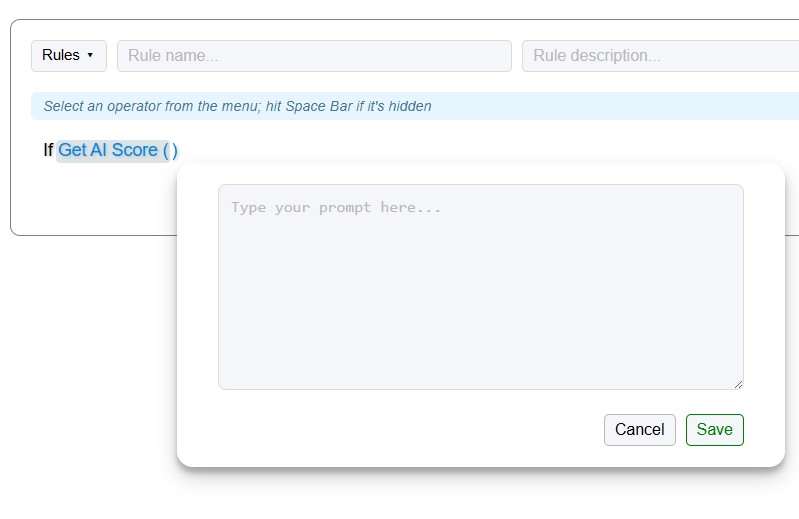
This allows organizations to integrate:
- LLM prompts
- AI-assisted evaluations
- semantic analysis
- probabilistic decision logic
directly into executable business rules while remaining completely independent of any specific AI provider or model.
First Native Visual Studio Rule Debugger and Evaluation Tracer
Version 6 introduces the first native rule evaluation Visual Studio debugger in the decision automation industry.
The new debugging architecture is implemented through a tracing delegate passed directly into the Evaluate() method, allowing organizations to integrate rule evaluation debugging, tracing, logging, and runtime inspection directly into their own application logic and development workflows.
Because the debugger operates through standard .NET execution flow rather than an external inspection layer, developers can use familiar Visual Studio capabilities including:
- breakpoints
- runtime inspection
- variable watches
- conditional debugging
during live rule evaluation.
This dramatically simplifies troubleshooting and operational validation for complex decision systems.
Importantly, the same delegate architecture also turns the new debugger into a full rule evaluation tracing and logging system.
Organizations can implement custom:
- evaluation tracing
- execution auditing
- operational logging
- runtime telemetry
- compliance tracking
- AI evaluation tracing
- diagnostics pipelines
- observability integrations
directly inside the evaluation flow itself. This allows teams to capture detailed rule execution data while preserving full control over:
- logging infrastructure
- trace persistence
- security boundaries
- telemetry pipelines
- operational visibility
- compliance policies
The debugger and tracer operate entirely within the organization’s own infrastructure and application runtime without relying on external debugging services or proprietary hosted inspection tools.
The result is a unified debugging, tracing, and observability architecture for enterprise decision automation built directly into the standard .NET development ecosystem.
Assembly Whitelisting for Enhanced Evaluation Security
Version 6 introduces Assembly Whitelisting as a new optional runtime security feature.
Organizations can now explicitly restrict rule execution to approved namespaces and assemblies during evaluation. If a rule attempts to invoke a method or access a field declared outside the approved whitelist, the engine immediately throws an exception and terminates evaluation.
This provides an additional layer of protection for environments requiring:
- strict execution governance
- isolated operational boundaries
- internal API control
- compliance enforcement
- security-reviewed execution paths
Assembly Whitelisting significantly strengthens runtime security for enterprise and regulated environments.
Modernized Styling System and Udated CSS Package
Version 6 introduces a fully updated editor styling system delivered through a modern npm package. Organizations can customize the editor’s:
- branding
- layouts
- spacing
- responsive behavior
- visual hierarchy
- control appearance
using standard modern frontend workflows and build pipelines.
Hardened Client-Side Security Architecture
Version 6 removes all dynamic execution mechanisms from the main editor script. As a result, the editor now satisfies some of the most rigorous modern frontend security and vulnerability validation requirements while fully supporting modern client-side frameworks such as Angular, React, Vue, and others.
The updated architecture was specifically designed to strengthen protection against:
- cross-site scripting (XSS)
- malicious user input injection
- unsafe dynamic code execution
- client-side script injection
- runtime expression exploitation
- unauthorized DOM manipulation vectors
- unsafe evaluation patterns
- common frontend attack surfaces identified by modern security scanners
The result is a significantly hardened client-side architecture suitable for enterprise environments with strict security review and compliance requirements.
Numerous UI Improvements and Workflow Refinements
Version 6 also includes a large number of UI fixes, workflow improvements, and usability refinements across the editor. While many of these issues were not blocking operational use, they were commonly identified through:
- customer feedback
- support requests
- onboarding sessions
- architecture reviews
- long-term production usage
Improvements include refinements to:
- editor responsiveness
- menu behavior
- control consistency
- keyboard interaction
- layout alignment
- operational usability
These updates collectively improve the overall authoring experience while preserving the flexibility and power of the underlying decision infrastructure.
Built for the Next Generation of Decision Automation
Version 6 represents a major evolution of the Code Effects platform. The release combines:
- AI-ready decision infrastructure
- enterprise-grade security
- native developer tooling
- environment-agnostic deployment
- high-performance compiled execution
- modern frontend architecture
inside a fully embeddable business rules platform designed for long-term enterprise decision automation.