Rule Storage in Rule Repository
When you use the Rule Repository (RR), you do not store rules. There is no save endpoint to write, no table to design, and no Rule XML to handle in your code. RR keeps every rule, every version of it, and the source objects the rules are written against in its own database, and it gives your application a way to get the live rules back for evaluation. This article explains what RR stores, where you can see it, and how your application loads the rules it evaluates.
If you use the Rule Editor on its own and keep the rules yourself, see the parent article, Storing Rules with Rule XML.
What RR Stores
RR keeps four kinds of records. The first two describe the world the rules live in, and the last two are the rules:
- A source object is the class your rules are written against, known to RR by its type name, called its alias. RR never stores the class itself. It stores its source versions: each one is a Source XML document describing the fields, methods, and actions the class offered at that moment. When the class changes in a way that could change what a stored rule does, RR creates a new source version and leaves the old one as it was. See Source Versions.
- A rule is the record that gives a business rule its identity: its ID, name, description, type (evaluation or execution), whether other rules can reuse it, and which of its versions is live, if any.
- A rule version holds what the rule actually says. It has its own name and description, the Rule XML document, the ID of the source version it was written against, its approval state, and the date it first went live.
- A draft holds a rule that is not finished. Drafts store the editor's own working model rather than Rule XML, and become rule versions when someone converts them.
Every save of a rule creates a new rule version. Versions are immutable: nothing changes the Rule XML of a version after it is written. To change a rule, a rule author clones a version, edits the clone, and saves it as a new version. At most one version of a rule is live, and the live version is the only one your application evaluates. Making a version live is a deliberate step, with its own permission and, if your configuration requires it, an approval. See the Glossary for the terms.
Rule XML in RR
Rule XML is the same document in RR as in a stand-alone Rule Editor, with the same schema. RR writes it for you: when a rule author saves, the RR client sends the rule in the editor's own format, RR rebuilds an editor on the server from the source version's Source XML, checks that the rule is complete and valid, and only then writes the document. Nothing is stored for a rule that is empty or invalid.
Four things are different from a stand-alone setup:
- The name and the description are not in the XML. RR keeps them beside the document, in the rule and rule version records, so there is no
<name> or <description> node in a stored rule.
- The rule's
id is the rule's ID in RR. The Rule Editor creates it, as a GUID, when the author starts a new rule, and RR uses it as the rule's key. Every version of a rule carries the same id.
- The
type attribute is the source object's type name, which is also the alias RR knows the source object by.
- Members are named by their declared names, never by their display names. Relabeling a field or translating the editor changes nothing in a stored rule.
You can see the exact document of any version in the Rule XML tab of its dialog:

The tab shows the document as stored, with line breaks and indentation added for reading. The copy icon in the upper right corner of the pane,  , copies it exactly as stored.
To see what changed between two versions of a rule, open one of them and pick another in the Compare to... list at the bottom of the dialog. Each side has its own Rule Editor and Rule XML tabs, and the elements that differ are marked. In the following example, version "v2 with carbon" of a rule adds a second condition to the first version. The id is the same on both sides, because both are versions of one rule. Click the picture to open it in full size:
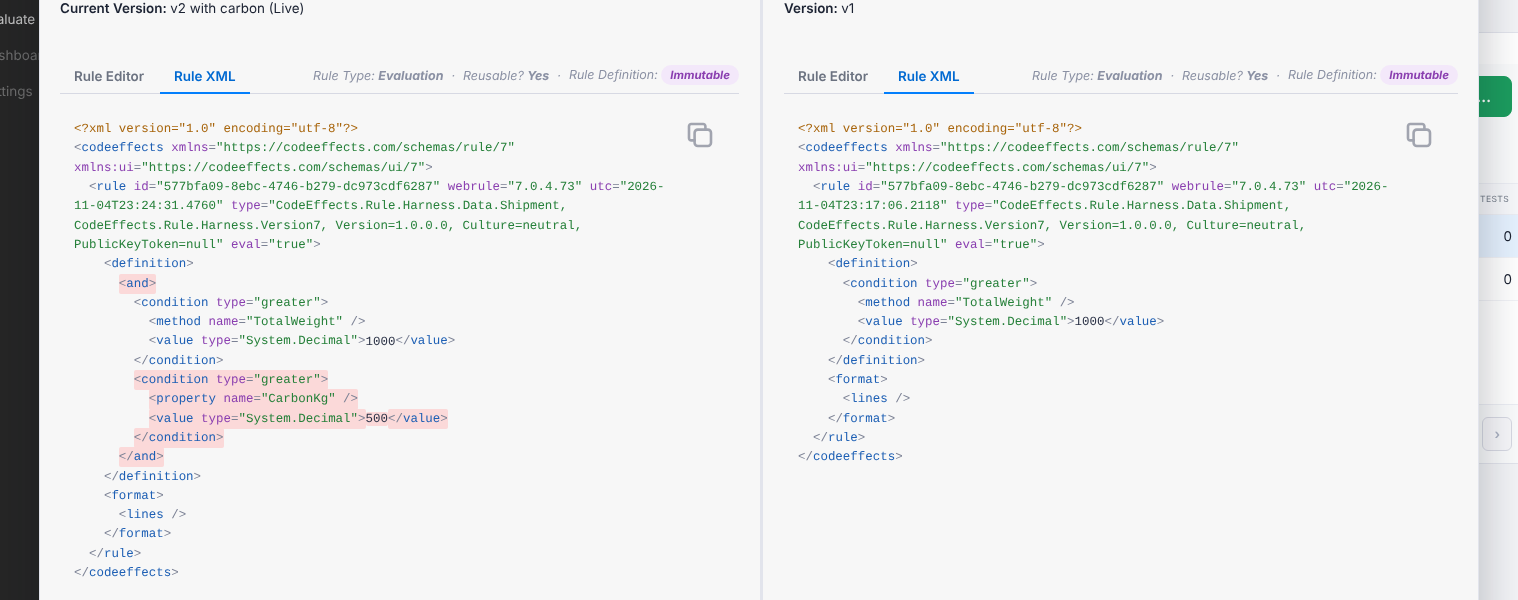
Do not change the stored documents with SQL. Nothing in RR expects it, the counters, indexes, and audit trail would no longer describe what is in the database, and the document of a version that was ever live is part of the record of what your application evaluated.
Saving Rules
Your application has no part in saving. The RR client talks to a single endpoint of your server, and that endpoint passes the request to RR. Its whole body is one call:
using CodeEffects.Rule.Repository;

app.MapPost("/api/rules", async (HttpRequest request) =>
{
    using var reader = new StreamReader(request.Body);
    string requestJson = await reader.ReadToEndAsync();

    // The configuration says who the current user is and what that user may do
    string responseJson = Context.GetResponse(configuration, dbProvider, requestJson);

    return Results.Content(responseJson, "application/json");
});
Your code decides who is calling and what they are permitted to do, through the configuration. RR does the rest, including the checks that a rule can be saved, made live, or deleted. See the Rule Repository Glossary for the permissions and states involved.
Loading Rules for Evaluation
Your application evaluates the live versions of rules, and it asks for them by a query, not by reading the database. Two libraries can answer the query, and which one you use depends on the licenses you have:
- The Rule Repository library loads live rules for any application that has it. Its evaluations leave no record.
- The Audit library is a separate product with its own license. It reads the same database, loads the same live rules, and in addition records every evaluation: which version of which rule ran, what it read, and what it returned. An application that has Audit loads its rules through Audit, so that the evaluations are recorded.
Both take the same RuleQuery, which finds rules by their IDs (ByIds), by their names (ByNames), or by their source object (BySource), and narrows a query to a source object (InSource) or to a rule type (OfType). Both return a ruleset that holds the live version of each rule the query names, and both follow the same rules:
- Only live versions. There is no way to ask for a version by number. A version your application should evaluate is a version someone made live.
- Everything a rule calls. When a rule calls reusable rules, or executes other rules, the ruleset includes their live versions as well, so the engine finds them without a rule resolver.
- A description of the ruleset.
ruleset.Rules lists every rule it holds with its ID, name, rule version, source version, and type, and ruleset.Rule(name) finds one. Rules that were added because another rule calls them are marked with IsCalled.
- Clear failures. A rule is returned only when it has a live version. When the query matches no live rule, or a rule it returns calls a rule that has none, the call throws a
RuleException that names the problem.
Create the evaluator once and keep it for as long as the ruleset is current. To pick up a version that was made live later, load the ruleset again.
Without the Audit Library
The GetRules() method of the Context class of the Rule Repository library takes your database provider and a query. It returns a LoadedRuleset, whose Xml goes to the evaluator as it is:
using CodeEffects.Rule.Common.Models;
using CodeEffects.Rule.Engine;
using CodeEffects.Rule.Repository;

// The live rules of one source object
LoadedRuleset ruleset = Context.GetRules(dbProvider, RuleQuery.BySource("MyApp.Orders.Order"));

var evaluator = new Evaluator<Order>(ruleset.Xml, new EvaluationParameters());

// Evaluate one rule of the ruleset, found by its name
bool approved = evaluator.Evaluate(order, ruleset.Rule("Approve large orders").Id);
The document in ruleset.Xml is the Rule XML of each live version as it is stored, in one document. Nothing in it is meant for anything but the engine, and nothing is recorded when you evaluate it.
With the Audit Library
The GetRules() method of AuditRecorder takes the same query and returns an AuditRuleset. The recorder is created once, from the same database provider, and attached to the evaluation parameters, so that the engine tells it what each rule read and returned:
using CodeEffects.Rule.Audit;
using CodeEffects.Rule.Common.Models;
using CodeEffects.Rule.Engine;

var audit = new AuditRecorder(dbProvider);

// The live rules of one source object
AuditRuleset ruleset = audit.GetRules(RuleQuery.BySource("MyApp.Orders.Order"));

var parameters = new EvaluationParameters();
audit.Attach(parameters);

var evaluator = new Evaluator<Order>(ruleset.Xml, parameters);

// Evaluate one rule of the ruleset, found by its name
bool approved = evaluator.Evaluate(order, ruleset.Rule("Approve large orders").Id);
The ruleset that Audit returns carries more than the rules. The following is the ruleset of the rule "High-value air freight" from the example above, as AuditRecorder.GetRules() returns it:
<codeeffects xmlns="https://codeeffects.com/schemas/rule/7" xmlns:ui="https://codeeffects.com/schemas/ui/7">
  <rule id="38252da1-4f86-4177-ac55-6993a7240f97" webrule="7.0.4.73" utc="2026-11-05T15:38:28.2115"
        type="MyApp.Shipment, MyApp, Version=1.0.0.0, Culture=neutral, PublicKeyToken=null"
        eval="true" auditRuleVersion="2018" auditSourceVersion="1007">
    <definition>
      <and testKey="R:38252da1-4f86-4177-ac55-6993a7240f97/g|0#1">
        <!-- the rule's conditions, each stamped with a testKey -->
      </and>
    </definition>
    <format><lines /></format>
  </rule>
</codeeffects>
The auditRuleVersion and auditSourceVersion attributes, and the testKey attributes on the elements, are what let Audit record which version of which rule ran, and what each part of it did. The engine ignores them in every other respect. Use the ruleset as it comes: do not store it, do not edit it, and do not take its documents out to evaluate them elsewhere, because a rule that did not come from AuditRecorder.GetRules() is evaluated but not recorded.
Choosing Between the Two
Store rules yourself when the Rule Editor is one component among many in an application that already has a place for its rules and its own rules for who may change them, and the application does not need to know what ran. Choose the Rule Repository when you need what stand-alone storage leaves to you: versions that never change, drafts, approvals, who changed what and when, and tests. Add the Audit library, which is licensed separately, when you also need a record of every evaluation.