What's New in Version 7
Code Effects version 7 expands the platform from rule authoring and execution to comprehensive decision management. The new Rule Repository brings rules, versions, approvals, testing and production insights into one workspace. The optional Audit library makes individual decisions traceable and explainable, while the new MCP server connects external AI agents to your rule environment.
AI capabilities built directly into the Rule Repository help users create business logic, investigate decisions and explore rule history through conversation. Richer rule expressions and a refreshed editor make sophisticated logic easier for people and AI agents to understand. Throughout the platform, your organization retains control of its data, infrastructure, permissions and publishing decisions.
The features below are available from version 7.0, except database support explicitly identified as upcoming.
The Rule Repository
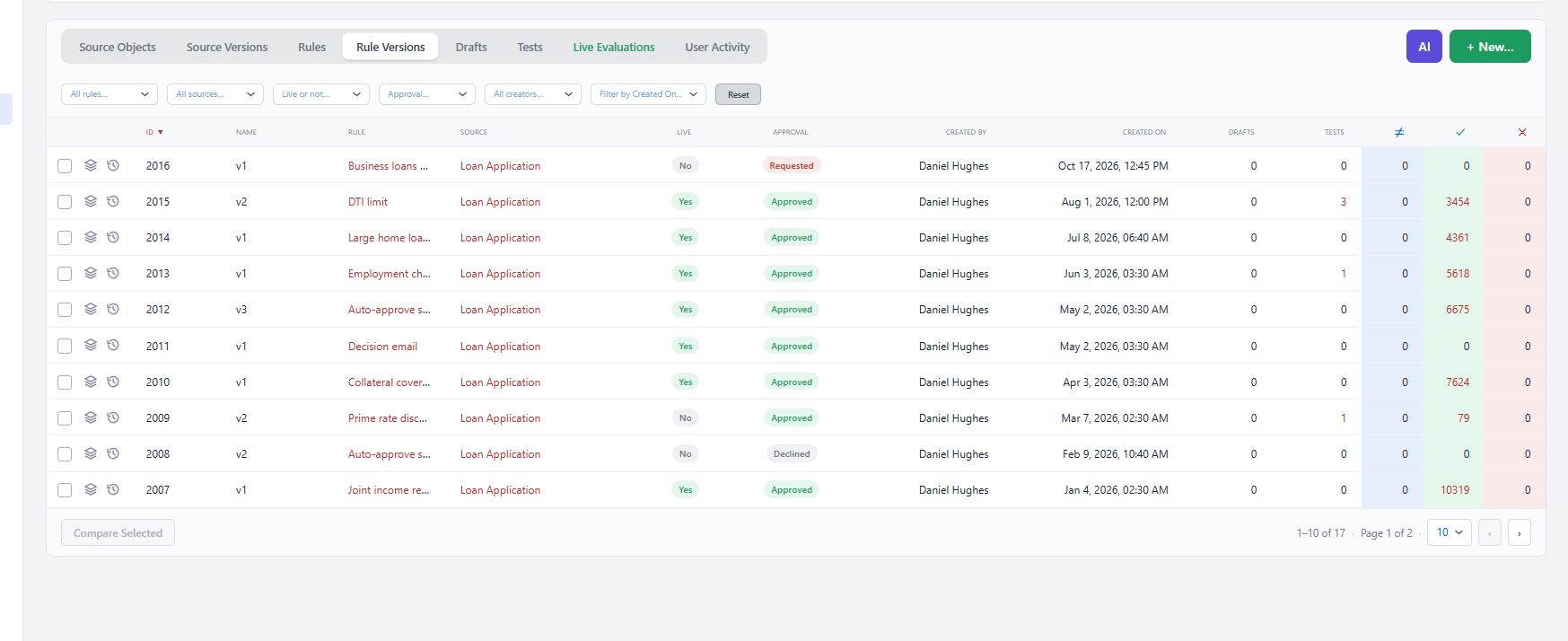
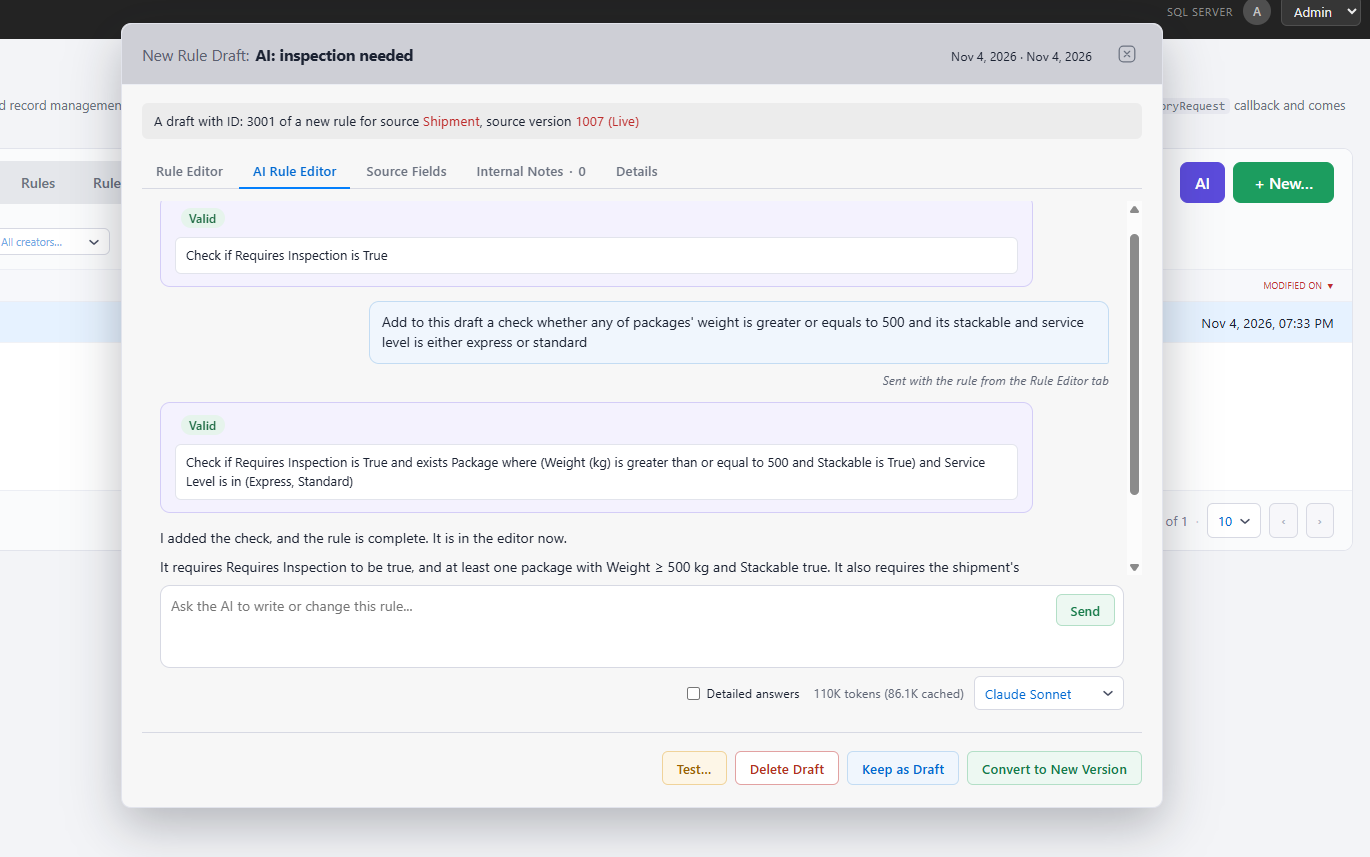
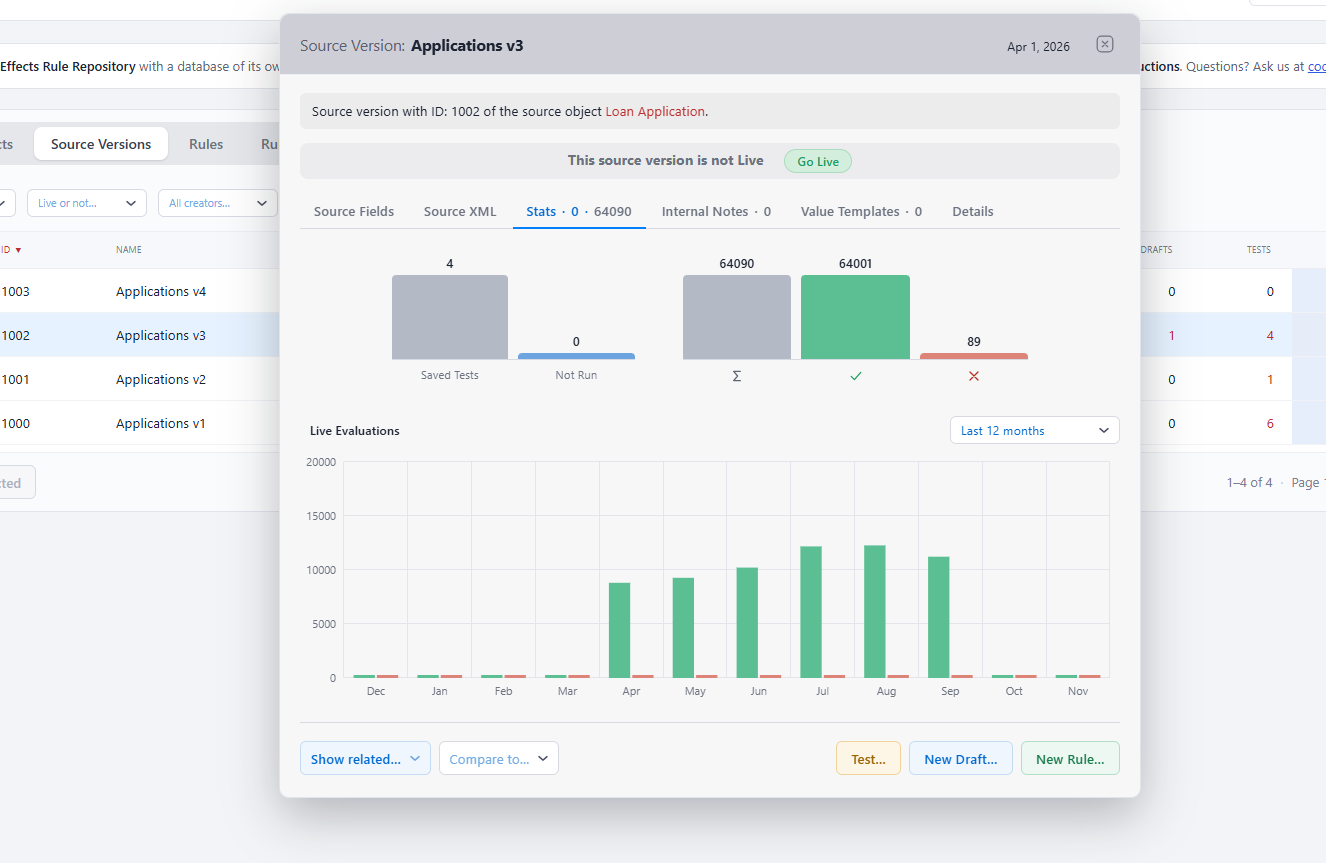
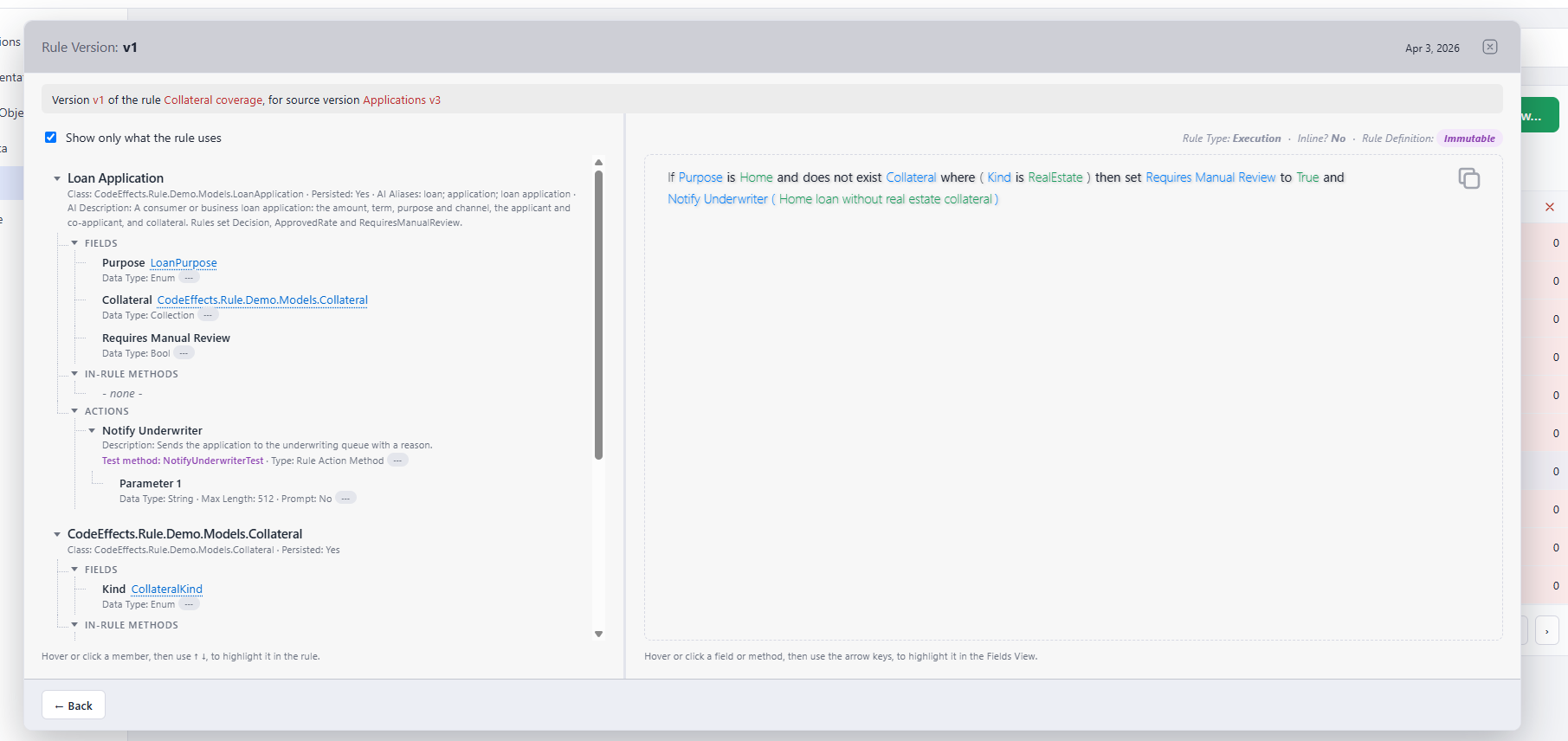
The Rule Repository (RR) gives business users an integrated environment for developing, testing, approving and managing the logic behind application decisions. Its ready-made interface includes rule editors, searchable grids, filters and dialogs, supported by a complete storage and data access layer. Development teams can bring these capabilities into their applications without building a rule management system of their own.
Your Database, Your Infrastructure, Your Control
Choose the database that fits your organization. RR supports SQL Server and PostgreSQL, with Oracle and MySQL support planned for upcoming minor versions. Your rules remain on your own hardware, under your own security context, with no hosting by Code Effects.
Code Effects provides the initial database creation script and subsequent updates as numbered scripts, verified against the database version you currently have. You control when those scripts run and how changes are deployed. Complete database providers and data access are included: supply your connection strings to the appropriate provider, and RR handles storage and retrieval for rules and repository features without requiring custom data access code.
Source Versioning That Reflects Business Impact
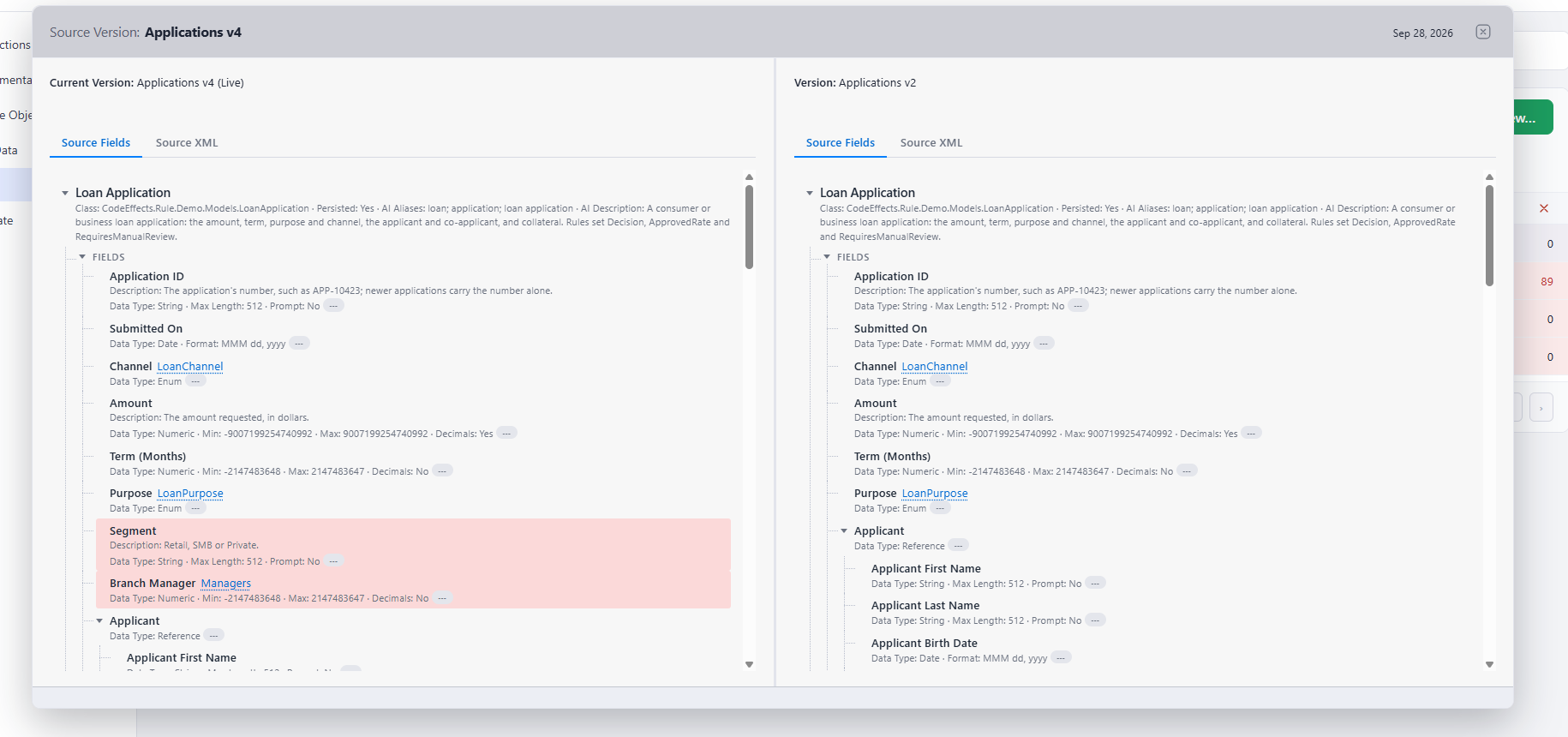
Keep rules aligned with the business data and operations exposed by your application. RR creates a new source version only when a change could affect how a stored rule evaluates, such as a renamed field or a changed data type. Display names and descriptions update in place, keeping presentation changes from creating unnecessary versions. Users can explore each source version and compare fields side by side to understand what changed.
A Precise History of Every Rule
Every saved rule change creates an immutable version linked to the source version used to author it. Users can clone versions, compare their underlying rule definitions, and move rules to newer source versions. During a migration, RR identifies elements the newer source cannot resolve, making the changes that need attention visible before the logic moves forward.
Approval and Publishing with Clear Accountability
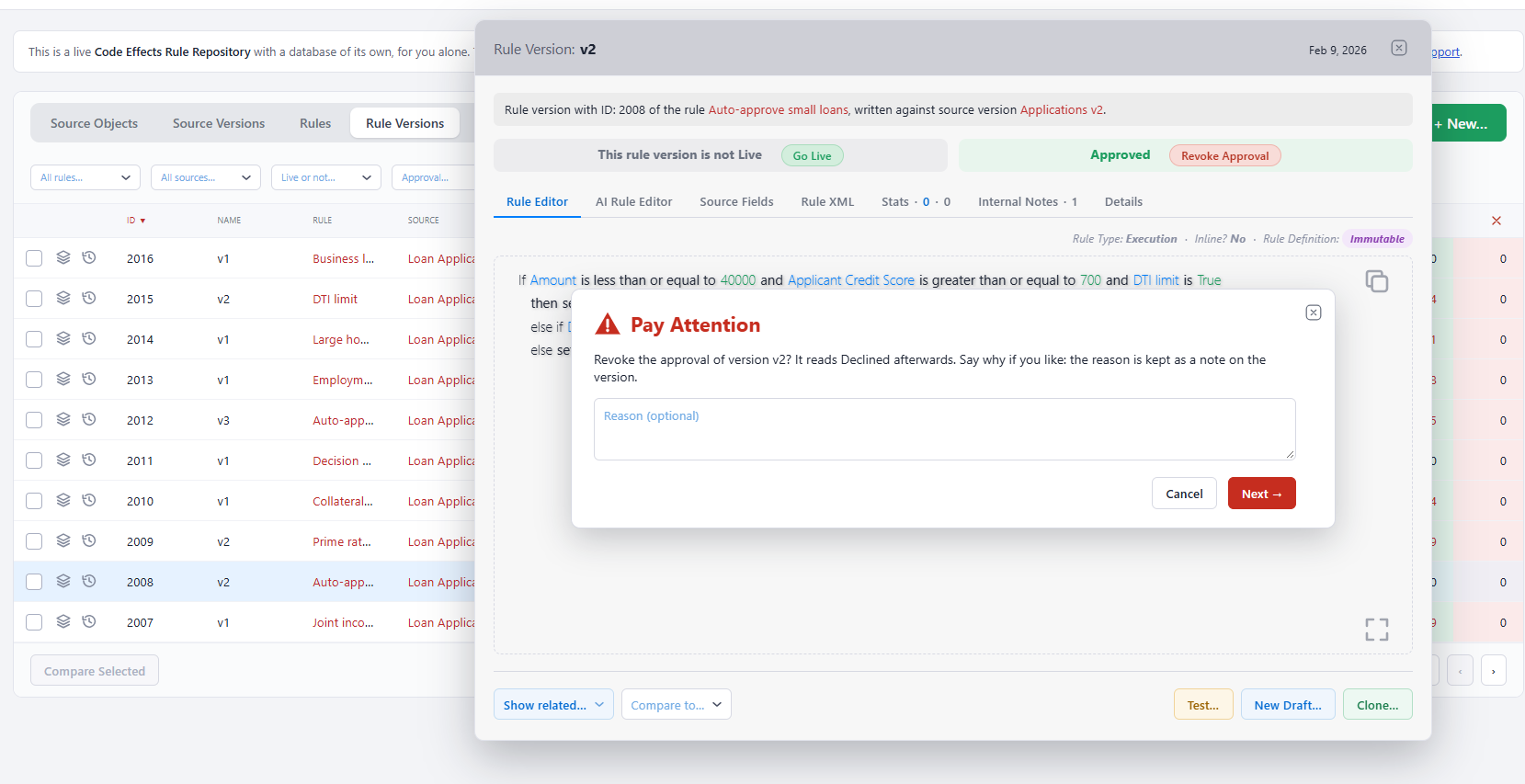
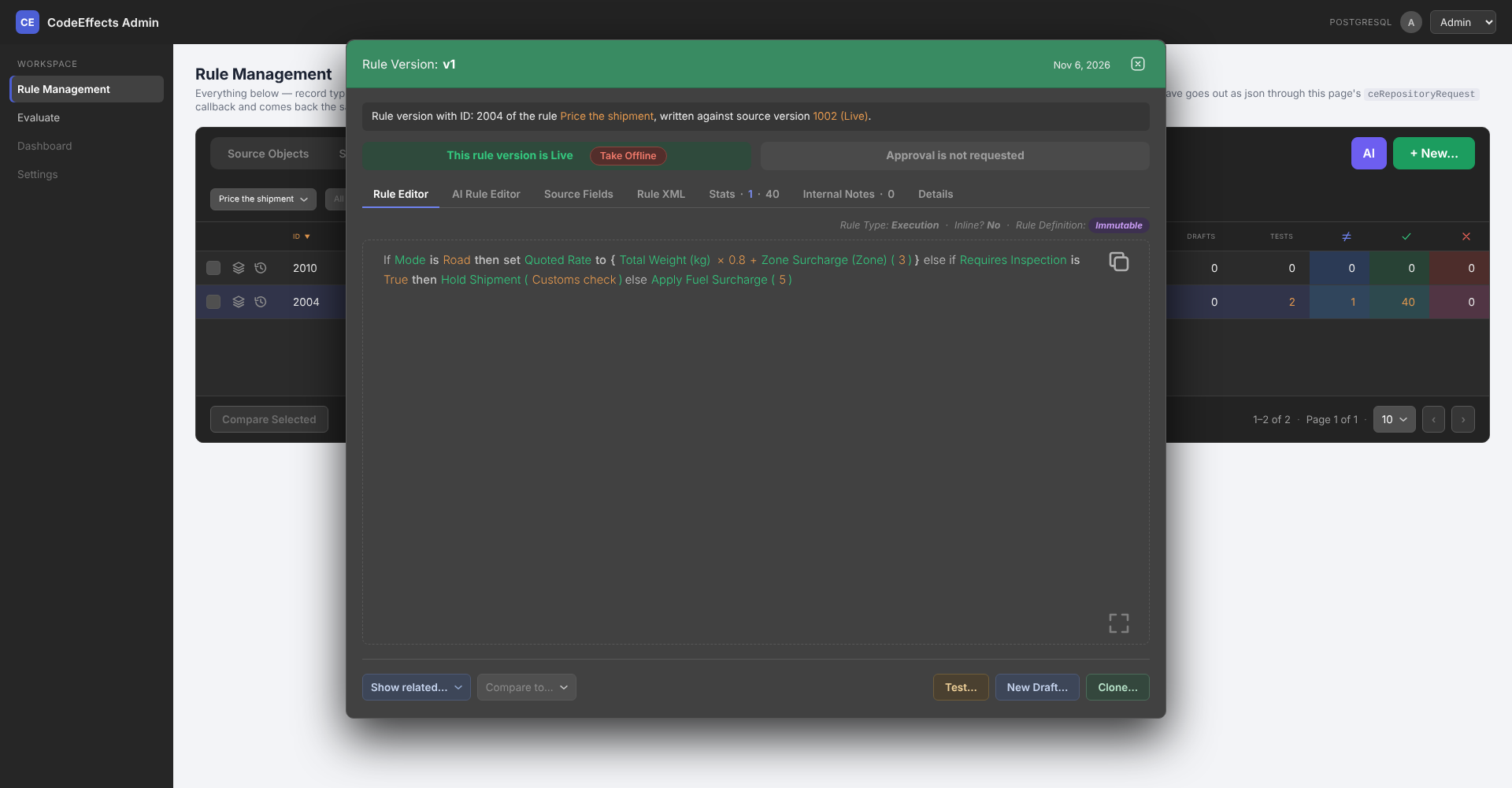
An explicit decision workflow of approval and publishing provides the review, control and traceability expected of a modern decision automation platform, and the host application decides which of its users may take each step. Each rule has at most one live version: the version your application evaluates. Versions can be submitted for approval, approved, declined or revoked, with notifications keeping the host application informed.
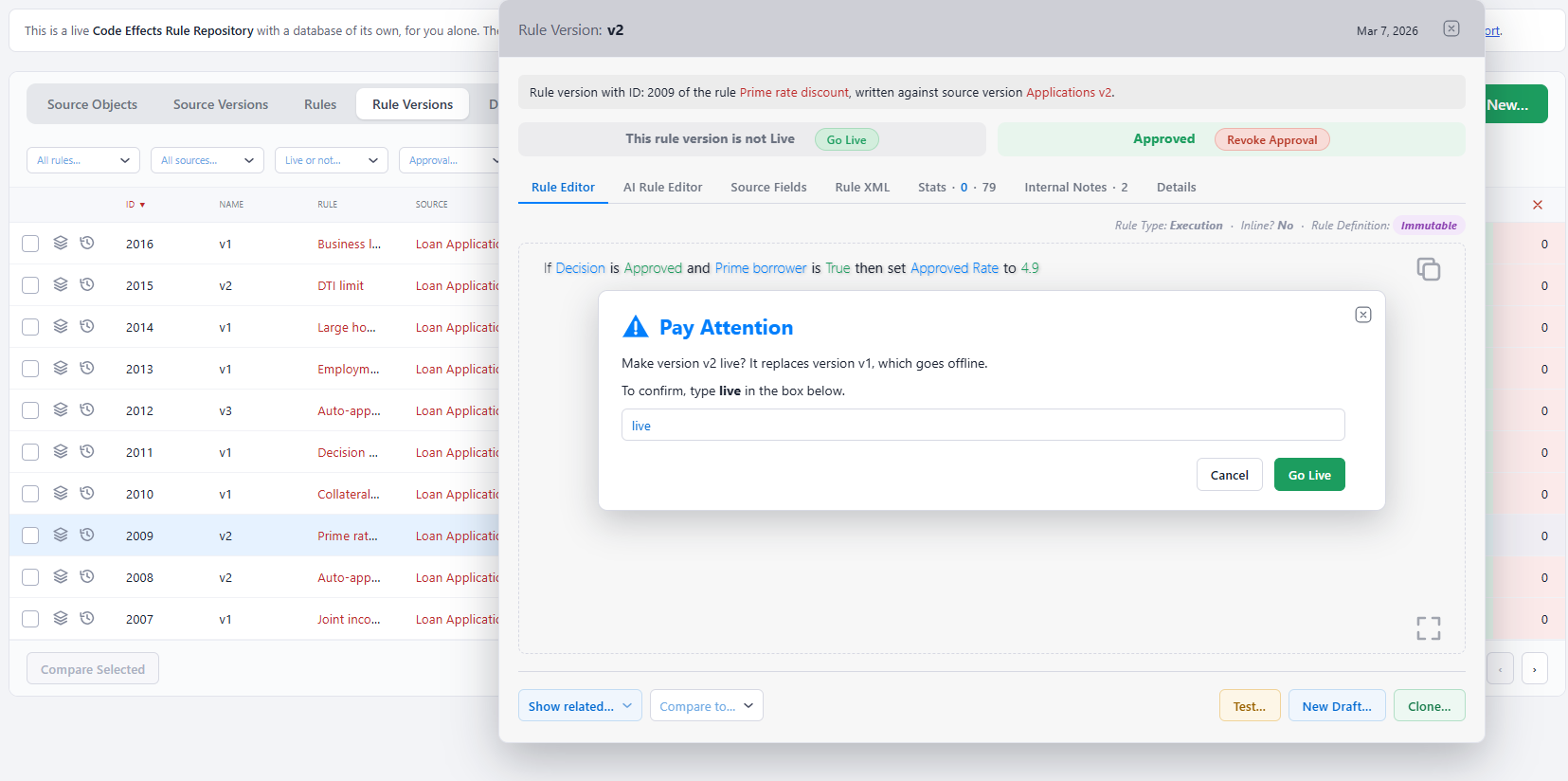
Go Live, Take Offline and approval actions require a typed confirmation. Together with permission checks, immutable versions and activity records, these deliberate steps give authorized users control over which business logic reaches production and when it is withdrawn.
A Playground for Ideas and What-If Scenarios
Create a draft on the fly to explore an idea, experiment with existing logic or test a scenario before a formal rule exists. Draft logic can be tested without saving it, giving users room to investigate alternatives before committing to an approach.
Save a draft whenever the work is worth keeping, then refine it as often as needed without creating rule versions. When ready, promote it to a new rule or a new version of an existing rule, carrying its notes and history forward.
Test Logic Before You Commit to It
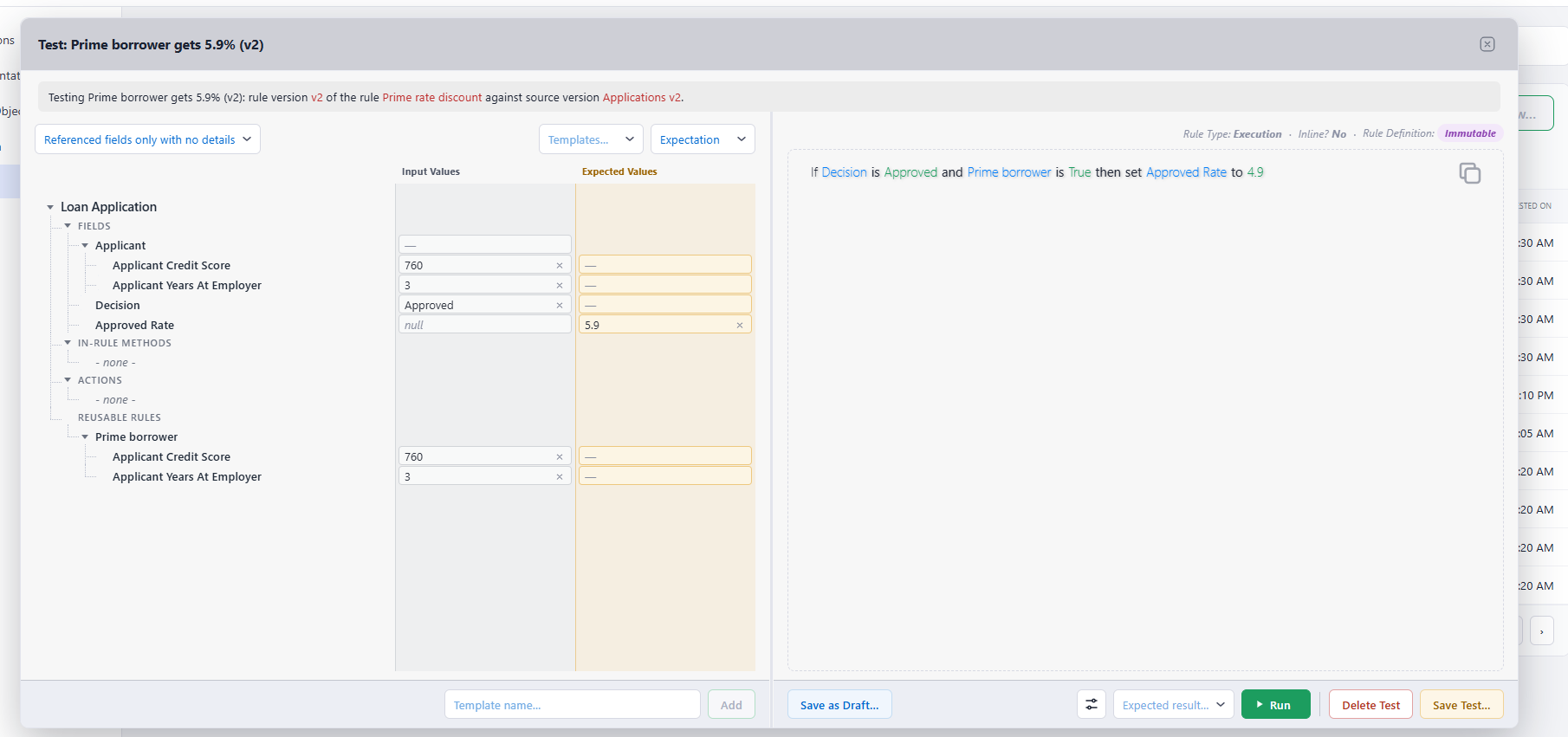
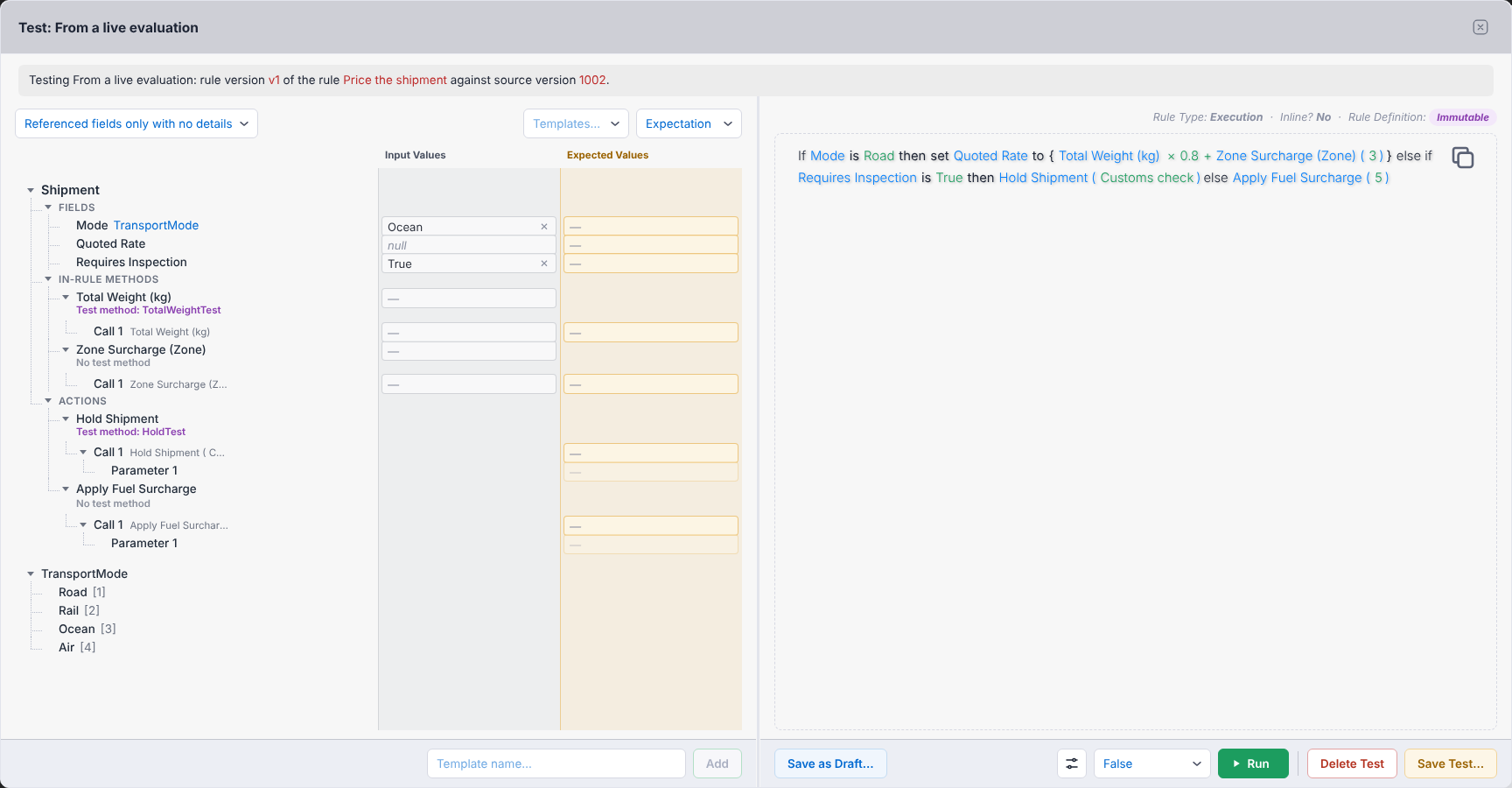
Try a new rule or a proposed rule version against values you enter before saving it. The same testing capabilities remain available after publication, supporting both early experimentation and ongoing verification against your application's real classes.
Exploration tests support what-if analysis: vary the inputs, examine different cases and discover how the logic responds. Expectation tests define an outcome the business logic must produce and report whether the evaluation passes or fails.
Each run exposes the decision path, resulting data values and conditions that led to the outcome, including conditions that were satisfied or prevented a result. Users can see how a decision was reached, making testing a practical foundation for explainability and audit review. Application-defined test methods can replace operations that should not execute during a test. Tests can be saved, created from value templates or recorded evaluations, and run in batches of up to 350.
Investigate Real Decisions and Reproduce Them as Tests
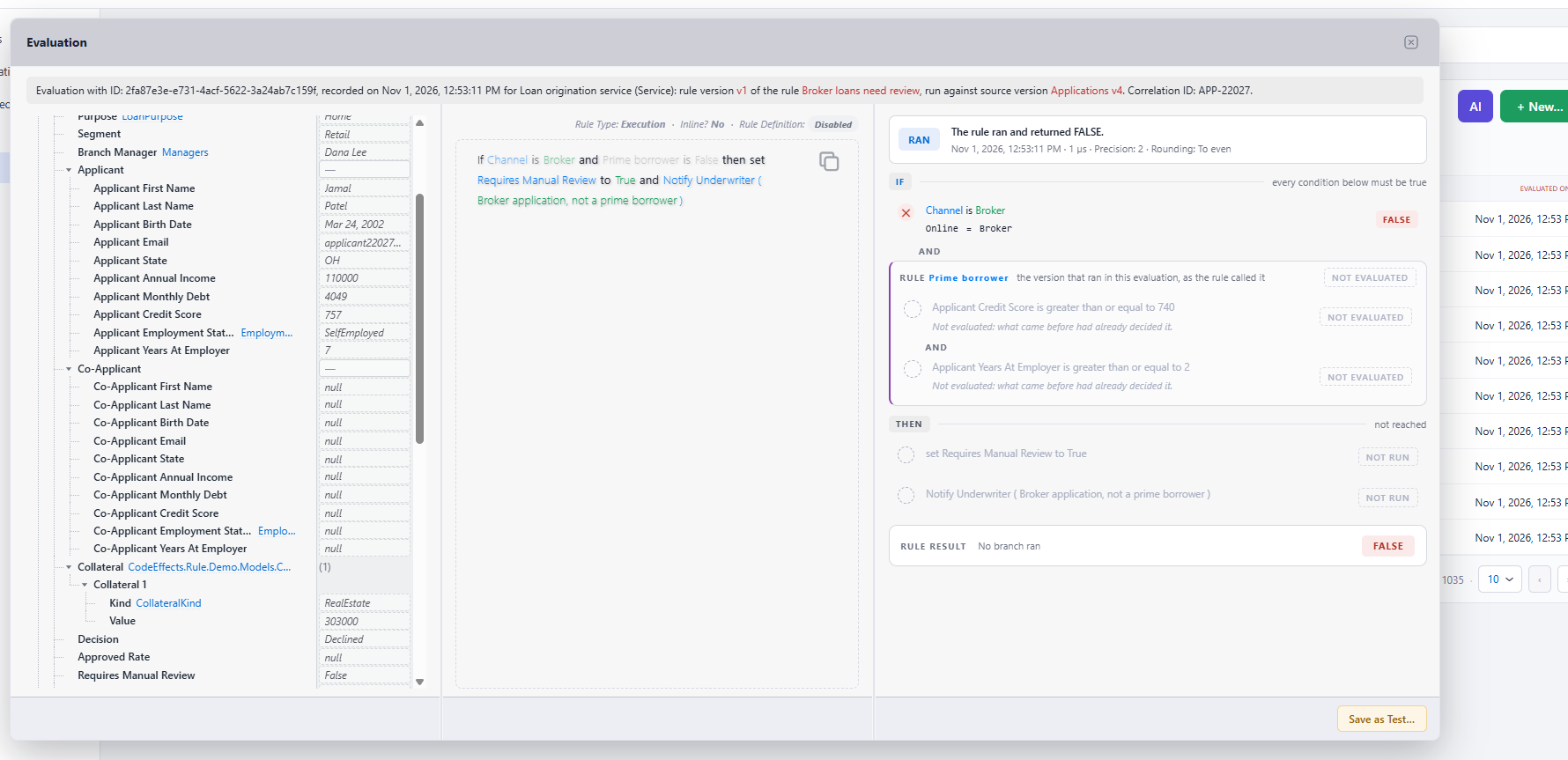
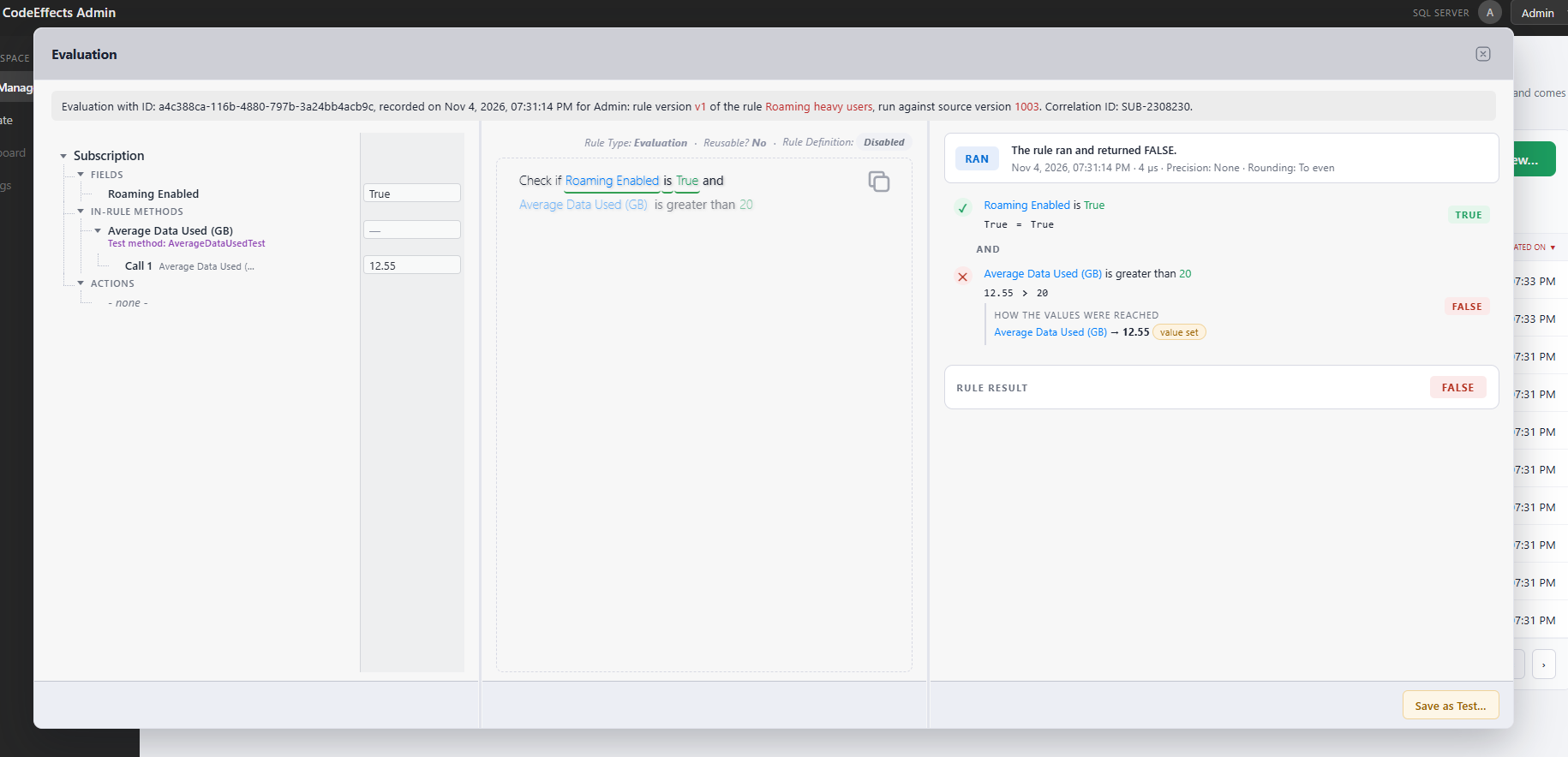
When the optional Audit library records production evaluations, RR brings those records into the same workspace as your rules. Open an evaluation to inspect its exact rule version, outcome, values and decision path. Replay it step by step, identify the conditions or actions responsible for the result, and save it as a new test using the actual production data.
Reuse Logic with Dependency Protection
Connect business logic through reusable and inline rules. A rule calls the live version of the rule it references, while RR prevents changes that would create a circular dependency or break a calling rule. Teams can build on established logic with visibility into the relationships that keep it working.
Activity Records That Support Investigation and Reporting
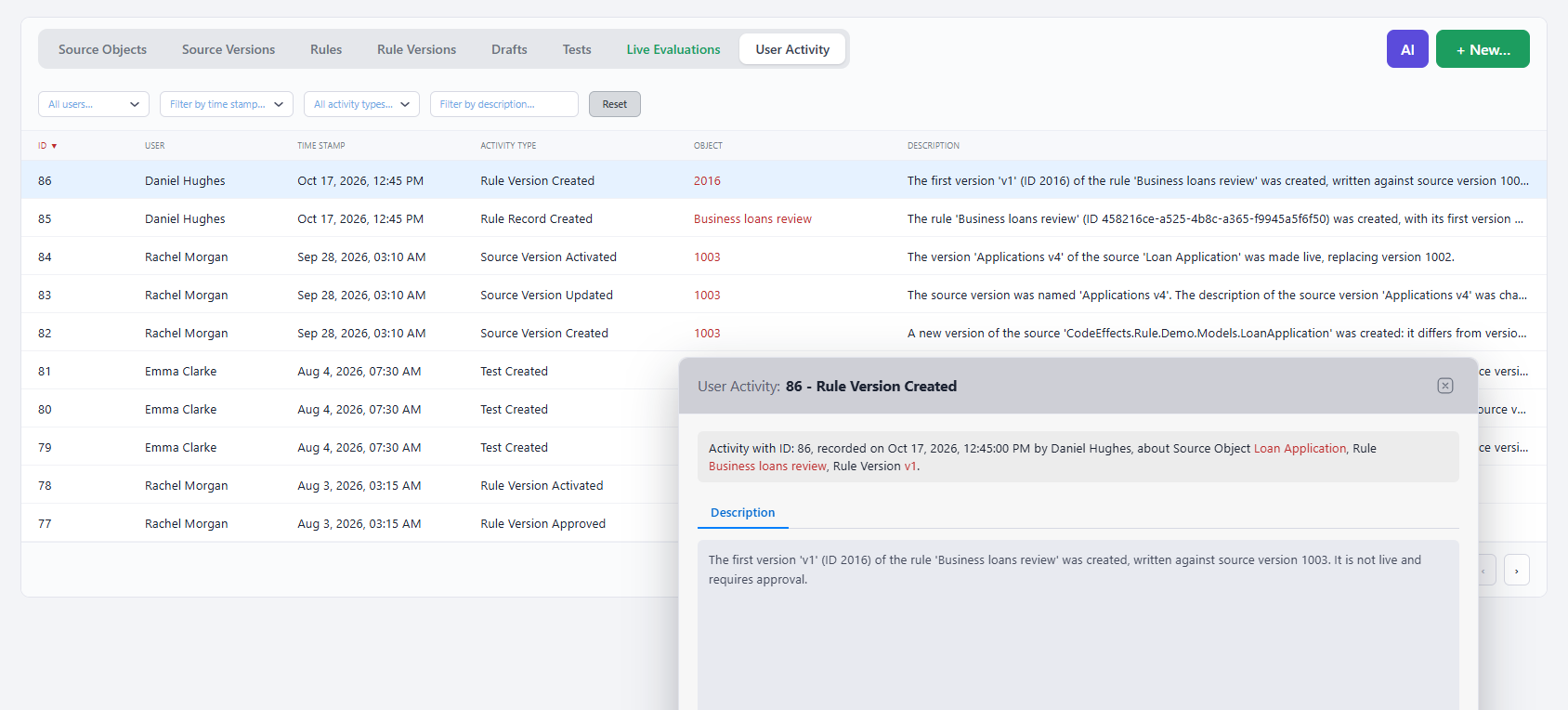
RR records who created, updated or deleted an object and who used key repository features. Records identify the affected objects and, when an AI agent acts on a user's behalf, the person it represented. These records support activity reporting, historical investigation and authorized AI queries alongside rule and evaluation history. Object descriptions and working notes preserve the business context behind the changes.
Permissions That Follow Your Application's Security Model
Use your application's existing security context to determine what each request may do. RR's 37 permissions govern meaningful repository actions and can reflect your organization's identities, roles and access policies. The host application supplies permissions for every request, allowing access to adapt to its security model and the current operation.
Permissions are enforced in the interface and on the server. Actions unavailable to a user are disabled in the UI, and unauthorized requests are rejected by the server. Additional restrictions on AI agents and services preserve human control over approval, deletion and production changes.
An Interface That Fits Your Audience and Your Brand
Adapt RR to your users with text supplied by a single, translatable XML file. Light and dark themes, fonts inherited from your page, and layouts that adjust to tablets and phones help the repository feel at home in your application.
Built for Strict Application Security
Version 7 combines request-level authorization with browser security protections suited to demanding application environments. Every request carries an anti-forgery token, and configurable limits govern request sizes and counts. Text is rendered as text, and RR supports pages that enforce Trusted Types and a Content Security Policy without inline styles.
Live Rules, Ready for Your Application
Retrieve the live versions of your rules together with the rules they depend on as a complete ruleset ready for evaluation. RR handles dependency resolution, simplifying the transition from managed business logic to application execution.
AI Assistant and AI Rule Editor
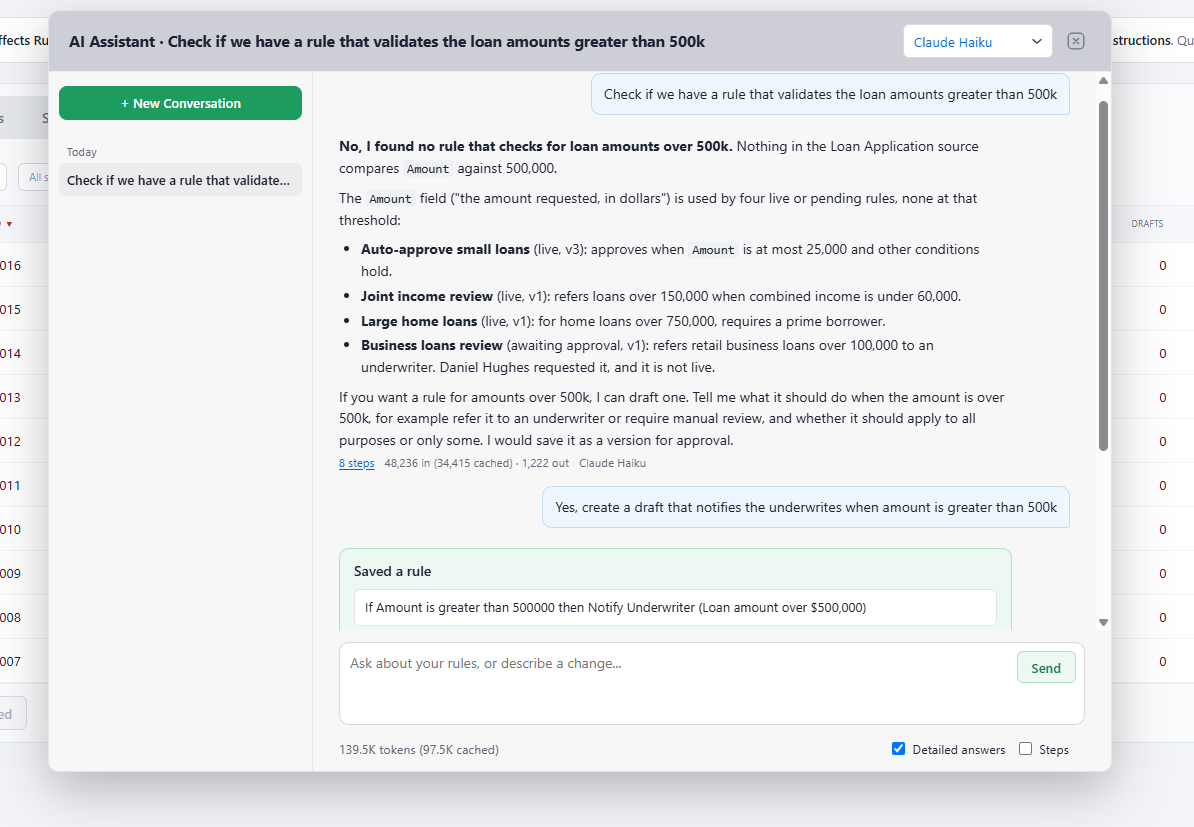
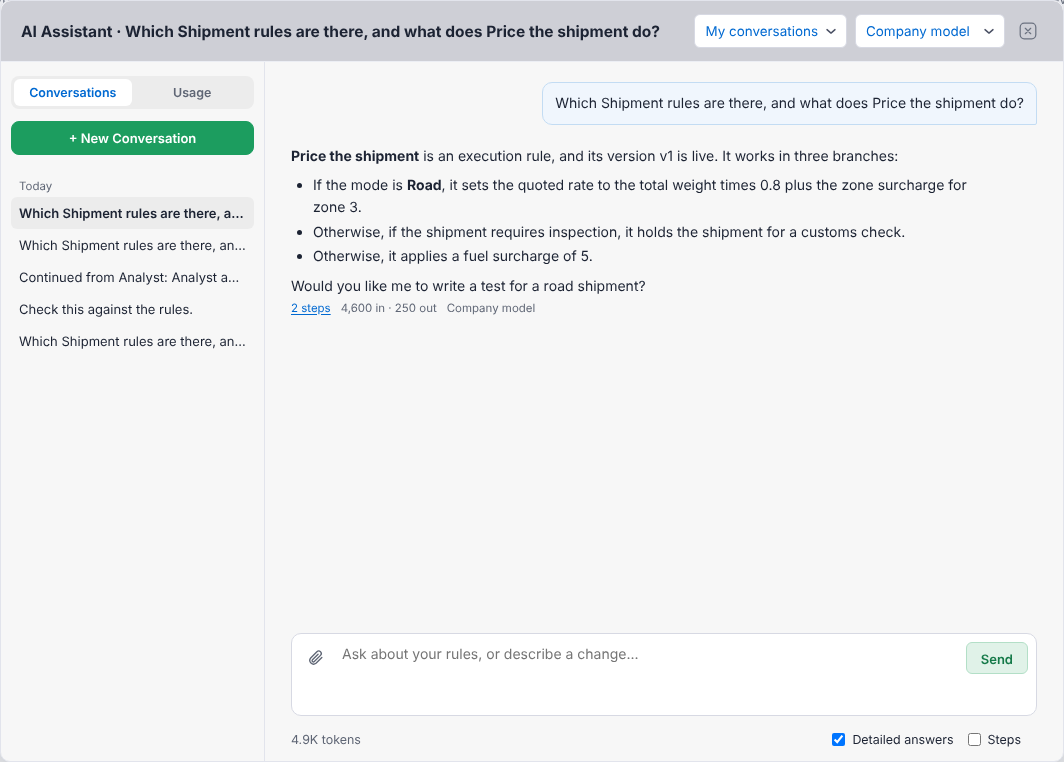
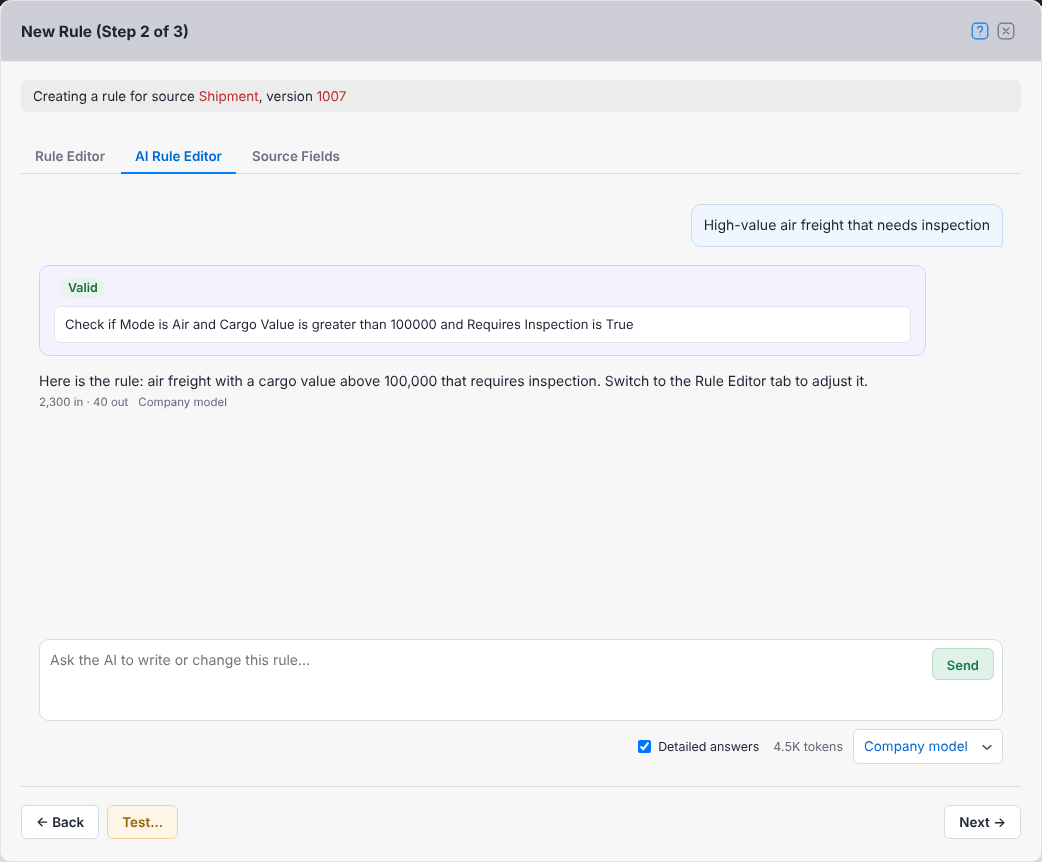
Bring AI directly into the rule management experience with your choice of one or more language models that support tool calling. Anthropic's Claude and OpenAI's GPT models have been tested, and your application controls model selection and API keys.
The AI Rule Editor and AI Assistant are included in the Rule Repository library and do not require the MCP server. They give authorized users conversational access to rule authoring, testing, investigation and reporting within the repository itself.
AI Rule Editor: Describe Business Logic in Any Language
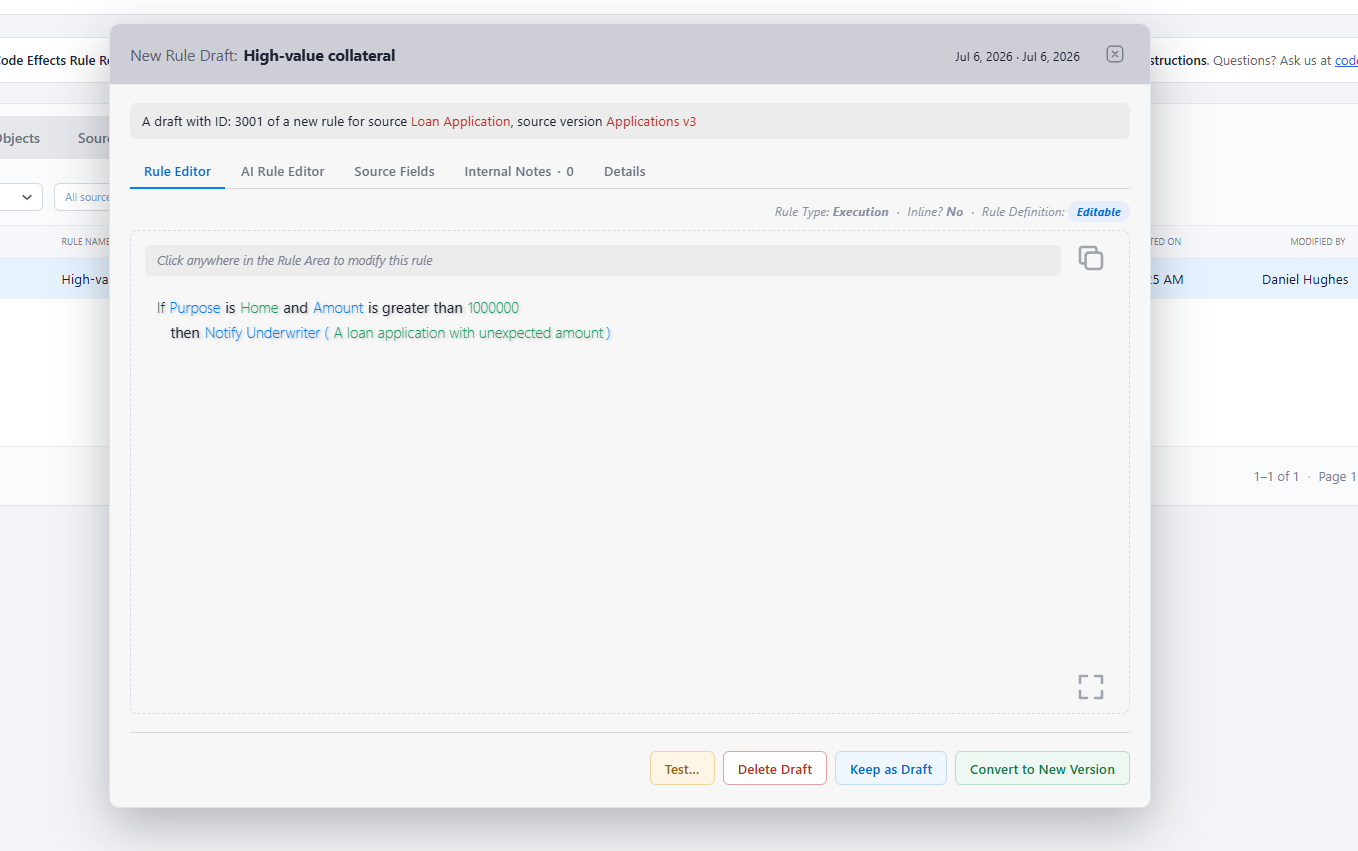
Assist the standard natural-language Rule Editor with an AI authoring experience that accepts instructions in any language. Users can describe the logic they need or request changes to an existing rule, letting AI compose the rule from their instructions.
Every generated rule is checked against its source object, with validation results shown immediately. The AI editor sits alongside the standard Rule Editor, so users can move between conversational authoring and direct editing while keeping the latest rule.
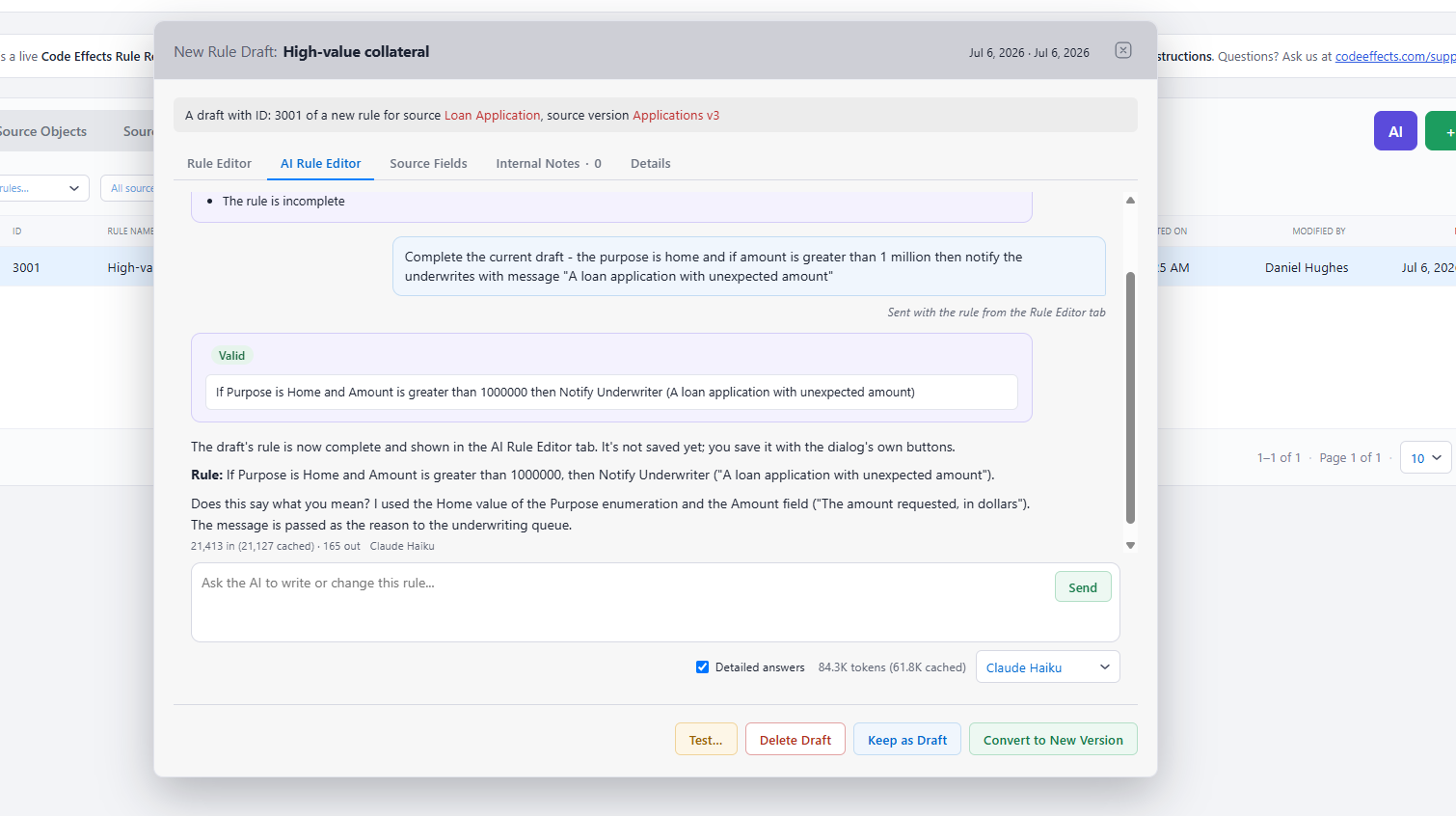
AI Assistant: Work Across the Rule Database
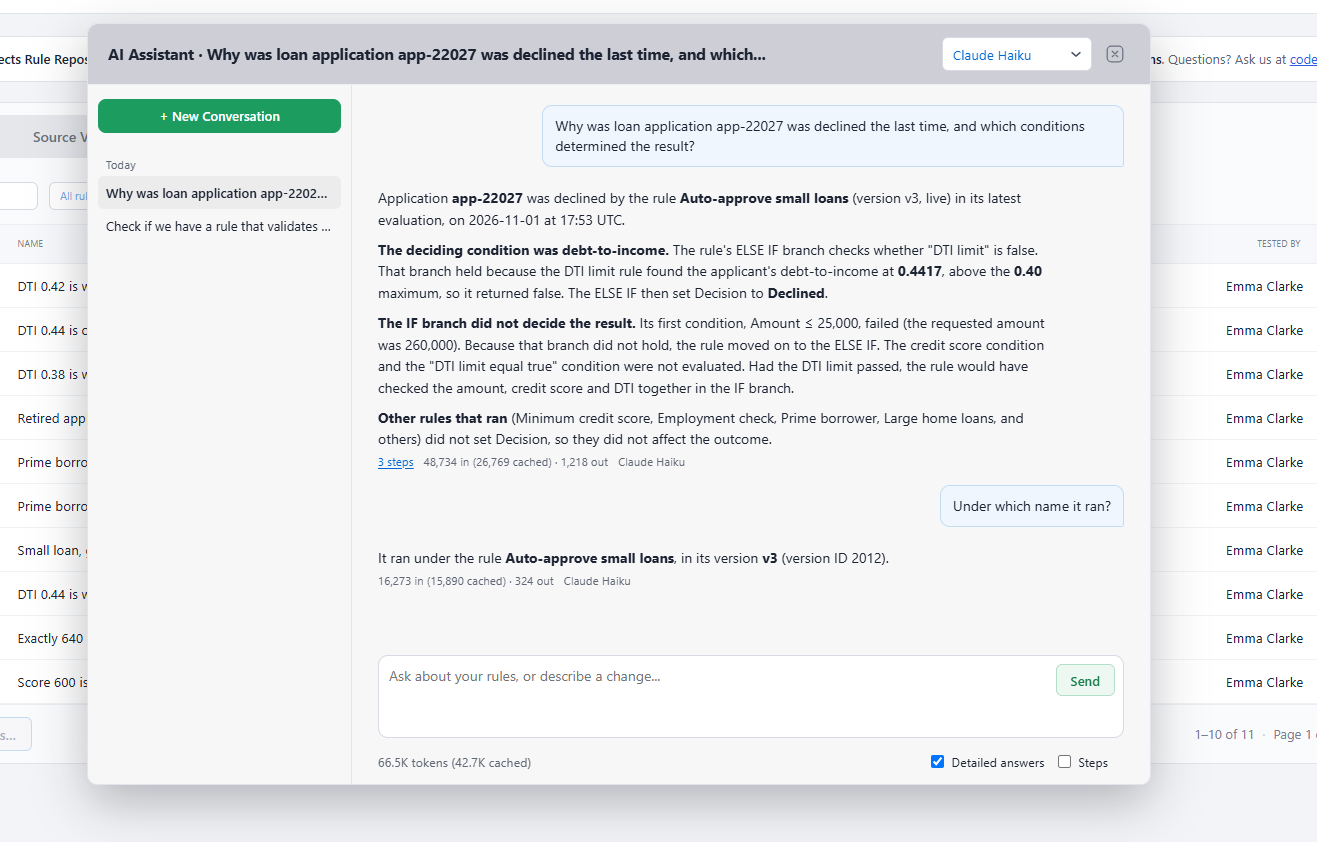
The AI Assistant gives users a dedicated conversation for working across the entire rules database, with access governed by the host application's permissions. It can find and explain rules, create and update rules, rule versions, drafts and tests, and run tests. It can also query rules, test history, recorded evaluations and user activity to retrieve historical information, calculate aggregates and support reporting.
The Assistant shows its steps as it works, preserves conversation history, and reports token usage and cost for each conversation. Users with the appropriate permissions can access other users' AI sessions, supporting oversight and review of AI-assisted work.
Ask Business Questions About Rules and Decisions
Move from locating records to understanding what they mean. With the appropriate permissions and available records, users can ask questions such as:
- “Why was loan application LN-2048 declined, and which conditions determined the result?”
- “How many loan applications for amounts over $100,000 were evaluated last quarter, and how many were declined?”
- “Which versions of our lending rules were tested before they went live?”
- “Who changed this rule, when did it change, and what happened in subsequent evaluations?”
These conversations bring rule definitions, test results, evaluation history and activity records into a shared context for investigation and reporting.
Bring Policy Documents into the Conversation
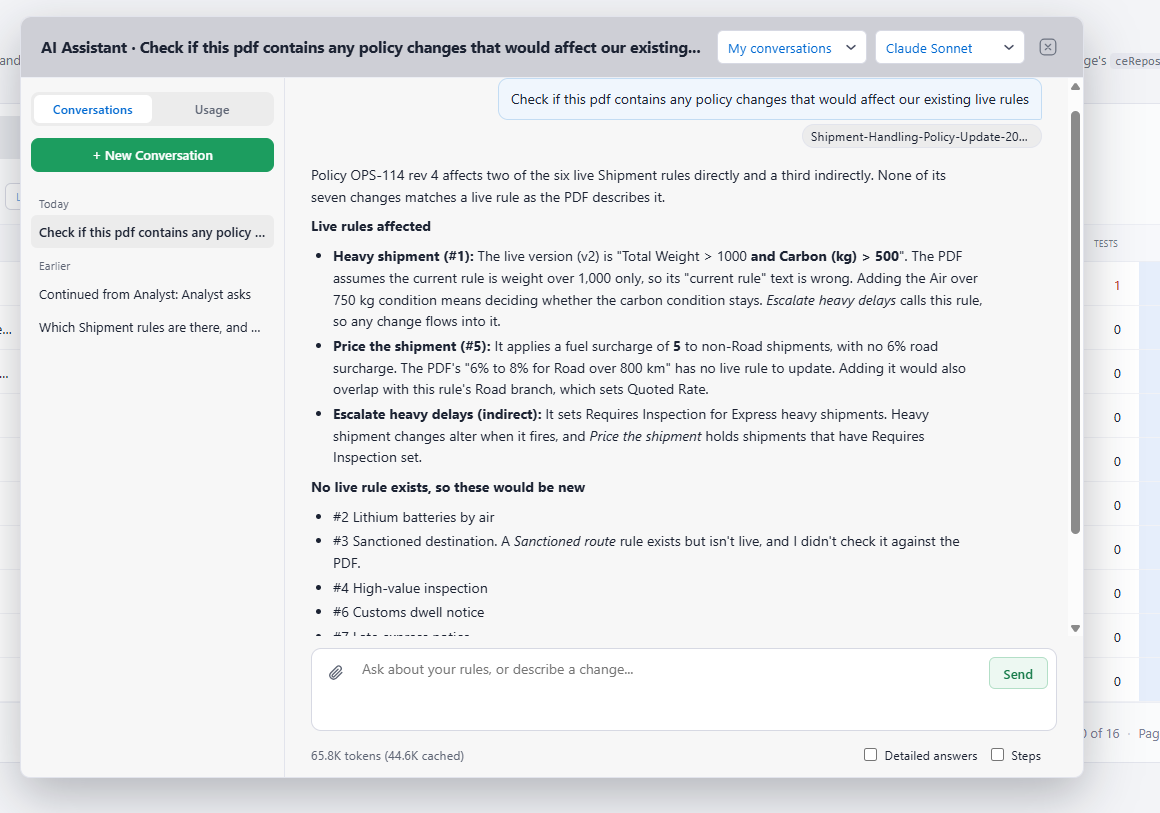
Authorized users can upload PDF files, ask questions about their contents, and compare their data or statements with existing rules, recorded evaluations, user activity and aggregate results. For example, a user can ask the Assistant to compare eligibility criteria in a policy document with current lending rules and identify differences. Document-based inquiry connects written business requirements with the logic and decisions recorded in RR.
Structural Guardrails for AI-Generated Logic
Code Effects' structured Rule XML gives AI agents a precise format they can validate immediately. As agents create rule versions or create and update tests and drafts, the platform's rule guardrails check the rule content against its structure and source, rejecting structurally invalid logic and returning validation feedback. Agents can verify these properties without requiring someone to manually read every generated result.
Structural validity establishes that the rule is well formed and compatible with its source. Whether it expresses the intended business policy still depends on requirements, testing and review; AI generation alone cannot guarantee business correctness.
Human Authority over Critical Actions
Code Effects applies explicit restrictions to agents acting on behalf of users, agents acting independently, and services the host application has not identified as users. These actors cannot delete, approve, move to production or take offline rules, sources or their versions, even if the host application mistakenly grants the corresponding permissions.
Every AI save requests approval. These restrictions apply alongside request permissions, preserving human authority over critical changes throughout AI-assisted work.
Audit
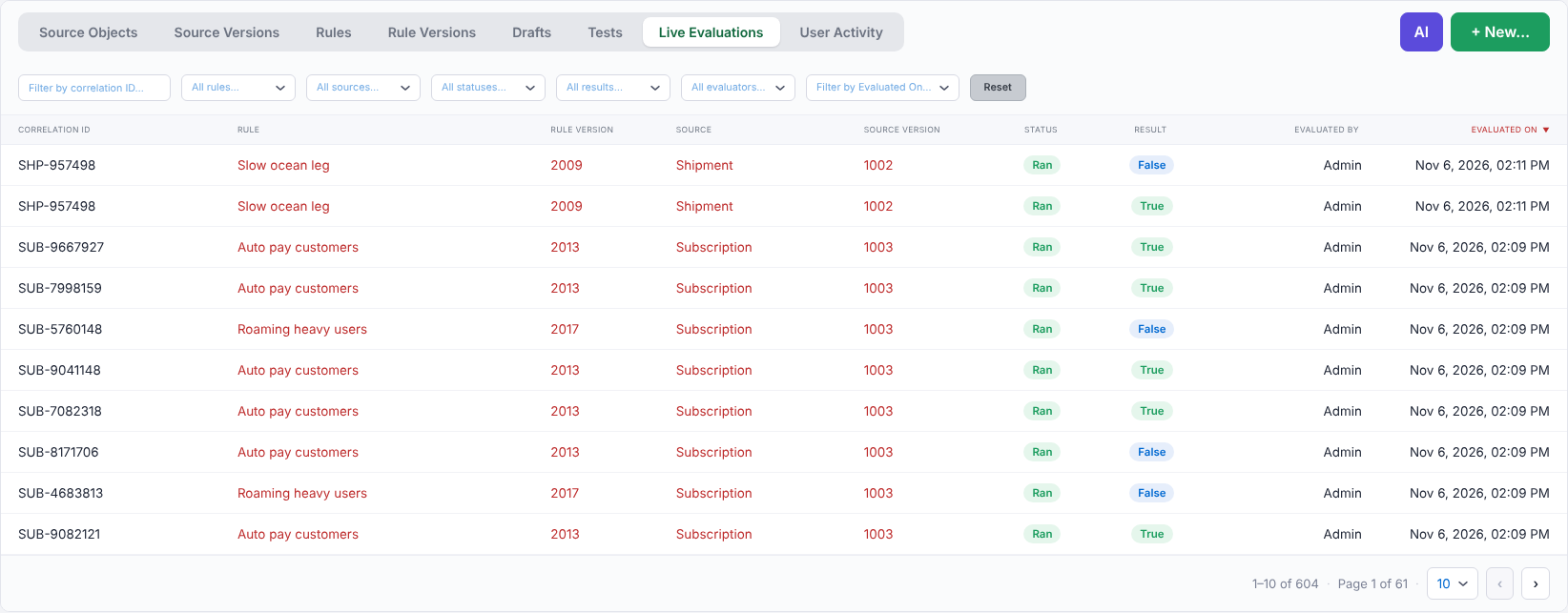
The new, optional Audit library captures a detailed record of production rule evaluations, making the reasoning behind individual decisions available for investigation. Each record is tied to the exact rule version that ran and can include its outcome, the branch taken, the values read, and the conditions or actions that led to the decision. Your application can record all values read or limit recording to selected values.
In RR, users can open an evaluation, examine its decision-making process and see why the result occurred. Together, the record and the replay in RR provide complete decision explainability: when each decision was made and for whom, how it was made, and why it came out the way it did, supporting detailed auditing and historical review. Any recorded live evaluation can become a new test using the actual live data, allowing teams to reproduce a business case and check how their logic handles it.
Records are written first to a local journal and transferred to the database by a background worker, so rule evaluations do not wait for database writes. Audit connects production behavior with rule management, testing and authorized AI analysis.
MCP Server
The new MCP server extends rule management to external AI agents through the Model Context Protocol. Add it to your ASP.NET Core application to let compatible agents work with Repository, Audit or both using your application's own OAuth authentication. Credentials are handled through authentication rather than passed to individual tools.
Agents can inspect sources, rules, tests and evaluations, create and update rules, rule versions, drafts and tests, and use available history for investigation and reporting. They operate within request permissions and the same restrictions that govern AI inside RR: every save requests approval, and agents cannot delete, approve, publish or take objects offline. Tests that would call production code require confirmation from the person using the agent.
The MCP server provides an external integration channel. RR's built-in AI Assistant and AI Rule Editor work independently of it.
New Rule Editor Features
Version 7 expands the language available to business users and AI agents, making more complex decisions expressible as complete, readable rules. These enhancements are shared by the Rule Editor and Rule Engine and work in both stand-alone implementations and RR.
Together, inline rules, membership and range conditions, collection functions, string composition, and date and time expressions give AI agents clearer building blocks for understanding and generating logic. Generated rules can be displayed in their entirety in the standard rule format, without assembling separate fragments through special representations or diagrams.
Concise Membership Conditions with In and Not In
Express list-based conditions in a single statement, such as Status is in (Active, Pending). Membership lists support numbers, strings, dates, times, enumerations and dynamic menu data sources, making common business criteria more compact and readable.

Inclusive Ranges with Between and Is Not Between
Define ranges with clear boundary behavior. Is between now includes both bounds, while the new is not between expresses its exact opposite. Both operators support numbers, dates and times.
More Expressive Collection Logic
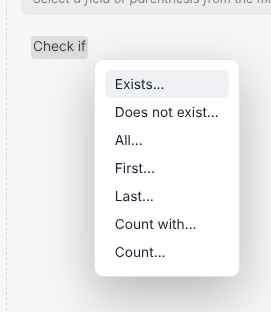
Work with collection conditions through one Collections... menu, including exists, does not exist, all, first, last, count and count with. These functions make it easier to express whether matching items exist, examine the first or last item, require a condition across all items, or count items that meet particular criteria. Conditions on all items evaluate to false when the collection is empty.
Compose Strings and Calculate Date-Based Values
Combine multiple values into a string with Concatenate..., or shift a date by a specified number of days, months or years. Expressions such as Order Date + 30 days bring familiar business calculations directly into a rule, making the relationship between data and policy easier to follow.
Execute Other Rules in Then and Else Actions
Inline rules allow an execution rule to run another execution rule from its THEN or ELSE section. Teams can compose larger decisions from existing action logic while keeping the overall rule readable for users and AI agents.
Richer Support for Dates, Times and Offsets
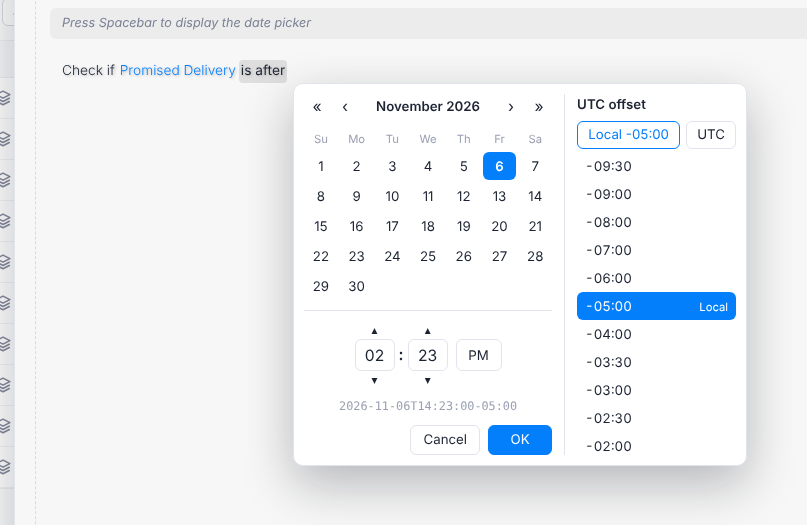
Work with date-only values, time-only values and date-and-time values that include an offset. Date-and-time fields displayed as dates are compared by their date component, and the offset-aware date picker allows users to specify the value's time zone offset explicitly.
Duration-Aware Authoring
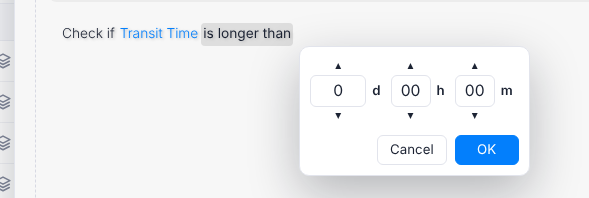
Represent elapsed time as a duration, with dedicated operators such as is longer than and is shorter than. A purpose-built picker uses the units configured for the field, helping users distinguish a length of time from a time of day.
Broader Support for Optional Values
Use enumerations that can contain an unspecified value, including collections of those values. The editor also prevents optional values from being passed to operations that cannot accept them, catching incompatible choices during authoring.
More Flexible Numeric and List Comparisons
Compare different numeric types using the wider of the two types, and compare a list with a field using a compatible shared type. These conversion rules allow more valid combinations while preserving consistent evaluation behavior.
A Refreshed Interface That Adapts to Your Design
Redesigned date and time pickers and light and dark themes bring a refreshed look to the editor. Inherited fonts and percentage-based text sizing help it align with your application's visual design.
Rendering Ready for Trusted Types
Names, descriptions and values are always displayed as text. The editor builds its interface without HTML strings, supporting pages that enforce Trusted Types without additional setup.
Source Objects
More Complete Adaptive Sources
Connect the repository to .NET types, Source XML or Adaptive Sources. The new unified source provider supplies source identity as well as inline and reusable rules for the editor. It replaces the older menu provider, which remains supported but is now deprecated.
More Expressive Source Definitions
Version 7 Source XML adds a source object display name, a complete listing of enumeration members, and labels for the reference properties from which fields are flattened. These additions give the platform more descriptive information about the data available to a rule. Version 6 source documents remain readable.
Source Metadata for AI, Testing and Business Context
Give AI agents additional context through member-level aliases and descriptions without changing the labels users see. Methods and actions can identify substitute methods for testing, while a source can designate a correlation field, such as a loan number, to associate evaluations with a particular business case.
Consistent Server-Side Dynamic Data
Dynamic menu data sources now run consistently on the server. Older source documents remain readable, with legacy data source location settings ignored.
Rule Engine and Compatibility
- Consistent method selection. The Rule Engine, Rule Editor and RR resolve method overloads in the same way, keeping validated rules aligned with the application methods used during evaluation.
- Unified version 7 schemas. Rule, interface and source definitions use version 7 XML schemas, while version 6 documents remain readable.
- More precise diagnostics. A dedicated error identifies rules that refer to an element missing from their source object, helping teams locate the cause of a validation problem.
Client-Side Integration
The browser components are delivered as two dependency-free npm packages using modern JavaScript modules: @codeeffects/editor for every application, with @codeeffects/repository added for applications using RR. Updated stylesheet names distinguish the editor's common, light and dark styles.
Implementation details are available in the Client-Side API Reference.
Products and Requirements
| Product or component |
Capabilities |
Target |
| Rule Editor, Rule Engine and shared components |
Rule authoring, evaluation and shared types |
.NET Standard 2.0 |
| Rule Repository |
Rule management, built-in AI tools and repository services |
.NET Standard 2.0 |
| Audit |
Production evaluation recording |
.NET Standard 2.0 |
| MCP server |
External AI agent integration |
.NET 8 |
| Database providers and connection components |
Database access for Repository and Audit |
.NET Standard 2.0 |
Version 7 introduces Code Effects packages. The Rule Editor and the Rule Engine are free for personal, community, development and research use as Code Effects Personal, with no limitations and no delays: any number of users, evaluations, developer seats and machines. They are available to everyone on NuGet as CodeEffects.Rule.Editor.Personal and CodeEffects.Rule.Engine.Personal. Commercial use requires a perpetual package: Code Effects Standard (the Rule Editor and the Rule Engine), Business (adds the Rule Repository), Enterprise (adds Audit) or Ultimate (adds the MCP server), the last three licensed per team of 30 users; Code Effects Source is the source code of the entire platform, for organization-wide use. The Assurance, Distribution and Support add-ons extend any paid package. One End User License Agreement covers every package. Every package except Personal is downloaded with a product key from the Code Effects Portal. All earlier editions and free versions are deprecated, with an upgrade path from previous versions. See Code Effects Packages.
RR's built-in AI features do not require the MCP server. The MCP server works with Repository, Audit or both and requires at least one of them. See Code Effects Packages for licensing information.
RR and Audit support SQL Server 2012 or later and PostgreSQL 14 or later. Oracle and MySQL support is planned for upcoming minor versions.