Decision Automation with Code Effects
Code Effects is an embeddable decision automation platform for .NET. It is not a separate system that you install and connect your applications to. It becomes part of your own application, so that business users can write, change and test the rules behind your decisions, while your application keeps full control of its data, its users and its security.
Every Code Effects implementation is built on the same two components:
- The Rule Editor, a web component in which business users write rules in plain language, choosing from menus that offer only what your data allows: Check if Order Total is greater than 1000 and Customer Tier is not Gold.
- The Rule Engine, a .NET library that compiles those rules and evaluates them against your own .NET objects in your production code.
What differs is everything around them: where the rules are stored, how versions are kept, who may change a rule, how a rule is tested and approved before it goes live, and how a production decision is explained later. Code Effects gives you two ways to handle that.
Two Ways to Run Code Effects
|
Stand-alone |
With the Rule Repository |
| What you add |
The Rule Editor and the Rule Engine |
The Rule Repository, which has the Rule Editor built in, the Rule Engine, and optionally Audit and the MCP server |
| Rule storage |
Yours: any database, files or service |
A SQL Server or PostgreSQL database the repository manages |
| Versions, approvals, going live |
You build them, if you need them |
Built in: immutable versions, comparisons, approvals, a live version per rule |
| Testing rules |
You build it, if you need it |
Built in: tests on your real classes, saved tests, batch runs |
| Who may do what |
Your own code |
Your sign-in, with the repository's permissions you assign per user |
| Explaining production decisions |
You build it, if you need it |
With Audit: every evaluation recorded, replayed and explained |
| AI |
AI prompts inside rules |
Also an AI Assistant and an AI Rule Editor, and AI agents through the MCP server |
| The user interface |
The editor, placed in your own pages and screens |
A complete rule management application in one element of your page |
| Time to production |
Typically 2 to 4 months for a team of two or three, with your own storage, versioning and testing |
Typically 3 to 4 days for one developer, plus 1 to 2 days of testing |
| Licensing |
Free for personal, community, development and research use as Code Effects Personal; commercial use requires the perpetual Code Effects Standard package |
The perpetual Code Effects Business (Rule Repository), Enterprise (+ Audit) or Ultimate (+ MCP server) package, licensed per team of 30 users |
Both ways use the same source objects, the same rules, the same Rule XML and the same engine, and both run entirely inside your applications. The difference is how much of the rule management you build yourself.
Stand-Alone: the Rule Editor and the Rule Engine
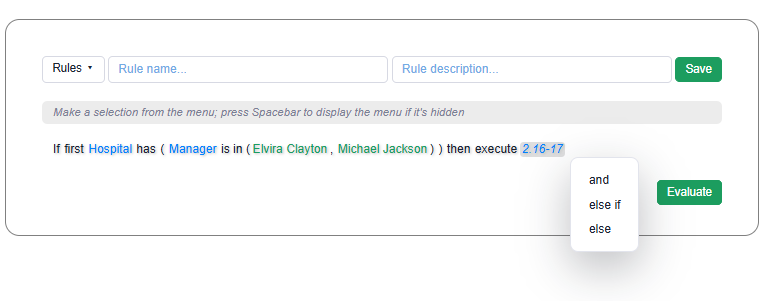
In a stand-alone implementation, Code Effects provides rule authoring and rule evaluation, and your application provides everything else.
 Your web application                      Your storage                Your production code
 Rule Editor  -- save callback -->  your code stores Rule XML  -->  Rule Engine evaluates it
- The editor never saves anything itself. When a user saves a rule, the editor hands it to your code, and your server checks it, turns it into Rule XML and stores it wherever you decide. Loading and deleting work the same way. See Storing Rules.
- Your production code evaluates the rules with the engine: it loads a rule's XML from your storage, compiles it once, and evaluates your objects against it. See Engine Implementation.
- Everything else is yours to design: who may see or change a rule, whether you keep versions, how a rule is tested and approved, how it reaches production, and what is logged.
Choose it when:
- You already have a rule management process, or a system the rules must fit into.
- Your rules need little more than authoring and evaluation.
- You want the editor inside screens of your own design.
- Your rules are evaluated in a desktop, mobile or embedded product with no web application to host a rule management system.
- You need to let the public build their own rules or data filters, such as the search conditions of your web site's visitors, without teaching them how rules are built in your project: the editor offers only valid choices, in plain language, at every step.
What it gives you: full control of every part of the solution, no database of ours, the smallest footprint, and only the Code Effects Standard package for commercial use. What it costs: the time to build the rule management your organization needs, typically two to four months for a small team when that includes storage, versioning and testing. See Editor Implementation.
With the Rule Repository
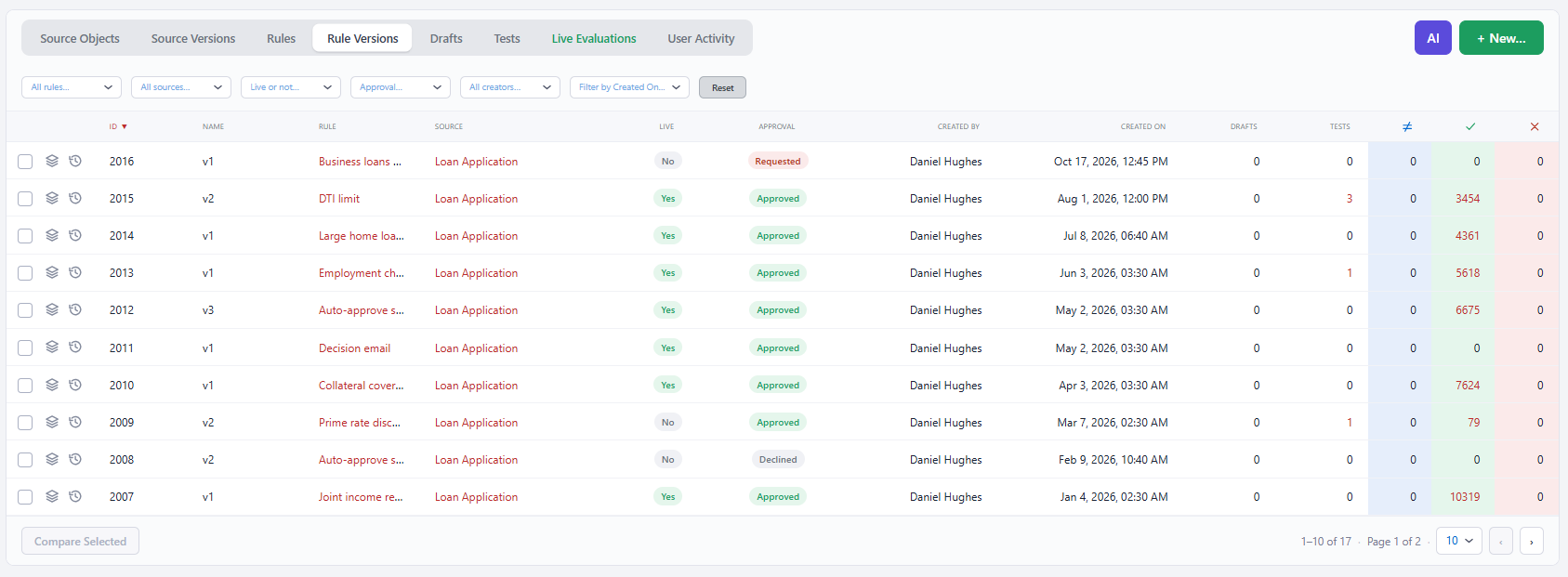
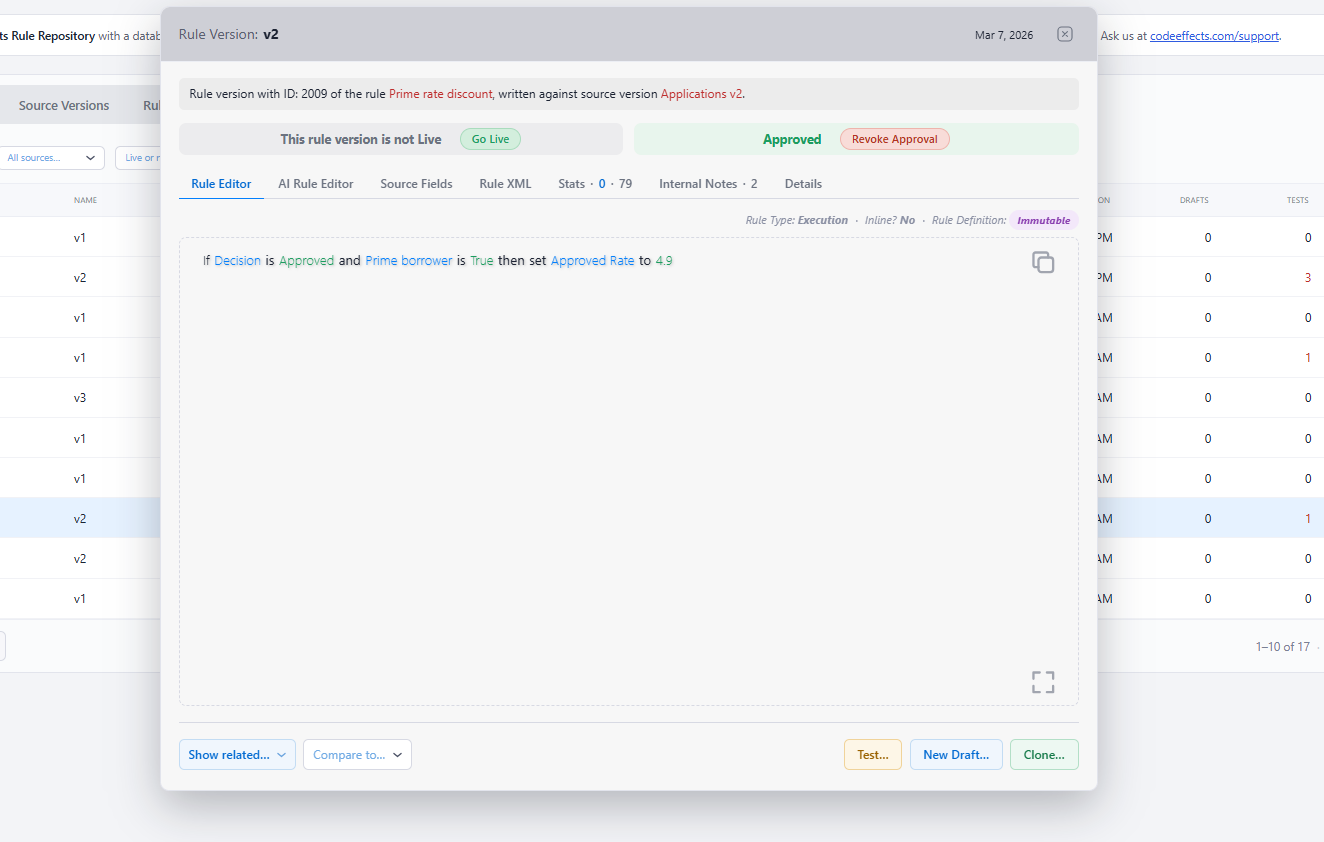
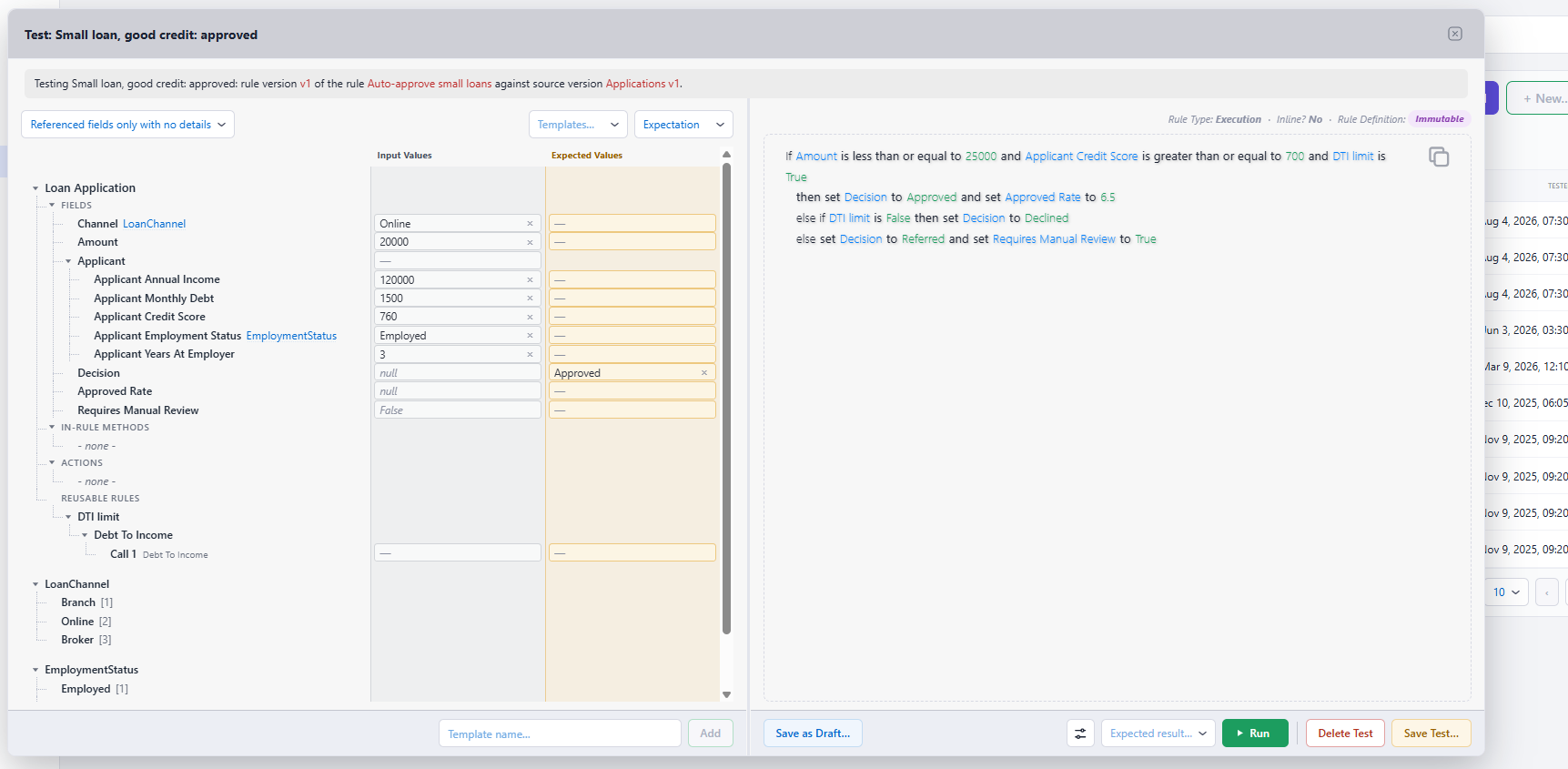
The Rule Repository is a complete rule management application that runs inside your own web application, on your own sign-in, against a database you own. It contains the Rule Editor, so business users write rules exactly as they would in a stand-alone editor, and it adds what a stand-alone implementation leaves to you.
 Your web application                   Your database                    Your production applications
 Rule Repository  <------------>  rules, versions, live versions  <----  Rule Engine (+ Audit) load the live versions
 (with the Rule Editor)                 evaluation records        <----  Audit records each evaluation
- Source objects come from your code. Your application synchronizes its .NET types, Source XML documents or Adaptive Sources into the repository. When a class changes in a way that could change how a stored rule evaluates, the repository creates a new source version, and every rule remembers the source version it was written against.
- Rules have versions, and one of them is live. Every saved change is a new, immutable version. Users compare versions, keep work in progress as drafts, request approval, and make a version live, with a typed confirmation for every production change: a complete decision workflow, with each step allowed only to the users you choose. Your production code always gets the live version. See Live Versions and Approvals.
- Rules are tested before they go live. A test runs a rule version on your real classes with values that users enter or keep as templates, checks the outcome against what they expected, and can be saved and run again in batches whenever the rule changes.
- Your users, your permissions. The repository has no users of its own: your application tells it who the current user is and what that user may do, from a set of 37 permissions. AI agents and services are users too, and they can never make a version live, approve or delete. See Permissions.
- Everything is recorded. Every change is an activity entry with who made it and when, and users can attach notes to any object.
- AI-assisted authoring, with your AI provider. If your application registers a model, users get an AI Assistant and an AI Rule Editor that work with your rules under the user's permissions. See AI Assistant and AI Rule Editor.
Choose it when you want business users to own the life of their rules, with versions, testing, approvals and a dependable history, without building that yourself.
What it gives you: a production-ready rule management system in days instead of months, the same engine performance, and your data in your own database under your own security. What it costs: a license, a SQL Server or PostgreSQL database, and an ASP.NET host for the repository's page and endpoint. See Repository Implementation.
Audit: Explaining Every Decision
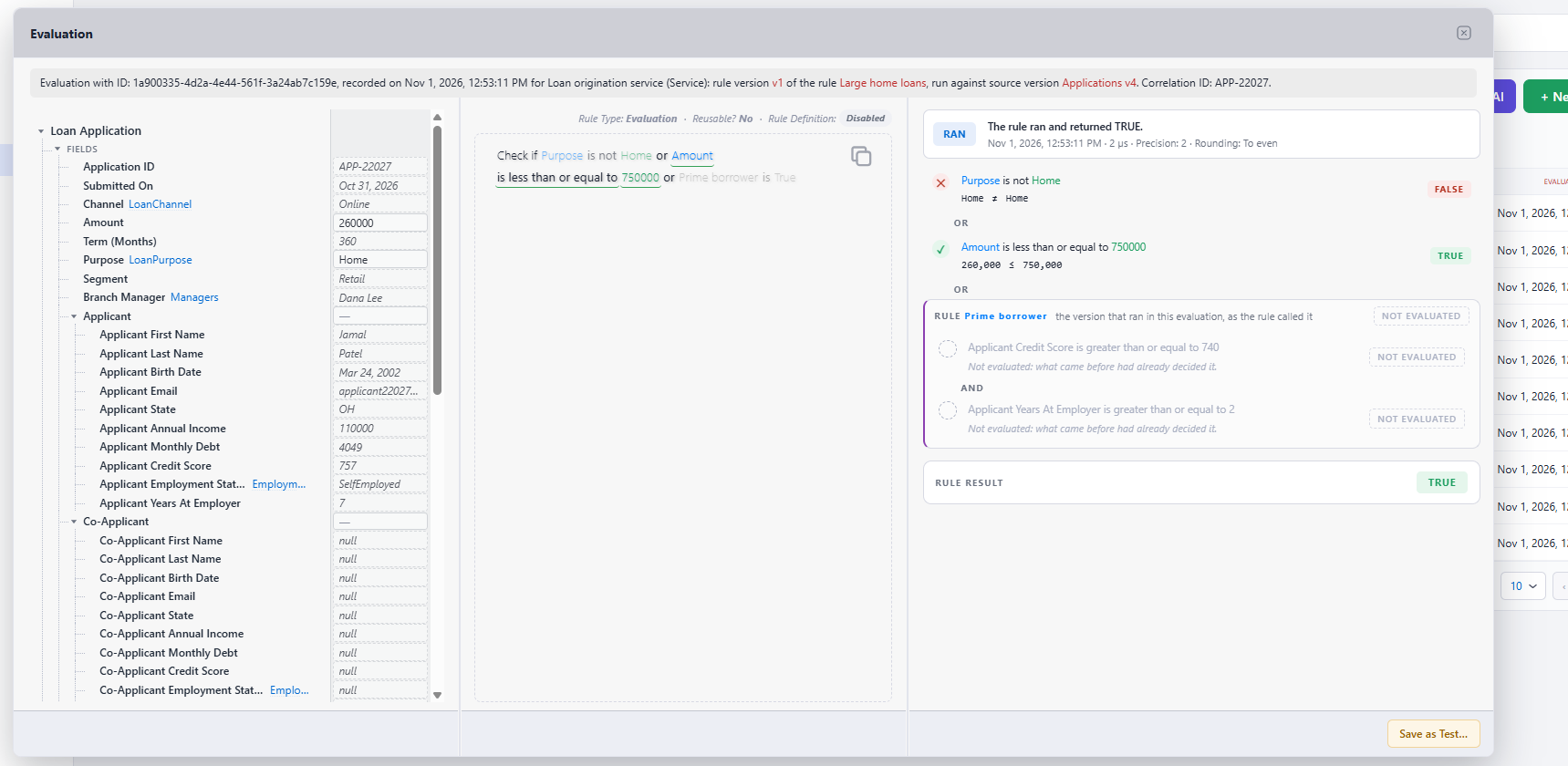
Audit is optional, and adds to the Rule Repository what happens after a rule goes live. Your production applications load the live rules through Audit and evaluate them as usual, and Audit records each evaluation: when it ran and for whom, the rule and source versions, the values it read, the branch it took and what it set. In the repository, any recorded decision can be found, replayed step by step and explained, counted in production statistics, analyzed by business values, and turned into a test. Recording never slows a decision down by default.
The MCP Server: Rules for AI Agents
The MCP server is optional too. It lets the AI clients your people already use find, explain, write and test rules, and investigate recorded decisions, through the Model Context Protocol, under your own OAuth sign-in and the same permissions. Every rule an agent saves waits for a person's approval, and an agent can never make a version live, approve or delete. It works with the Rule Repository, with Audit, or with both.
What Both Ways Share
- Source objects. Rules are written against your own data: a .NET class, a Source XML document, or an Adaptive Source that your code supplies at run time. Attributes on your members decide what users see and how values are entered. See Source Objects.
- Two types of rules. Evaluation type rules return true or false. Execution type rules also set values and call your .NET methods in their THEN and ELSE sections. Rules can call reusable rules as conditions and run inline rules as actions.
- A rich, typed rule language. Numbers, strings, dates, times, durations, enumerations and collections, each with operators of its own, calculations, concatenations and date shifts. See Data Types.
- Rule XML. A rule is stored as a Rule XML document, which is complete and portable: the same document is evaluated the same way wherever it runs.
- One engine. The engine compiles each rule once into native code and evaluates it at the speed of compiled C#, on any number of threads. It can also filter collections with a rule.
- Every saved rule is structurally valid. A rule is built only from the members of its source object, in menus that offer nothing but valid choices at each step, and the server checks it again against the source object before it becomes Rule XML: an unfinished or invalid rule produces no Rule XML and is never stored as a rule. (In the Rule Repository, a draft may hold unfinished work, but a rule version cannot.) So every saved rule is well formed and consistent with your data, whether a person, a script or an AI agent wrote it, and no one has to read it to check its structure. This is where Code Effects differs from platforms built on decision tables, whose rules must still be checked by hand before they can be trusted, even when an AI agent wrote them. What no platform can guarantee is that a rule says what the business meant: that is what tests, and in the Rule Repository approvals, are for.
- Inside your systems. No component calls a Code Effects service, and your rules and data stay in your systems. The only data that leaves is what the repository's optional AI features send to the AI provider you configure.
How Evaluation Looks in Each
Stand-alone, with a rule your application stored:
using CodeEffects.Rule.Engine;

var evaluator = new Evaluator<Order>(ruleXmlFromYourStorage);   // compile once, keep, reuse
bool approved = evaluator.Evaluate(order);
With the Rule Repository, loading the live versions:
using CodeEffects.Rule.Common.Models;
using CodeEffects.Rule.Engine;
using CodeEffects.Rule.Repository;

LoadedRuleset rules = Context.GetRules(dbProvider, RuleQuery.BySource("Acme.Orders.Order"));
var evaluator = new Evaluator<Order>(rules.Xml);                // compile once, keep, reuse
bool approved = evaluator.Evaluate(order, rules.Rule("Approve large orders").Id);
With Audit, the rules are loaded through the AuditRecorder instead, and each evaluation is recorded. See Evaluating Rules from the Repository.
Where It Runs
- The Rule Engine and the Rule Editor are .NET Standard 2.0: .NET Framework 4.6.2 and later, and .NET Core 2.0 and later, including .NET 8 and later, on Windows, Linux and macOS, in containers and in the cloud. The editor runs in any .NET web application (ASP.NET Core, MVC, Razor Pages, Blazor or WebForms) and in all current browsers, with React, Angular and Vue as well as plain pages.
- The Rule Repository and Audit run in ASP.NET Core or in ASP.NET on .NET Framework 4.7.2 and later, with SQL Server 2012 or later or PostgreSQL 14 or later.
- The MCP server runs in ASP.NET Core on .NET 8 or later.
See Code Effects Implementation for the components, their packages and the estimated time to production, and What's New in Version 7 for everything added in this release.
Where to Go Next