ContextMenuRules
Type: System.Collections.Generic.ICollection<MenuItem>
Gets or sets the collection of reusable rules that can be added to the field menus in the Rule Editor. Only rules of the evaluation type should be included in this collection. Such rules appear in the field menu as regular fields of the System.Bool type. It is up to the developer to determine which existing evaluation-type rules, if any, should be made available in the context menu. This property is optional. The default value is an empty collection of type List<MenuItem>.
DataSources
Type: System.Collections.Generic.ICollection<DataSourceHolder>
Gets or sets the collection of named GetDataSourceDelegate delegates. Each delegate in the collection is represented by an instance of the DataSourceHolder class. See the Customizable Dynamic Data Sources topic for details. This property is optional. The default value is an empty collection of type List<DataSourceHolder>.
ExcludedOperators
Type: System.Collections.Generic.ICollection<Operator>
Gets or sets the collection of operators that should be excluded from menus of the Rule Editor. The Rule Editor automatically includes only the operators required for the data types used by the source object. For example, if the source object does not contain any members of the System.DateTime type, the Rule Editor will automatically exclude all date operators from the client-side settings. However, developers may occasionally need to explicitly exclude certain operators for existing data types. The following code example demonstrates how to exclude the string operators startsWith, doesntStartWith, endsWith, and doesntEndWith:
  control.ExcludedOperators.Add(
  	new CodeEffects.Rule.Common.Models.Operator
  	{
  		Type = CodeEffects.Rule.Common.Models.OperatorType.String,
  		ExcludedOperator =
  			ExcludedOperator.StartsWith |
  			ExcludedOperator.DoesNotStartWith |
  			ExcludedOperator.EndsWith |
  			ExcludedOperator.DoesNotEndWith
  	});
This property is optional. The default value is an empty collection of type List<Operator>.
HelpXml
Type: System.Xml.XmlDocument
Gets or sets the XmlDocument object that contains custom help, warning, and validation messages used in the Help String, as well as all UI labels and values displayed by the Rule Editor in the Rule Area. In Code Effects, this document is referred to as Help XML. It plays a key role in providing multilingual support.
By default, the editor uses the English version of the Help XML document compiled into the CodeEffects.Rule.Editor.dll assembly. You can load this default document by calling the GetDefaultHelpXml() method in debugger mode, save its OuterXml string, and use it as a template for translation into other languages or to modify the default English version as needed.
For more information, see the Help XML and Multilingual Support topic.
HelpXmlFile
Type: System.String
Gets or sets the full path to the XML file that contains the customized Help XML document.
ID
Type: System.String
Gets or sets the ID of the HTML element that hosts the Rule Editor on the client.
IsEmpty
Type: System.Bool
Gets a value indicating whether the Rule Area is empty (contains no rule elements).
IsValid
Type: System.Bool
Gets a value indicating whether the submitted rule has passed automatic validation. The Rule Editor performs automatic validation each time a rule is submitted. If validation fails, the Rule Area highlights all invalid rule elements, and rule authors can hover the mouse pointer over each invalid element to view a description of the corresponding validation issue. If enabled, the Help String displays a relevant error message. The default English descriptions and messages can be customized by modifying the Help XML document.
KeepDeclaredOrder
Type: System.Bool
Gets or sets a value indicating whether the Rule Editor should alphabetically order fields, in-rule methods, and rule actions in menus, or retain the order in which they are declared in the source object. The default value is false.
MenuProvider
Type: CodeEffects.Rule.Editor.Models.IMenuProvider
Gets or sets the IMenuProvider instance used by the Rule Editor to dynamically provide menus in Adaptive Source mode. This property is ignored when the editor is configured to use any other source object model.
Mode
Type: CodeEffects.Rule.Common.Models.EvaluationMode
Gets or sets the current mode of the Rule Editor.
The RuleType.Execution value allows rule authors to create both evaluation and execution-type rules (in this mode, the evaluation type is the default). The RuleType.Evaluation value restricts rule authors to evaluation-type rules only. The RuleType.Filter value configures the Rule Editor for data filtering. Other modes are also available.
See the Understanding Modes topic for details. The default value is RuleType.Evaluation.
Rule
Type: CodeEffects.Rule.Editor.Models.RuleModel
Gets the instance of the rule that is currently loaded in the Rule Editor.
RuleNameIsRequired
Type: System.Boolean
Gets or sets the value indicating whether Rule Editor should require each rule to have a name when the rule author uses Toolbar to save or update a rule. The default value is true. This property is ignored if the ShowToolBar is set to false. Value of this property has no effect on rule evaluation.
RuleResolver
Type: CodeEffects.Rule.Core.GetRuleDelegate
Delegate used to request missing rules — rules that are referenced but not included in the current rule set. This property is optional.
Remarks
In some cases, such as rules that use reference-typed collections and arrays, the editor creates separate rule nodes in RuleXML for each referenced collection because its ElementType is essentially another source object for the rule. Those rule nodes are included in the resulting RuleXML of the main rule, so the RuleResolver delegate is not needed in that scenario.
However, if, for instance, you use the reusable rules feature and do not manually add to the main Rule XML all reusable rules referenced by the main rule before loading it into the editor, you need a RuleResolver delegate. The editor calls this delegate whenever it needs a referenced reusable rule, allowing your code to query rule storage and return the requested rule.
ShowDescriptionsOnMouseHover
Type: System.Boolean
Gets or sets a value indicating whether the Rule Editor should display descriptions of rule actions, fields, in-rule methods, parameters of actions or in-rule methods, and reusable rules when the rule author hovers the mouse pointer over those elements in the Rule Area.
Element descriptions are optional and can be defined using the Description property of the ActionAttribute, FieldAttribute, MethodAttribute, or ParameterAttribute.
The default value is true. The value of this property has no effect on rule evaluation.
ShowHelpString
Type: System.Boolean
Gets or sets a value indicating whether the Rule Editor should display the Help String located between the Toolbar and the Rule Area. The default value is true. The value of this property has no effect on rule evaluation.
ShowLineDots
Type: System.Boolean
Gets or sets a value indicating whether the Rule Editor should display a • character before each new line in the Rule Area. The default value is false. The value of this property has no effect on rule evaluation.
ShowMenuOnElementClicked
Type: System.Boolean
Gets or sets a value indicating whether the Rule Editor should display the related context menu when the rule author clicks elements of the current rule. If set to true, this property allows rule authors to edit rule values and modify fields, actions, operators, and other rule elements on the fly by clicking an element and selecting a replacement value from the context menu. If no suitable items are available, the Rule Editor displays the menu for the next applicable element (if any). The default value is true. The value of this property has no effect on rule evaluation.
ShowMenuOnRightArrowKey
Type: System.Boolean
Gets or sets a value indicating whether the Rule Editor should display a context menu listing the next possible rule elements each time the rule author presses the Right Arrow key while navigating the current rule using the keyboard. When set to true, this property eliminates the need to press the Spacebar to open the menu whenever a new rule element needs to be inserted. The default value is true. The value of this property has no effect on rule evaluation.
ShowToolBar
Type: System.Boolean
Gets or sets a value indicating whether the Rule Editor should display its Toolbar. The default value is false if the Mode value is set to Filter. Otherwise, it's true. The value of this property has no effect on rule evaluation.
SourceType
Type: System.Type
Gets or sets the type of the source object. This property is required in Reflection and FlexSource source models and optional in Adaptive Source if no value is set for any of the SourceXml, SourceTypeName, or SourceXmlFile properties.
  private Control GetEditor()
  {
  	var ce = new Control("divClientEditorContainerId");

  	ce.SourceType = typeof(MySourceObject);
  	ce.Mode = CodeEffects.Rule.Common.Models.RuleType.Execution;
  	ce.ShowHelpString = true;
  	ce.ShowToolBar = true;
  	ce.ShowLineDots = true;

  	return ce;
  }
SourceTypeName
Type: System.String
Gets or sets the assembly-qualified name of the source object type. This property is required in Reflection and FlexSource source models and optional in Adaptive Source if no value is set for any of the SourceXml, SourceType, or SourceXmlFile properties. You can obtain the assembly-qualified name of the source object type by executing:
sourceObjectInstance.GetType().AssemblyQualifiedName;
SourceXml
Type: System.Xml.XmlDocument
Gets or sets the XmlDocument that defines the structure of the source object. In Code Effects, this document is referred to as Source XML. You can obtain the string representation of the Source XML at any time by calling the GetSourceXml() method of the instance of the Control class.
SourceXmlFile
Type: System.String
Gets or sets the full path to the custom XML file that defines the source object. In Code Effects, this document is referred to as Source XML. You can obtain the string representation of the Source XML at any time by calling the GetSourceXml() method of the instance of the Control class and use it as a template for source object customization in dynamic scenarios.
ToolBarRules
Type: System.Collections.Generic.ICollection<MenuItem>
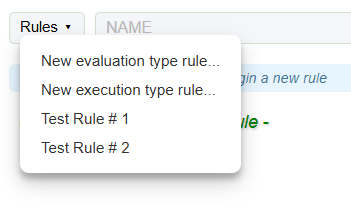
Gets or sets the collection of existing rules that can be added to the Rules menu of the Toolbar, if it is displayed. Adding rules to the Rules menu allows rule authors to select, load, edit, or delete existing rules directly within the Rule Editor. It is up to the developer to determine which rules, if any, should be included in this collection. This property is ignored if the ShowToolBar property is set to false.
TypeResolver
Type: CodeEffects.Rule.Core.GetRuleDelegate
Gets or sets the delegate used to resolve .NET types by their assembly-qualified or alias names during rule evaluation. Assign this property when your application uses custom type aliases or requires custom type resolution logic. This property is optional. See the main Type Handling and Aliasing article for details.
UseHighestZindex
Type: System.Boolean
Gets or sets a value indicating whether the Rule Editor should calculate and apply the highest zIndex for its pop-up elements such as menus, date pickers, and similar controls. Set this property to true only if your script dynamically adds other DOM elements that could potentially obscure the editor’s controls and menus. The default value is false.
GetEditorData
Returns: System.String
Returns a JSON string containing the source object member information required by the Rule Editor to complete its initialization during page load. Pass the returned JSON to the editor’s loadSettings() method of the Client-Side API to load the source object data when initializing the editor for the first time.
Parameters
Remarks
This code examples demonstrate how to initialize the editor on the client using the data from the server endpoint:
  // Server endpoint

  api.MapGet("/api/settings", () =>
  {
  	var settings = new MySettings();
  	var editor = new Control("divEditor");
  	editor.SourceType = typeof(MySourceObject);

  	// Get UI settings for the editor (Help String, UI labels, etc)
  	settings.EditorData = editor.GetInitialSettings();

  	// Get the source data for the editor
  	settings.SourceData = editor.GetEditorData();

  	return Results.Ok(settings);
  });
  // Client-side js

  // Declare the editor as a global var
  var editor = null;

  async function settings()
  {
  	const res = await fetch('/api/settings', { headers: { 'Accept': 'application/json' } });
  	const settings = await res.json();
  	// Init and clear the editor
  	editor = $rule.init(settings.editorData);
  	editor.clear();
  	// Attach rule action handlers
  	// All code examples above show implementation of these action methods
  	editor.setCallbacks(load, remove, save);
  	// Load the source data into the editor
  	editor.loadSettings(settings.sourceData);
  };

  // Call the settings() function when the page loads to init the editor
  settings();
Refer to the Code Effects Client-Side API topic and the Code Effects demo projects for implementation details.
GetGlobalData
Returns: System.String
Returns a JSON string containing the current environment information, UI messages and labels, mode details, and other data required by the Rule Editor to complete its initialization after the page is loaded. Pass the returned string to the $rule.init() global method of the Client-Side API before initializing the Rule Editor.
Parameters
GetInvalidData
Returns: System.String
Returns a JSON string containing an array of rule elements that failed validation.
Parameters
Remarks
The following C# example demonstrates an ASP.NET endpoint that saves a rule. Note the use of both the IsValid property and the GetClientInvalidData() method to return invalid rule elements to the client:
  api.MapPost("/api/save", ([FromBody] string rule) =>
  {
  	// Using the Reflection source model
  	var editor = new Control("divEditor");
  	editor.SourceType = typeof(MySourceObject);

  	editor.LoadClientData(rule);
  	var response = new MyResponse(); // See our demo projects for implementation details

  	if(editor.IsEmpty) { response.IsRuleEmpty = true; }
  	else if(!editor.IsValid)
  	{
  		response.IsRuleValid = false;

  		// Load invalid elements from the editor
  		response.ClientInvalidData = editor.GetInvalidData();
  	}
  	else
  	{
  		// See our demo projects for the rule storage implementation details
  		MyStorage[editor.Rule.ID] = new Rule
  		{
  			Eval = editor.Rule.IsEvalType.HasValue && editor.Rule.IsEvalType.Value,
  			Name = editor.Rule.Name,
  			RuleXml = editor.GetRuleXml()
  		};
  		// Using the Output value to send rule ID back to client
  		response.Output = editor.Rule.ID;
  	}
  	return Results.Ok(response);
  });
The following JavaScript excerpt demonstrates how the client calls the /api/save endpoint and handles the response, including invalid rule elements if the rule is invalid:
  // The "rule" is supplied by the editor
  async function save(rule)
  {
  	const response = await fetch(
  		'/api/save',
  		{
  			method: 'POST',
  			headers:
  			{
  				'Content-Type': 'application/json'
  			},
  			body: JSON.stringify(rule)
  		});

  	const data = await response.json();

  	if (data.isRuleEmpty)
  	{
  		alert("The rule is empty");
  	}
  	else if (!data.isRuleValid)
  	{
  		editor.loadInvalids(data.clientInvalidData);
  		alert(The rule is invalid);
  	}
  	else
  	{
  		// Server returns the new rule ID using the Output property.
  		// You are free to use any value for that. The editor needs this ID.
  		editor.saved(data.output);
  		alert("The rule was saved successfully");
  	}
  };
Refer to the Code Effects Client-Side API topic and the Code Effects demo projects for implementation details.
GetRuleData
Returns: System.String
Returns a JSON string containing an array of rule elements used to load the rule into the Rule Area.
Parameters
Remarks
The following C# example demonstrates an ASP.NET endpoint that receives a rule ID and returns the data required to load that rule on the client:
  api.MapGet("/api/load/{ruleId}", (string ruleId) =>
  {
  	MyStorage.TryGetValue(ruleId, out var ruleXml);

  	var editor = new Control("divEditor");
  	editor.SourceType = typeof(MySourceObject);
  	editor.LoadRuleXml(ruleXml);

  	// Returns the rule data to the client
  	return Results.Ok(editor.GetRuleData());
  });
This JavaScript excerpt shows how the client calls the /api/load endpoint and loads the rule into the editor:
  // The ruleId is supplied by the editor
  async function load(ruleId)
  {
  	const res = await fetch(`/api/load/${encodeURIComponent(ruleId)}`);
  	const data = await res.json();
  	editor.loadRule(data); // Load the rule
  };
Refer to the Code Effects Client-Side API topic and the Code Effects demo projects for implementation details.
GetRuleXml
Returns: System.String
Returns a string containing the Rule XML document of the rule currently displayed in the Rule Editor. Check the IsValid property to ensure that the current rule is valid before calling this method; otherwise, an InvalidRuleException will be thrown. Use the returned string to store the rule in a database as anvarchar(max) or XML type or in a file system as an XML or txt file. This is the same string you pass to all evaluation classes to evaluate the rule. You can also use this string to load the rule into the Rule Editor for editing or deletion.
Parameters
GetSourceXml
Returns: System.String
Returns a string containing the Source XML document. Use this method to obtain the Source XML for manual editing or as a template for creating other sources in dynamic scenarios.
Parameters
LoadRuleData
Returns: System.Void
Loads the rule into the instance of the Rule Editor for further processing on the server.
Parameters
- ruleClientData (
System.String) - A JSON string containing the current rule returned by the client’s $rule.extract() method. See the Client-Side API for details.
LoadRuleFile
Returns: System.Void
Loads the XML file containing the Rule XML into the instance of the Rule Editor.
Parameters
- ruleXmlFileFullPath (
System.String) - The full path to the file containing the XML rule document.
LoadRuleXml
Returns: System.Void
Loads the XML string containing the Rule XML document into the instance of the Rule Editor.
Parameters
- ruleXml (
System.String) - The rule XML document as a string.
ToString
Returns: System.String
Returns the string representation of the current rule.
Parameters
ToString
Returns: System.String
Returns the string representation of the current rule. Accepts a dictionary of dynamic menu data sources to retrieve the correct display names when the rule references items from those sources. See the description of the last ToString() overload for details.
Parameters
- dataSources (
System.Collections.Generic.Dictionary<System.String, CodeEffects.Rule.Common.Models.GetDataSourceDelegate>) - A dictionary of dynamic menu data sources.
Example
  using System.Collections.Generic;
  using CodeEffects.Rule.Common.Attributes;
  using CodeEffects.Rule.Common.Models;
  using CodeEffects.Rule.Editor;

  [Data("Education", typeof(Utility), "GetSchools")]
  public class Test
  {
  	public string GeRuleDefinition(ruleId)
  	{
  		var editor = new Control("divEditorContainerId");
  		editor.SourceType = typeof(Test);
  		editor.LoadRuleXml(MyStorage.GetRuleByID(ruleID));

  		var sources = new Dictionary<string, GetDataSourceDelegate>();
  		sources.Add("Education", Utility.GetSchools);

  		return editor.ToString(sources);
  	}
  }

  public class Utility
  {
  	public static List<DataSourceItem> GetSchools()
  	{
  		var schools = new List<DataSourceItem>();
  		schools.Add(new DataSourceItem(1, "School # 1"));
  		schools.Add(new DataSourceItem(2, "School # 2"));
  		return schools;
  	}
  }